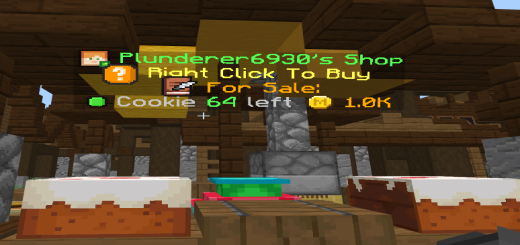
Advance Item Shop!
Bedrock add-on listed for Minecraft 1.20–1.21 (behavior pack only). Needs Beta APIs. File opened and checked on 5 Oct 2026; installs from the MC Bedrock Mods app on Android.
⬇ DownloadAdvance Item Shop by JMAFK BEDROCK
Supported Version: 1.21.70+
Features:

- Player-Owned Shops – Create and manage your own item shops.
- Custom Pricing – Set your own prices for buying and selling.
- Income Tracking – Monitor your shop's sales and earnings.
- Rating System – Players can rate and review shops.
- Notifications – Get alerts for sales and important events.
- Market Analysis – Track item price trends and shop performance.
- Admin Controls – Full set of tools for server moderation and configuration.
Player Commands:
- !sp create – Create a new shop.
- !sp yes – Confirm the creation of your shop.
- !sp cancel – Cancel a pending shop creation.
- !sp income – View your shop’s income and sales history.
- !sp claim <amount> – Claim a specific amount of income.
- !sp claim all – Claim all available income.
- !sp help – Display all available commands.
Admin Commands:
- !sp settings – View current addon settings.
- !sp price <amount> – Set the price for shop creation.
- !sp create true|false – Enable or disable player shop creation.
- !sp limit <number> – Set the maximum number of shops per player.
- !sp shops – List all existing shops.
- !sp tp <number> – Teleport to a specific shop.
- !sp delete <number> – Delete a shop by its ID.
- !sp money <objective> – Set the scoreboard objective used as money.
- !sp true|false – Enable or disable custom pricing system.
Shop Interaction:
- Right-click a shop to purchase items.
- Sneak + Right-click to open shop management.
- Sneak + Left-click (admin only) to delete or restrict a shop.
Configuration:
- Default money objective: money
- you can configure this by !sp money [new objective]
- Shop creation costs, limits, and permissions are fully customizable.
- Supports integration with custom economy systems.
Installation:
- Download the addon.
- Import it into your world.
- Turn on Beta- api in the experimental section
- The system initializes automatically.
- Use admin commands to configure everything.
Support:
Discord: @jm_afk
YouTube: youtube com/@JMAFKBedrock
This are the UI design of the Entity
Unclaimed Shop
Claimed Shop
Restricted Shop
Credits:
Created by: JMAFK BEDROCK
UI Design by: Angel136381
Note: If you plan to reupload or showcase this addon, please give proper credit to JMAFK BEDROCK.
- Edition: Minecraft Bedrock
- File type: .mcpack or .mcaddon
- Minecraft version listed: 1.21.70
- How to install: Download the .mcpack or .mcaddon file. → Open it — Minecraft imports it. → In your world: Behavior Packs → Available → Activate, then the same under Resource Packs.
- Where to get it: In MCModsHub, or directly above on this page.
Install steps are the general flow for this file type — How to install Minecraft Bedrock addons & mods walks through it step by step.
- Pack type: .mcaddon — behaviour and resource pack in one file
- Manifest requires Minecraft 1.20.0 or newer
- Needs Beta APIs switched on in the world settings
- Complete pack — everything it depends on is inside the file
- Download size: 600 KB
- Download link checked 3 Aug 2026 — working
- Mirrored on our own servers — the download does not depend on the original host
These come from our own check of the pack file, not from the source page.