
Warps Plus
Bedrock add-on listed for Minecraft 1.20–1.21 (behavior + resource pack). Needs Beta APIs. File opened and checked on 10 Oct 2026; installs from the MC Bedrock Mods app on Android.
⬇ Download
🎮 How to Use:
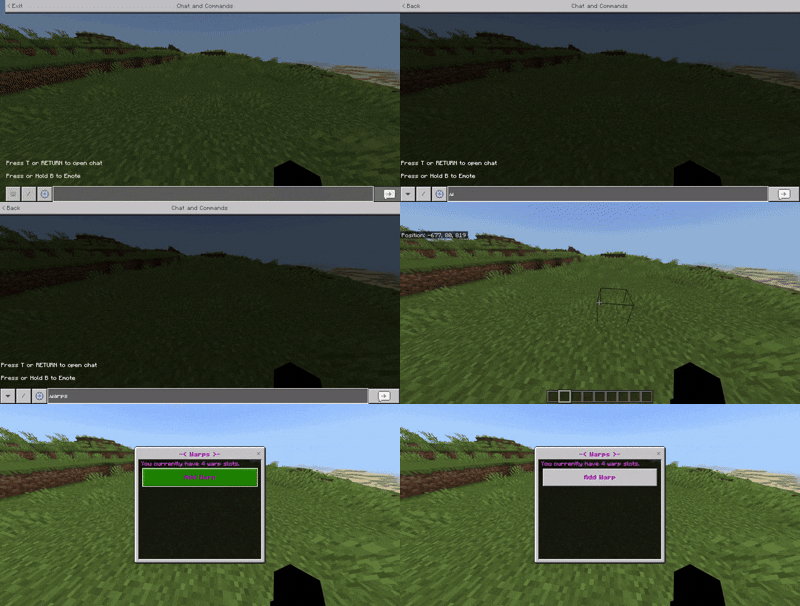
• Warps Menu: Warps can be accessed by typing .warps in chat.
Example:
➕ Adding a Warp:
• Open the Warps Menu.
• Click "Add Warp".
• Input a name for the warp
Example:
✨ Teleporting/Deleting a Warp:
• Open the Warps Menu.
• Click on a saved Warp.
• You can either teleport to or delete the warp.
NOTE: Warping cross dimensions costs 5 XP levels!
Example (Teleporting):
🌟 Warp Slots:
• By default, you have 3 warp slots.
• Warp Slots can be increased by using a Warp Star.
• Warp Stars can be crafted or found in End Cities.
.
🌀 Coordinate Teleport
On the v2 version, you can now teleport to certain coordinates in every direction.
It costs 30 levels, and you must travel to a dimension first to unlock coordinate TP in that dimension.
Example 1:
Example 2:
📃 Recipe:
🧪 Experiments Needed:
Ensure the Beta-APIs experiment is enabled for this addon to work correctly!
- Edition: Minecraft Bedrock
- File type: .mcpack or .mcaddon
- Minecraft versions listed: 1.20.70, 1.20.60
- How to install: Download the .mcpack or .mcaddon file. → Open it — Minecraft imports it. → In your world: Behavior Packs → Available → Activate, then the same under Resource Packs.
- Where to get it: In MCModsHub, or directly above on this page.
Install steps are the general flow for this file type — How to install Minecraft Bedrock addons & mods walks through it step by step.
- Pack type: .mcaddon — behaviour and resource pack in one file
- Manifest requires Minecraft 1.21.60 or newer
- Needs Beta APIs switched on in the world settings
- Complete pack — everything it depends on is inside the file
- Download size: 3.5 MB
- Download link checked 11 Aug 2026 — working
- Mirrored on our own servers — the download does not depend on the original host
These come from our own check of the pack file, not from the source page.