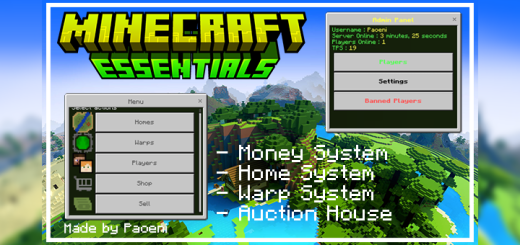
Minecraft Essentials | 1.21.70x
Bedrock add-on listed for Minecraft 1.21 (behavior + resource pack). Needs Beta APIs. File opened and checked on 2 Oct 2026; installs from the MC Bedrock Mods app on Android.
⬇ DownloadMinecraft Essentials v2.14.0
Showcase:
Command List :
Don't understand the commad? Don't worry use !help command to get command list and the description! You can also use !help <command_name> to get command usage! ("?" that means the choice is not must be filled)
You can use Minecraft Format to select player.
Example : !money "Test Player" or !money Paoeni or use short name !money Pao
General Command :
- !back (Teleport to last died location)
- !calculate <math> (Calculate basic math)
- !credit (Credits of addons)
- !help (Provides help/list of commands)
- !info (Shows information set by the server owner)
- !message <player_name> <message> (Send private message to Player)
- !playerlist (List of Online Player)
- !reply <message> (Reply private message to another player)
- !report (Create/View report)
- !rtp (Random Teleport)
- !tps (World Tick per Second)
Floating Text Command :
- !floatingtext-add <type: text/scoreboard> (Add Floating Text)
- !floatingtext-clear (Clear all Floating Text)
- !floatingtext-edit (Edit Floating Text)
- !floatingtext-remove (Remove Floating Text)
- !floatingtext-duplicate (Duplicate / Clone Floating Text)
Home Command :
- !delhome <home_name> (Removes a home)
- !home <home_name> (Teleport to your selected home)
- !listhome (Provides list of your homes)
- !sethome <home_name> (Create a new home in your current location)
Land Command :
- !land <options> (Land Claim)
- !landsetting (Setting Land System)
Money Command :
You can get money from selling item, killing mobs and players, or make a trade to other player.
- !auctionhouse (Open the auction house)
- !money <player_money?> (States the current balance of a player)
- !pay <player_name> <amount> (Pays another player from your balance)
- !sell (Sell items)
- !shop (Open the main shop)
- !topmoney (List players by top balances)
- !withdraw <amount> (Withdraw your money into banknote)
Ranks Command :
- !addranks <player_name> (Give Rank to Player)
- !createranks (Create ranks)
- !deleteranks (Delete Ranks)
- !editranks (Edit Ranks)
- !removeranks <player_name> (Remove Rank from Player)
TPA Command :
- !tpa <player_name> (Request to teleport to the specified player)
- !tpacancel <on/off> (Cancel all or specify outstanding teleport requests)
- !tpaccept <on/off> (Accept a tpa request from player)
- !tpahere <player_name> (Request that the specified player teleport to you)
- !tpasetting <on/off> (Set your tpa setting. If its off you can't send tpa request to other player and other player can't send tpa request to you)
Warp Command :
- !warp <place_name> (Teleport to selected warp)
- !spawn (This command will show up if you have warp with name "spawn")
- !listwarp (Provides list of available warp)
Admin Command : (TO USE ADMIN COMMAND, YOU MUST HAVE ADMIN TAG)
Use /tag @s add admin to give you admin command access
- !adminpanel (Open admin panel)
- !ban <player_name> <reason> (Bans a player)
- !broadcast <message> (Broadcasts a message to a world)
- !delwarp <place_name> (Removes a warp)
- !economy <place_name> (Manages the server economy)
- !inventorysee <player_name> (See the inventory of other players)
- !kick <player_name> <reason> (Kick a specified player with a reason)
- !log (Open Logs)
- !mute <player_name> (Mutes a player)
- !resetdata (Reset all or specific Data)
- !sellsetting (Setting items in sell, Join Discord for Tutorial)
- !setting <settingname> <value> (Set a configuration)
- !setwarp <place_name> (Create a new warp)
- !shopsetting (Set groups/items in shop, Join Discord for Tutorial)
- !teleport <player_name> (Teleport to player)
- !tempban <player_name> (Temporary ban a user)
- !unban <player_name> (Unbans the specified player)
- !unmute <player_name> (Unmutes a muted player)
Gamemodes Command: (NEED ADMIN ACCESS)
- !gmc <player_name?> (Change player gamemode to Creative)
- !gms <player_name?> (Change player gamemode to Survival)
- !gmsp <player_name?> (Change player gamemode to Spectator)
- !gma <player_name?> (Change player gamemode to Adventure)
Tired of typing commands? Use compass to open an UI
You can do configuration in file Configuration.js
Don't change anything in the code, unless you know what are you doing!
Maybe this addon will not work if there other addon that have custom command and same prefix!
You are permitted to:
- Use the addon packs as you see fit in-game.
- Modifying or configuring addon for personal use.
- Examine the code and works to learn more about the creation and development of addon
You are NOT permitted to:
- Change the codes and re-publish it as your own.
- Negate the accreditation of the original author.
- Paste the direct download link, negating the MCPEDL page.
- Take the author's code, works, and textures just to republish them as your own.
Creator contacts :
MCPEDL Profile : https://mcpedl.com/user/paoo/
Discord Community : https://paostudio.xyz/discord
Discord : @paoeni
- Edition: Minecraft Bedrock
- File type: .mcpack or .mcaddon
- Minecraft version listed: 1.21.70
- How to install: Download the .mcpack or .mcaddon file. → Open it — Minecraft imports it. → In your world: Behavior Packs → Available → Activate, then the same under Resource Packs.
- Where to get it: In MCModsHub, or directly above on this page.
Install steps are the general flow for this file type — How to install Minecraft Bedrock addons & mods walks through it step by step.
- Pack type: .mcaddon — behaviour and resource pack in one file
- Manifest requires Minecraft 1.21.70 or newer
- Needs Beta APIs switched on in the world settings
- Complete pack — everything it depends on is inside the file
- Download size: 449 KB
- Download link checked 3 Aug 2026 — working
- Mirrored on our own servers — the download does not depend on the original host
These come from our own check of the pack file, not from the source page.