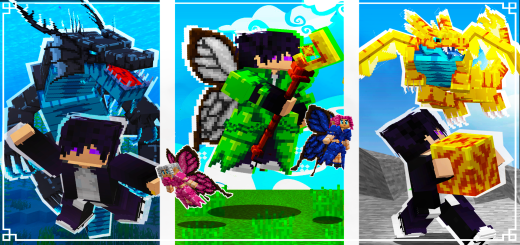
Mythic Conquest 1.5 Add-on
Bedrock add-on listed for Minecraft 1.20–1.21 (behavior + resource pack). File opened and checked on 28 Sep 2026; installs from the MC Bedrock Mods app on Android.
⬇ DownloadMythic Conquest 1.5 Add-on:
If you decide to download my project, please use my creator link on the MCPDL website.
It will help me a lot! I hope you enjoy the add-on.
To see how each mob and structure works, just click on the names listed below.
🏗️ New Structure Generation System
Now, when you install the addon in the Behavior Pack section, you can choose between three difficulty levels:
Easy: Structures spawn more frequently — perfect for those who love exploring.
Normal: Balanced structure generation — ideal for a natural survival experience.
Hard: Rare structure spawns — suited for players who prefer a cleaner and more challenging world.
Structure - Attention:
To summon the dragon, break the block!
Dragon Nest:
The nest will generate throughout the world in the following biomes:
Plains, Forest, Extreme Hills. System: Features.
Has 1000 health, dangerous attacks, capable of biting the player, attacking with its tail,
flying, and breathing fire. Don’t think you can defeat it with just iron armor.
Dragon Syrax Egg:
After the battle with Syrax, it may drop its egg.
With it, you can hatch it and create your own dragon.
Once the egg has been placed on the ground, it cannot be removed.
It takes 3 minutes to hatch.
To tame it, you need to craft a special food, but don't worry—it's quite simple:
Dragon Syrax:
With the food in hand, interact with the dragon and feed it until it reaches its final stage.
After that, interact with it to fly.
Important: If you want the dragon to stop following you, crouch and interact with it.
This will put the dragon into standby mode.
Dragon Syrax:
By holding on the screen, you can use the fire breath attack.
For those who prefer a darker path, it’s possible to become one with the dragon.
To do this, you must collect its soul and craft the Soul Bond, connecting your soul to the dragon’s
body and acquiring its powers, such as flying and breathing fire.
Mode Syrax:
To fly, simply equip Syrax Mode and double-jump.
The rest is easy: look up to ascend and look down to descend.
Mode Syrax:
When you equip Syrax Mode, you will receive an item.
Use this item by holding it on the screen to unleash Syrax's breath attack.
When you merge souls with Syrax Mode,
you will gain some effects and receive +4 extra health bars.
How Does It Work? 🛠️
Crafting and Using the Airdrop:
Craft the airdrops using standard Minecraft resources.
Once crafted, interact with the item to launch a signal into the sky.
The selected airdrop will descend, delivering essential supplies!
Types of Airdrops 🎨
Basic (Green):
Contents: Chainmail armor, stone tools, and carrots.
Best for: Early adventures or simple emergencies.
Intermediate (Blue):
Contents: Iron armor, iron tools, a bow with arrows, and bread.
Best for: Players mid-progress who need upgraded equipment.
Advanced (Red):
Contents: Diamond armor and tools, shield, bow with arrows, steak, and golden apples.
Best for: High-difficulty challenges or intense battles.
Compact Medieval Tower:
Inspired by medieval architecture, this tower is built with stone and wood,
making it ideal as a lookout point or shelter. Its robust design blends perfectly with any biome,
from forests to mountains,adapting to the surrounding environment.
Thematic Camp:
Featuring vibrant tents (red, white, and wood) and a central campfire,
this camp exudes an adventurous atmosphere. It can appear in any biome,
making it a perfect spot to rest, whether in the desert, forests, or plains.
Cabin in the Cherry Blossom Forest:
Made with dark wood and a sloped roof, this cabin brings a unique charm that fits
well into any biome, even outside cherry blossom forests. Its simple and cozy appearance
ensures seamless integration with the environment.
Wooden House with Tower:
A blend of a tower and a cozy house, this structure is compact and functional. It adapts to any biome,
whether in dense forests, savannas, or even snowy biomes, maintaining its aesthetic balance.
Curved Roof Cabin:
With a charming design and a curved roof, this cabin features a fairy tale-inspired style.
It can spawn in any biome, such as forests, plains, or hills, adding a touch of fantasy to
the surroundings.
Snowy Cabin:
While it seems designed for cold climates, this vertical cabin with rustic details can appear
in any biome. Whether in tundras or tropical forests, it fits well into the setting, offering a
functional and beautiful refuge.
Blacksmith’s Workshop:
Built with stone and wood, this compact blacksmith’s workshop features a functional forge and a smoking
chimney. Its reinforced design and covered area provide workspace and storage.
It can generate in any biome, adapting to the environment.
Japanese House:
With a curved roof and wooden details, this house reflects Japanese architecture.
Hanging lanterns and white walls create a cozy atmosphere.
It can generate in any biome, bringing harmony to the landscape.
The fact that each structure includes chests with small items makes exploration more rewarding,
encouraging players to investigate each one and better prepare for their journeys in Minecraft!
How Does It Work? 🛠️
Now, while exploring your Minecraft world, you can find dragon nests in specific biomes:
🐉 Fire Dragon – Found in savannas.
❄️ Ice Dragon – Found in snowy biomes.
☠️ Poison Dragon – Found in swamps.
⚡ Electric Dragon – Found in mountains.
To summon any of these dragons, simply break the block inside the nest.
Dragons:
They have attack animations that make combat more immersive.
Dragons:
They can fly and perform ranged attacks.
Each dragon has a unique elemental breath:
🔥 Fire – Unleashes devastating flames.
☠️ Poison – Releases a toxic mist.
⚡ Electricity – Fires electric bolts.
❄️ Ice – A cold breath, but it doesn’t freeze enemies.
Dragons:
Upon defeating a dragon, it will perform a death animation and drop valuable items:
🐉 Scales 💀 Bones 🩸 Dragon Blood 🥚 Dragon Egg
Dragon Egg:
You can hatch the egg and raise your own dragon of the chosen element.
Dragon Baby:
Once the baby dragon is born, feed it special dragon food to make it grow.
When it reaches adulthood:
Crouch to put it in wait mode.
Dragons:
Interact with it to mount and fly.
While flying, interact again to activate the dragon’s elemental breath.
With the items collected from dragons, you can craft:
🗡️ Elemental swords, each infused with a dragon’s power.
🛡️ Custom armor with dragon-inspired details.
✨ Enchantments to make weapons and armor even stronger.
Dragons Crafts:
To craft these items, follow the standard crafting pattern using your dragon’s elemental materials!
How Does It Work? 🛠️
Discover the Kitsune Temple:
Explore your world to find the naturally generated, grand Kitsune Temple.
This magnificent structure is home to the Legendary Kitsune, a fearsome foe ready to test your skills!
Structure - Attention:
To summon the Kitsune, break the block!
Kitsune's Abilities:
Solar Sphere ☀️
Throws a fiery sphere that burns and deals 25 damage to opponents.
Lunar Sphere 🌘
Launches a lunar sphere that deals 25 damage to enemies.
Cutting Leap 🗡️
Executes a powerful leap followed by an area attack.
Solar Shield 🛡️☀️
Activates an impenetrable barrier, becoming invulnerable.
Lunar Eclipse 🌘
Envelops opponents in a dense and dark mist, obscuring their vision.
Lunar Eclipse 🌘
Player's Vision.
Kitsune Death:
Upon defeat, the Kitsune performs an animation and drops special rewards.
Solar Shield ☀️
Grants absolute resistance when activated, accompanied by an epic animation.
Kitsune Mask 🦊
Increases the player’s speed and grants night vision.
Solar and Lunar Spheres:
A unique item that allows you to launch powerful spheres to damage enemies.
Taming the Kitsune 🦊
All Itens:
Kitsune Essence: Upon defeating the Kitsune for the first time, you’ll obtain the Kitsune Essence,
used to craft the Taming Pact.
Preparing the Pact: Gather the necessary materials at the crafting table to create the Taming Pact.
More details below:
Crafts:
Just follow the instructions shown in the images below.
Taming:
Fight the Kitsune until she is at the brink of death.
Act quickly! You’ll have only a few seconds to interact with her using the pact.
After taming her, an epic animation will play, and you’ll receive the Shape Shift item.
Transformation and Control:
Shape Shift Item:
Use this item to switch between the Kitsune’s legendary form and her human form.
In both animal and human forms, the Kitsune can sit by crouching and interacting with her.
To ride her, make sure you’re holding nothing and interact with her.
Feed her with steak or chicken to restore her health.
Why Get This Addon?
Epic Exploration: Discover stunning temples and face a powerful legend.
Absolute Power: Gain unique abilities that transform your Minecraft experience.
Loyal Companion: Tame the Kitsune and have a powerful and versatile ally.
How Does It Work? 🛠️
🍄 Discover the Giant Mushroom:
Explore the world to find enormous magical mushrooms.
These majestic structures are home to various fairies, each representing a special element of nature!
🧚 Fairy Variations:
There are five types of magical fairies:
Plant Fairy: Guardian of nature. 🌱
Fire Fairy: Intense and radiant. 🔥
Water Fairy: Serenity in magical form. 💧
Lightning Fairy: Pure and powerful energy. ⚡
Wind Fairy: Agile and free like the breeze. 🌪️
✨ Magical Items:
Magic Necklace:
With the magic necklace, you can unlock the special fairy outfit,
allowing you to blend into their enchanted world.
Fairy Wings:
Obtaining the fairy wings lets you fly like them, exploring the world with freedom and grace.
How to Fly:
To fly, simply equip the wings and run while jumping.
To control your flight, keep holding the run button and look in the direction you want to go.
Fairy Staff:
Although fairies are peaceful creatures,
you can acquire their magical staffs to use their elemental abilities and protect yourself from enemies.
🔮 Immersive Gameplay:
Enjoy a unique experience with first-person and third-person views while using the magical staffs.
🎨 Magical Customization:
Customize your look with 5 enchanting outfit variations:
Blue, Red, Green, Yellow, and White
Match them with wings and staffs of the same colors to create the perfect style!
🌟 Magical Abilities of the Staffs:
Lightning Magic:
Using the lightning staff, unleash a powerful bolt 2 blocks ahead, dealing area damage.
Water Magic:
With the water staff, create a splash that sends enemies upward, disorienting them.
Wind Magic:
Use the wind staff to summon a tornado that sweeps away enemies in its path.
Plant Magic:
With the plant staff, summon a magical plant to attack enemies at your command.
Fire Magic:
With the Fire Staff, launch a fireball to attack your enemies.
Fairy Trades:
Obtain items from the fairies by trading.
Give them a cookie to make them follow you, but they don’t attack other mobs and won’t stay still.
Why Get This Addon? 🎯
Enchanting Exploration: Dive into the magical world of fairies and discover their mystical groves.
Powerful Abilities: Use elemental staffs to wield extraordinary magic in your adventures.
Unique Customization: Design your fairy style with customizable wings, outfits, and staffs.
Immersive Gameplay: Add a new layer of fantasy and charm to your Minecraft experience.
How Does It Work? 🛠️
Discover the Floating Island:
Explore your world to find naturally generated floating islands.
These islands are home to the King of Slimes, ready to test your skills!
Structure - Attention:
To summon the Slime King, break the block!
Battle and Reward:
Gear up and prepare for an epic fight against the King of Slimes.
Defeat him to earn a Special Slime Pants, a unique item with incredible abilities.
The Special Slime Pants 🎽
Exclusive Benefits:
Long Jumps: Enables you to leap great distances without taking fall damage.
Animated Design: Features a beautiful slime-themed animation for added style.
Why Should You Get This Item? 🎯
Enhanced Exploration: Jump higher and reach hard-to-access areas with ease.
Improved Mobility: Perfect for navigating terrain, escaping dangers, or exploring.
Unique Gear: A rare item that combines functionality with a stunning design.
Succubus:
🌙 Succubus Overview
The images below are for illustrative purposes only, helping to better understand the models and attacks.
Please note that the Succubus spawns only at night; at dawn, she will disappear.
🩸 Succubus Attacks
Basic Slashing Attacks:
The Succubus uses two slashing attacks to deal damage to her enemies.
Kiss Enchantment:
She can enchant her targets with a kiss, applying nausea and slowness effects,
making it difficult to escape.
Summon Flying Eyes:
The Succubus can summon flying eyes that assist her in combat,
overwhelming her prey with added pressure.
🦋 Succubus Flight
With her beautiful wings, the Succubus can fly,
making it easy to locate and hunt her targets from above.
💨 Wind Slashes
While in flight, the Succubus can activate wind slashes,
sending multiple slashes of wind at her enemies, dealing area damage.
⚔️ Special Attack
When wielding her massive scythe, the Succubus prepares for a powerful jump,
delivering a sweeping slash that deals significant damage to her target.
🪓 Succubus Scythe
The scythe, dropped by the Succubus upon defeat,
deals 9 damage and can be used to fight back against other enemies.
🛠️ Scythe Skills
First Skill:
Unleash three wind slashes to deal damage to enemies.
Hold the scythe and crouch to switch between skills.
Second Skill:
Summon four flying eyes to aid you in combat for 30 seconds.
Switch skills by crouching while holding the scythe.
🔮 Enchanting the Scythe
You can enchant the Succubus Scythe at the enchantment table
to make it even more powerful with Minecraft's enchantments.
Why Get This Addon? 🎯
Unique Challenge: Face the powerful and dangerous Succubus, testing your combat skills in Minecraft.
Exciting Combat: Unique attacks, flight, and summoning allies make the fight strategic and challenging.
Powerful Loot: Defeat the Succubus and obtain her Scythe, a strong and enchantable weapon.
Immersive Gameplay: The Succubus adds an exciting and dangerous atmosphere to your world.
All Filolials:
Available colors in this version: green, black, pink, purple, red, and white.
Each Filolial has 120 health points and 5 damage.
Spawn locations: plains, forest, birch forest, taiga, and cherry grove.
Villager Filolial:
To acquire your Filolial, just find it in the world.
It will spawn in the same locations where other Filolials appear.
Filolial Egg:
After trading with the NPC, place the egg on the ground and wait for it to hatch.
Remember that once placed, it cannot be picked up again.
Filolial Baby:
Once it hatches, simply feed it with a carrot or beetroot, and it will grow.
Adult Filolial:
After reaching its adult stage, you can make it sit by crouching and interacting with it.
Filolial:
You can also ride it by interacting with it.
Note that it can jump very high, and its speed is impressive.
Water Dragon:
The legendary Water Dragon can be found in the depths of the oceans.
It has four attacks:
The first is a bite that causes medium damage.
The second is a tail swipe that deals damage and knocks the player away.
The third is used when the player is at a distance;
the dragon shoots small water bubbles that cause damage.
The fourth attack, which can be considered a special move,
surrounds the player with a rotating animation and summons guardians to assist in the battle.
Upon defeating the boss, you will have the chance to obtain some of its rare drops, including its eyes, gills, and scales,
which can be used to craft weapons and armor.
Water Dragon Egg:
It is also possible to acquire a Water Dragon Egg.
To hatch the egg, simply place it on the ground and wait for 3 minutes.
Once placed, it cannot be removed.
Baby Dragon:
You can feed it Salmon, Cod, and Tropical Fish.
Water Dragon:
In its adult stage, you can ride it and explore the oceans.
As a legendary dragon, it provides water breathing while you’re riding it.
You can also make it sit; just crouch and interact with it.
Sword & Bow:
The sword features custom animations in first person, with three distinct attacks.
The bow is equally impressive, boasting realistic animations that make it even more engaging.
First Person View:
The sword deals 12 damage, while the bow inflicts 8 damage with its arrows.
Water Dragon Armor:
The armor provides excellent protection and is also very stylish.
Crafts:
It is possible to enchant your weapons at the enchanting table.
It is possible to enchant your armor at the enchanting table.
Treefolk Guardians Add-on:
Oak Ent:
Defender of the oak forests, Each Ent will protect its forest.
They have 300 health and can deal 10 damage with their attacks.
They are slow, but when they sense ill intentions,
they become fierce beasts against anyone who dares to harm the trees.
Dark Oak Ent:
Defender of the Dark Oak forests.
Birch Ent:
Defender of the birch forests.
Spruce Ent:
Defender of the pine forests.
Acacia Ent:
Defender of the acacia forests.
Jungle Ent:
Defender of the jungle forests.
Cherry Ent:
Defender of the cherry blossom forests.
By defeating the Ents,
you can obtain items to craft the armor of the Ents you have defeated.
It is possible to enchant your armor at the enchanting table.
Crafting is simple: just follow the process below.
To remove the message in the top right corner:
Simply download it from the website using my creator link in the downloads section.
- Edition: Minecraft Bedrock
- File type: .mcpack or .mcaddon
- Minecraft versions listed: 1.21.70, 1.21.50, 1.21.41
- How to install: Download the .mcpack or .mcaddon file. → Open it — Minecraft imports it. → In your world: Behavior Packs → Available → Activate, then the same under Resource Packs.
- Where to get it: In MCModsHub, or directly above on this page.
Install steps are the general flow for this file type — How to install Minecraft Bedrock addons & mods walks through it step by step.
- Pack type: .mcaddon — behaviour and resource pack in one file
- Manifest requires Minecraft 1.20.0 or newer
- Complete pack — everything it depends on is inside the file
- Download size: 7.1 MB
- Download link checked 3 Aug 2026 — working
- Mirrored on our own servers — the download does not depend on the original host
These come from our own check of the pack file, not from the source page.