Custom Command Creator!
Bedrock add-on listed for Minecraft 1.20–1.21 (behavior pack only). Needs Beta APIs. File opened and checked on 4 Oct 2026; installs from the MC Bedrock Mods app on Android.
⬇ DownloadStep 1:
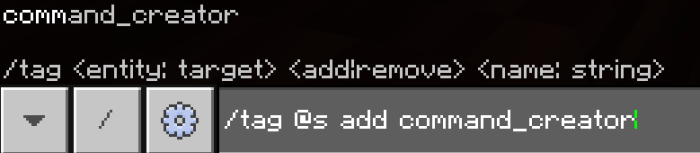
Give yourself the command_creator tag, therefore you can create custom commands

Step 2:
Set your custom command prefix by typing setPrefix - you can use any prefix, - is just an example.
Step 3:
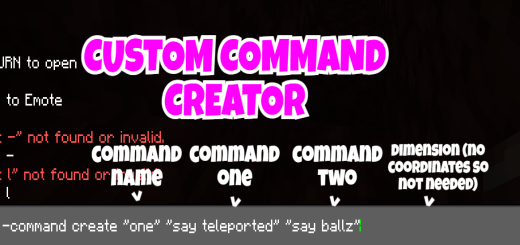
Now onto the good stuff, the way the commands are created, type -command create "nameOfCommand" "commandOne" "CommandTwo" "dimension"
NOTE: Dimension is only needed, if one of your commands include SET coordinates, for example commandOne in the example image is teleporting the player to 0 -59 0 so a dimension must be provided, the dimension is the dimension you will teleport to
Below is an image without a command that has set coordinates, therefore a dimension tag does not need to be provided.
After you have done that type -one or your command name, im using -one as an example, then boom your custom command will run! And remember you can include infinite commands!
WARNING: If any of your commands are incorrect or wrong, i cannot detect that, therefore if the custom command does not run as intended, one of your commands may be incorrect causing it to not work.
- Edition: Minecraft Bedrock
- File type: .mcpack or .mcaddon
- Minecraft version listed: 1.21.50
- How to install: Download the .mcpack or .mcaddon file. → Open it — Minecraft imports it. → In your world: Behavior Packs → Available → Activate, then the same under Resource Packs.
- Where to get it: In MCModsHub, or directly above on this page.
Install steps are the general flow for this file type — How to install Minecraft Bedrock addons & mods walks through it step by step.
- Pack type: .mcaddon — behaviour and resource pack in one file
- Manifest requires Minecraft 1.20.20 or newer
- Needs Beta APIs switched on in the world settings
- Complete pack — everything it depends on is inside the file
- Download size: 412 KB
- Download link checked 3 Aug 2026 — working
- Mirrored on our own servers — the download does not depend on the original host
These come from our own check of the pack file, not from the source page.