Easier /loot command!
Bedrock add-on listed for Minecraft 1.21. Installs from the MC Bedrock Mods app on Android.
⬇ DownloadBasically, my .zip file contains the behaviour pack and text file. The text file can be opened with anything, it doesn't matter. Unzip the folder, open the folder, run the .mcaddon file to get it to import, and add it to the world where you need easy access to chest loot tables. The text file contains the names of every loot table that I've included, categorized for easy comprehension, so you can just stuff them into the command and get them!
The command part:
The addon just makes it slightly easier to use one command.
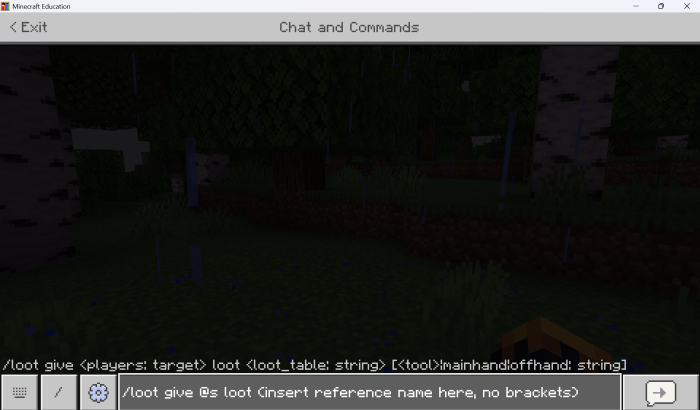
This command will not work, because the (insert reference name here, no brackets) is not a loot table. Open the text file, choose the loot table that you want to use, and replace it in. Three examples:
Getting buried treasure loot: /loot give @s loot buriedtreasure
Getting treasure bastion loot: /loot give @s loot bastion_treasure
Putting mineshaft loot into a barrel under you (works with chest, but it is kind of annoying, or just get rid of the -1 after the ~): /loot insert ~~-1~ loot abondoned_mineshaft
Hope you enjoy this little assistance with randomly-generated loot!
- Edition: Minecraft Bedrock
- File type: .mcpack or .mcaddon
- Minecraft versions listed: 1.21, 1.21.20, 1.21.30
- How to install: Download the .mcpack or .mcaddon file. → Open it — Minecraft imports it. → In your world: Behavior Packs → Available → Activate, then the same under Resource Packs.
- Where to get it: In MCModsHub, or directly above on this page.
Install steps are the general flow for this file type — How to install Minecraft Bedrock addons & mods walks through it step by step.
- Pack type: .mcaddon — behaviour and resource pack in one file
- Download size: 62 KB
- Download link checked 3 Aug 2026 — working
- Mirrored on our own servers — the download does not depend on the original host
These come from our own check of the pack file, not from the source page.