ItemXchange
Bedrock add-on listed for Minecraft 1.21 (behavior + resource pack). File opened and checked on 12 Oct 2026; installs from the MC Bedrock Mods app on Android.
⬇ DownloadHow to Use

Step 1:
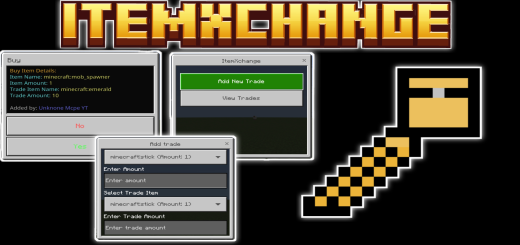
Open the ItemXchange Menu Hold a stick in your hand and use it to access the ItemXchange menu. You'll see two options: Add New Trade: Set up your own trades. View Trades: Browse and participate in existing trades.
Step 2:

Add a New Trade Select Add New Trade to create your trade. Fill in the details: Item to Trade: Choose an item from your inventory to offer. Trade Amount: Specify how much of the item you want to trade. Item You Want: Select the item you want in return. Desired Amount: Specify how much you want in exchange. Codinet: Enter coordinates for where the trade should finalize.
Step 3:
View and Accept Trades Select View Trades to see all available trades. Each trade displays details like the item offered, the amount required, and the player who created it. Click on a trade to accept it. Ensure you have the required trade item in your inventory!
Step 4:
Complete the Trade Once you accept a trade: Your trade items will be deducted automatically. The items you're trading for will be added to your inventory. The traded items will be delivered to the specified codinet chest.
- Edition: Minecraft Bedrock
- File type: .mcpack or .mcaddon
- Minecraft version listed: 1.21.50
- How to install: Download the .mcpack or .mcaddon file. → Open it — Minecraft imports it. → In your world: Behavior Packs → Available → Activate, then the same under Resource Packs.
- Where to get it: In MCModsHub, or directly above on this page.
Install steps are the general flow for this file type — How to install Minecraft Bedrock addons & mods walks through it step by step.
- Pack type: .mcaddon — behaviour and resource pack in one file
- Manifest requires Minecraft 1.21.50 or newer
- Complete pack — everything it depends on is inside the file
- Download size: 247 KB
- Download link checked 3 Aug 2026 — working
- Mirrored on our own servers — the download does not depend on the original host
These come from our own check of the pack file, not from the source page.