HomeJavaModsModernConfig
ModernConfig
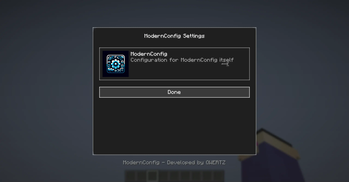
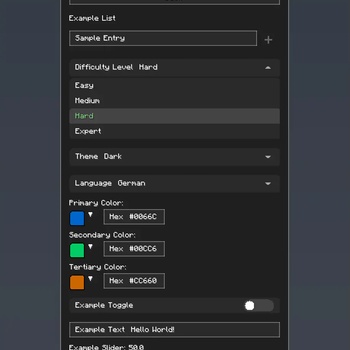
ModernConfig — screenshot 1ModernConfig — screenshot 2

ModernConfig

ModernConfig Logo

A beautiful, modern configuration library for Minecraft mods

License Minecraft Mod Loader Version

🌟 Overview

ModernConfig is a sleek configuration library for Minecraft Fabric mods that makes managing settings easy. No more config commands - ModernConfig has animations, a modern style, and its really easy to implement in your mods.

✨ Features

🧩 Configuration Options

🚀 Easy to Develop with

🔧 Other Features

📸 Screenshots

Main Interface

Main Config Screen Main interface with animations and modern design

Configuration Options

Config Options Rich variety of input types: toggles, sliders, text fields, and more

Color Picker

Color Picker HSV color picker with real-time preview

🚀 Installation

For Players

  1. Download and Install Fabric

  2. Download ModernConfig

  3. Install the Mod

    • Place the .jar file in your mods folder
    • Launch Minecraft with the Fabric profile

For Developers

Add ModernConfig to your build.gradle:

repositories {
    maven {
        name = 'QWERTZ-Repo'
        url = 'https://repo.qwertz.app/'
    }
}

dependencies {
    modImplementation 'app.qwertz:modernconfig:1.3'
}

🎮 Usage

Opening the Configuration

Navigation

🔧 Developer Guide

Quick Start

Here is how easy it is to set up a config:

public class YourMod implements ClientModInitializer {
    
    @Override
    public void onInitializeClient() {
        ModernConfig config = ConfigBuilder.create("YourMod", "Your Mod Configuration")
            .toggle("enabled", "Enable Mod", true)
            .slider("power", "Power Level", 50, 0, 100, 1)
            .text("username", "Player Name", "Steve")
            .color("theme_color", "Theme Color", 0x4A90E2)
            .list("whitelist", "Player Whitelist", "Player Name")
            .dropdown("difficulty", "Difficulty", Arrays.asList("Easy", "Normal", "Hard"), "Normal")
            .build();
    }
}

Using Categories

When you have lots of settings, organize them into categories:

ModernConfig config = ConfigBuilder.create("AdvancedMod", "Advanced Mod Settings")
    .category("general", "General Settings", "Main configuration options", category -> category
        .toggle("enabled", "Enable Mod", true)
        .slider("update_interval", "Update Interval", 20, 1, 100, 1)
        .text("server_url", "Server URL", "https://api.example.com")
    )
    .category("ui", "User Interface", "Customize the user interface", category -> category
        .color("primary_color", "Primary Color", 0x4A90E2)
        .color("secondary_color", "Secondary Color", 0x2ECC71)
        .dropdown("theme", "Theme", Arrays.asList("Dark", "Light", "Auto"), "Dark")
        .slider("ui_scale", "UI Scale", 1.0f, 0.5f, 2.0f, 0.1f)
    )
    .category("advanced", "Advanced Settings", "Advanced configuration options", category -> category
        .toggle("debug_mode", "Debug Mode", false)
        .list("blocked_items", "Blocked Items", "Item ID")
        .list("whitelist", "Whitelisted Servers", "IP")
        .text("api_key", "API Key", "")
    )
    .build();

Accessing Configuration Values

// Get configuration options by category path
ConfigOption<?> enabledOption = config.getOption("general", "enabled");
ConfigOption<?> updateOption = config.getOption("general", "update_interval");
ConfigOption<?> whitelistOption = config.getOption("advanced", "whitelist");

// Get the actual values
boolean isEnabled = (Boolean) enabledOption.getValue();
int updateInterval = (Integer) updateOption.getValue();
List<String> whitelist = (List<String>) whitelistOption.getValue();

🎨 Configuration Options

Toggle (Boolean)

.toggle("toggle_id", "Display Name", defaultValue)

Text Field (String)

.text("text_id", "Display Name", "default_value")
.text("text_id", "Display Name", "default_value", maxLength)

Slider (Numeric)

.slider("slider_id", "Display Name", defaultValue, minValue, maxValue, step)

Color Picker (Integer)

.color("color_option_id", "Display Name", 0xRRGGBB)

List (String Array)

.list("list_id", "Display Name", "Item Display Name")

Dropdown (String Selection)

.dropdown("dropdown_id", "Display Name", Arrays.asList("Option1", "Option2"), "Default")

Categories (Organization)

.category("category_id", "Category Name", "Description", category -> category
    // Add options here
)

🤝 Contributing

Pull Request Process

  1. Fork the repository
  2. Make your changes
  3. Test it
  4. Submit a pull request

🙏 Credits

Development Team

📞 Support

🌟 Star History

Star History Chart


Made with ❤️ and many tears 🥲

⬆ Back to Top

Quick facts

Install steps are the general flow for this file type — How to install Minecraft Java mods & modpacks walks through it step by step.

Verified by MCModsHub

These come from our own check of the pack file, not from the source page.

Explore more