OpenSoundboard
A feature-rich soundboard mod for Simple Voice Chat.
Play MP3s directly through voice chat — with per-sound controls, keybinds, and a built-in YouTube downloader.
Features
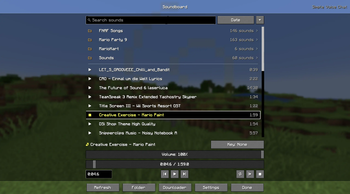
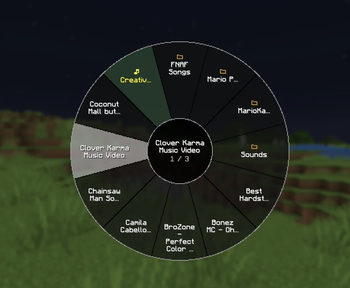
Soundboard UI — Press U (configurable) to open a full-featured soundboard screen.
- Browse, search, and favorite your sounds
- Play / pause / stop with playback controls
- Timeline seeking and skip forward/back
- Set custom starting points for any sound
- Loop individual sounds or all sounds
- Double-click a sound to play instantly
Per-Sound Controls
- Independent local volume (what you hear) and player volume (what others hear)
- Optional synced volume mode for simpler control
- Global volume multiplier for both channels
- Custom keybinds — bind any key combo to instantly play a sound
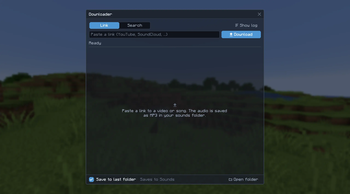
Built-in YouTube Downloader
- Paste a YouTube URL and download audio directly into your sounds folder
- Progress bar and live log output
- Extracts audio automatically as MP3
- Automatically downloads yt-dlp and ffmpeg on first use
Configuration
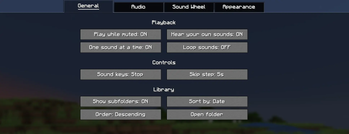
- Play while muted
- Play sounds locally (hear your own sounds)
- Single song at a time mode
- Sync per-sound and global volume controls
- All settings accessible via Mod Menu or the in-game config button
Supported Versions
| Minecraft | Status |
|---|---|
| 26.2 | ✅ Supported (latest) |
| 26.1, 26.1.1, 26.1.2 | ✅ Supported |
| 1.21.11 | ✅ Supported |
| 1.21, 1.21.1 | ✅ Supported |
| 1.21.10, 1.21.8, 1.21.5, 1.21.4 | ⚠️ Deprecated |
Deprecated versions were supported under the previous per-version build and no longer receive updates. New releases target the supported versions above.
Dependencies
| Mod | Required |
|---|---|
| Fabric API | Yes |
| Simple Voice Chat | Yes |
| Mod Menu | Optional |
Getting Started
- Install the mod and all required dependencies
- Join a server (or singleplayer world) with Simple Voice Chat
- Drop
.mp3files into.minecraft/opensoundboard/— or use the built-in YouTube downloader - Press U to open the soundboard and start playing
Credits
Thanks KamiKMB for creating the amazing Logo for the Mod.
License
Quick facts
- Edition: Minecraft Java
- File type: .jar
- Minecraft version listed: 26.2
- How to install: Install the matching mod loader (Forge, Fabric or NeoForge) for your Minecraft version. → Download the .jar. → Put it in the .minecraft/mods folder and launch that loader profile.
- Where to get it: Opens on Modrinth — not every file is mirrored on our own servers.
Install steps are the general flow for this file type — How to install Minecraft Java mods & modpacks walks through it step by step.
Verified by MCModsHub
- Ships as opensoundboard-0.4.0+mc26.2.jar — drop this file into the mods folder
- Download size: 143 KB
- Download link checked 30 Aug 2026 — working
These come from our own check of the pack file, not from the source page.