HomeJavaModsBetter Fabric Console
Better Fabric Console
ModsJava

Better Fabric Console

by jpenilla · on Modrinth

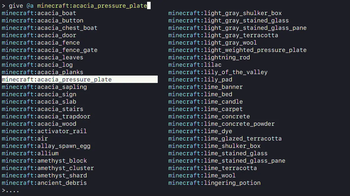
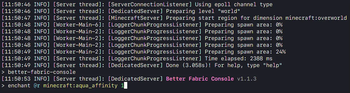
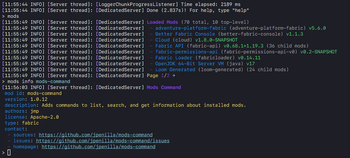
Server-side Fabric mod enhancing the console with tab completions, colored log output, command syntax highlighting, command history, and more.

Which Minecraft do you have?

Every version of the game needs its own build. Pick yours, then download — the wrong build installs fine and then does nothing in the game. This mod is built for Fabric only.

⬇ Download for 26.1.2–26.2⬇ Download for 1.21.11⬇ Download for 1.21.10⬇ Download for 1.21.8⬇ Download for 1.21.5⬇ Download for 1.21.4⬇ Download for 1.21.3⬇ Download for 1.21–1.21.1⬇ Download for 1.20.6⬇ Download for 1.20.4⬇ Download for 1.20.2⬇ Download for 1.20.1⬇ Download for 1.19.4⬇ Download for 1.19.3
I don't know my version or loader
Open the Minecraft launcher and look at the profile you play on — it names both, like fabric-loader-1.21.4. The version also shows in the bottom-right corner of the game's main menu.
No loader in the profile name? Then it's plain Minecraft, and these mods won't run — you need Fabric or NeoForge installed first.
Better Fabric Console — screenshot 1Better Fabric Console — screenshot 2Better Fabric Console — screenshot 3

Better Fabric Console

Better Fabric Console icon

Better Fabric Console is a server-side Fabric mod that replaces the vanilla dedicated server console experience with an interactive, color-aware terminal.

Features

Screenshot 1

Requirements

Installation

  1. Download the latest Better Fabric Console, Fabric API, and adventure-platform-fabric jars.
  2. Place the jars in your server mods/ directory.
  3. Start the server once to generate config files.
  4. Stop the server and edit configuration as needed.
  5. Start the server again.

You may also choose to run the server with the --nogui argument (i.e. java -jar fabric.jar --nogui) to disable the server GUI (this is a Vanilla option).

Configuration

Better Fabric Console generates and reads:

The bundled default Log4j config is also written to config/better-fabric-console/defaults/log4j2.xml for reference. If you customize log4j2.xml and the bundled default changes, Better Fabric Console will warn on startup until you review/merge the change and run:

/better-fabric-console dismiss-log4j-config-update

You can also start once with -Dbetter-fabric-console.dismiss-log4j-config-update=true to dismiss the warning.

Default better-fabric-console.conf for reference:

# Specify argument highlight colors, in order. Possible values: [BLACK, RED, GREEN, YELLOW, BLUE, MAGENTA, CYAN, WHITE]
highlight-colors=[
    CYAN,
    YELLOW,
    GREEN,
    MAGENTA,
    BLUE
]
# Whether to log commands executed by players to console.
log-player-executed-commands=true

Click here to see the default log4j2.xml configuration.

Better Fabric Console also respects the following system properties to override terminal environment detection:

Changes require a server restart.

Command

License

MIT. See license.txt.

Quick facts

Install steps are the general flow for this file type — How to install Minecraft Java mods & modpacks walks through it step by step.

Verified by MCModsHub

These come from our own check of the pack file, not from the source page.

Explore more