
Command GUI Buttons
Command GUI Buttons Remade from Description Command GUI Buttons is a fabric mod for Minecraft that allows users to create buttons on their clients for…
I don't know my version or loader
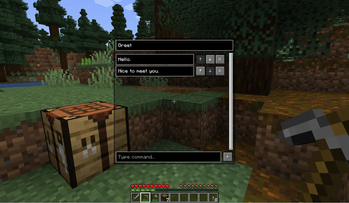
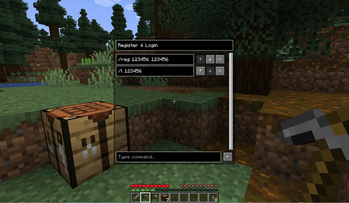
Command GUI Buttons
Remade from https://github.com/joseph-garcia/command-gui-buttons


Description
Command GUI Buttons is a fabric mod for Minecraft that allows users to create buttons on their clients
for preset chat messages, commands such as /warp home, or anything in the chat box.
Users can bring up this menu in-game with the key G, type in the button's Name and Command they want to
create, and press the button + to create. Then, the button will appear on users' screen for use whenever they want.
Dependencies
Dependencies
| Dependency | Type | Link |
|---|---|---|
| Fabric API | Required | CurseForge | Modrinth |
| LibGui | Required | GitHub | Maven(Not recommend) |
For your convenience, download links are listed below:
| Minecraft Version | Fabric API | LibGui (Please use the given version) |
|---|---|---|
| 1.16.5 | CurseForge | Modrinth | 3.4.0 GitHub |
| 1.17.1 | CurseForge | Modrinth | 4.2.3 GitHub |
| 1.18.2 | CurseForge | Modrinth | 5.4.2 GitHub |
| 1.19.2 | CurseForge | Modrinth | 6.4.0 GitHub |
| 1.19.3 | CurseForge | Modrinth | 6.5.3 GitHub |
| 1.19.4 | CurseForge | Modrinth | 7.1.1 GitHub |
| 1.20.6 | CurseForge | Modrinth | 10.0.0 GitHub |
| 1.21.1 | CurseForge | Modrinth | 11.1.0+1.21 GitHub |
| 1.21.5 | CurseForge | Modrinth | 13.1.0+1.21.5 GitHub |
| 1.21.8 | CurseForge | Modrinth | 14.0.0+1.21.6 GitHub |
| 1.21.10 | CurseForge | Modrinth | 15.0.0 GitHub |
| 1.21.11 | CurseForge | Modrinth | 15.0.0 GitHub |
Features
- Unlimited number of buttons
- Multiple commands or chat messages in one button
- Custom order execute commands or send messages
- Search for buttons (Case sensitive)


How to Use
- Bring up the menu in-game with the G key
- Type in the Name and Command you want to save into a button
- Press the
+button
How It Works
The list of commands are serialized into a JSON format and stored locally on the users’ systems. The mod writes any new commands into the JSON as new buttons are created, and loads the JSON at the next start of the game.
Development
Support
Current main development for Minecraft version: 1.21.11
And use preprocess to be compatible with the following versions.
Note: We only accept the following versions of issues.
Please note that this information is time-sensitive and any version of the issue not listed here will be closed.
- Minecraft
1.16.5 - Minecraft
1.17.1 - Minecraft
1.18.2 - Minecraft
1.19.2 - Minecraft
1.19.3 - Minecraft
1.19.4 - Minecraft
1.20.6 - Minecraft
1.21.1 - Minecraft
1.21.5 - Minecraft
1.21.8 - Minecraft
1.21.10 - Minecraft
1.21.11
Mappings
We are using the Mojang official mappings to de-obfuscate Minecraft and insert patches.
- Edition: Minecraft Java
- File type: .jar
- Minecraft versions listed: 1.16, 1.16.1, 1.16.2
- How to install: Install the matching mod loader (Forge, Fabric or NeoForge) for your Minecraft version. → Download the .jar. → Put it in the .minecraft/mods folder and launch that loader profile.
- Where to get it: Opens on Modrinth — not every file is mirrored on our own servers.
Install steps are the general flow for this file type — How to install Minecraft Java mods & modpacks walks through it step by step.
- Ships as CommandGUIButtons-all-2.5.0+build.414+fa67364.jar — drop this file into the mods folder
- Download size: 475 KB
- Download link checked 20 Sept 2026 — working
These come from our own check of the pack file, not from the source page.