
ModsJava
Full Grown Crop Marker Mod (1.21.11, 1.20.1) – Visual Cues for Ripe Crops
Java mod listed for Minecraft 1.20–1.21. Downloads from the MC Java Mods app on Android.
⬇ Download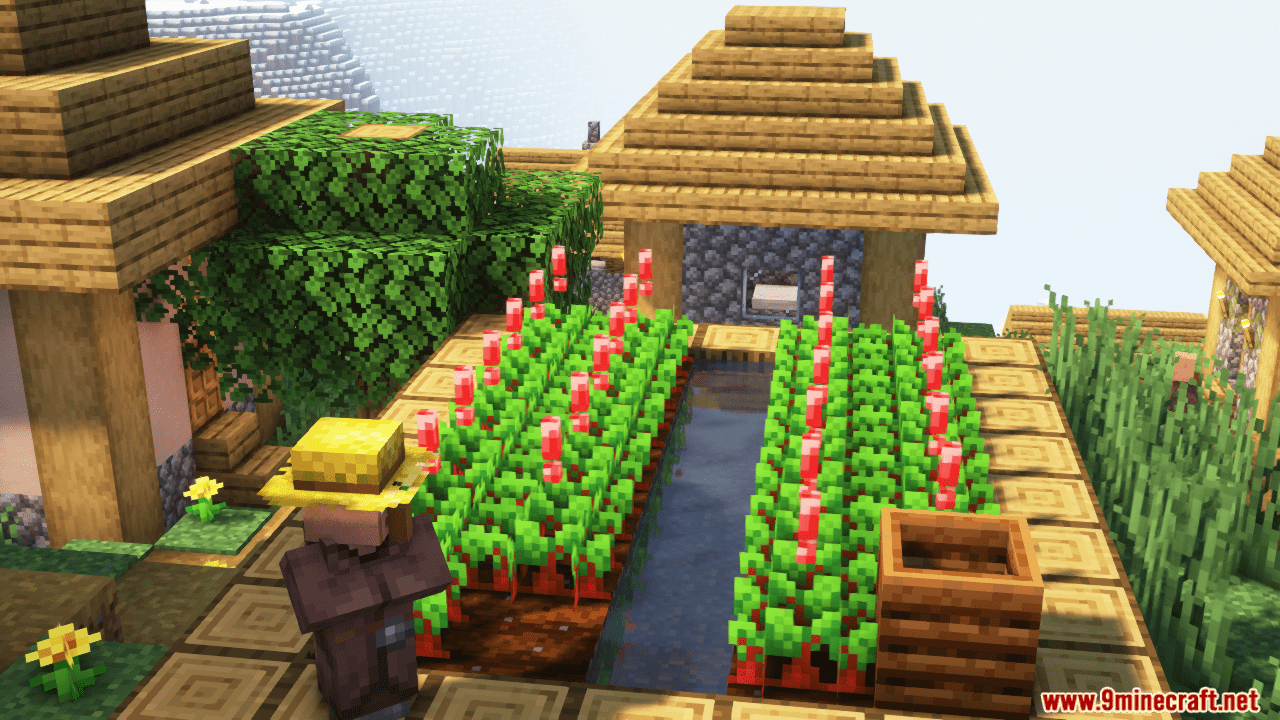




Full Grown Crop Marker Mod displays a small marker on all fully grown crops! An exclamation mark will appear above fully matured plants, and the color of the mark will depend on the crop. For example, it will be red for beets and yellow for wheat. This mod is client-side only, meaning it doesn’t need to be installed on a server. It’s a great tool for easily identifying when your crops are ready for harvest.
Features:
- Displays a marker above crops that are fully grown.
- Each crop can have its own unique marker with customizable options.
- Configurable marker positions (e.g., top or none).
- Customizable marker colors, including green, red, blue, yellow, orange, and purple.
- Option to make the marker animated.
- Supports both vanilla crops (like wheat, carrots, potatoes, beetroots, and nether wart) and modded crops that extend the CropsBlock class.
Screenshots:
Full Grown Crop Marker Mod Download Links
Quick facts
- Edition: Minecraft Java
- File type: .jar
- Minecraft versions listed: 1.21.11, 1.20.1
- How to install: Install the matching mod loader (Forge, Fabric or NeoForge) for your Minecraft version. → Download the .jar. → Put it in the .minecraft/mods folder and launch that loader profile.
- Where to get it: In MC Java Mods, or directly above on this page.
Install steps are the general flow for this file type — How to install Minecraft Java mods & modpacks walks through it step by step.
File checked by MCModsHub
- Downloads as 25749.mcaddon
- Download size: 49 KB
- Download link checked 26 Sept 2026 — working
- Mirrored on our own servers — the download does not depend on the original host
These come from our own check of the pack file, not from the source page.