Mixtape
I don't know my version or loader
Mixtape
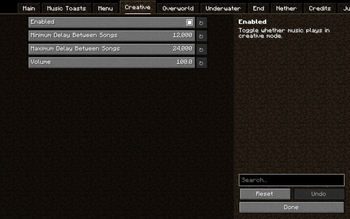
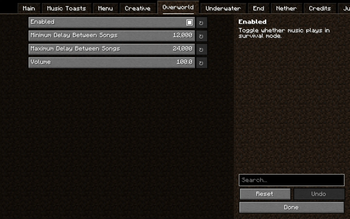
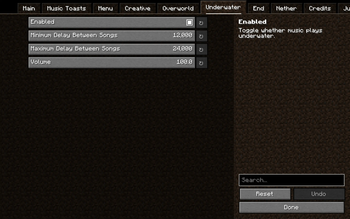
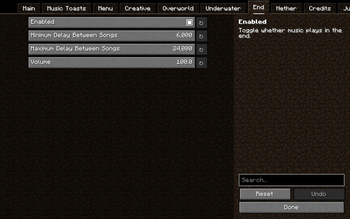
Mixtape is a client sided mod that adds lots of configuration for the music, Letting you control how often music happens, what music plays, and much more! I will backport the mod to older versions on request.
Social
Discord: https://discord.gg/WyrTsYFweK!!!
Features
The current features include
A skip keybind
- Setting that lets you choose if the skip keybind starts a new song if the delay is bigger than 0
A start new song keybind
- Setting that lets you choose if the play keybind replaces the current song
A pause/resume keybind (currently only sets the delay between songs to infinite, not finished)
A setting to change the music from based on your location, to the music from a specific location, nether, end, underwater, etc
A setting to set the delay between songs in all areas 0
Settings to stop the music from pausing when you pause the game, travel dimensions, and leave a world
A setting that you can enable to make the pitch of the music varied, so each time you hear it it's slightly different
- You can change the minimum and maximum the pitch can change to, giving you control over the variation
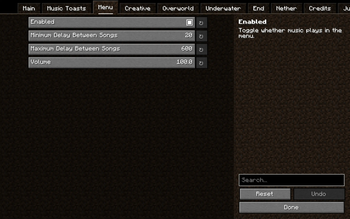
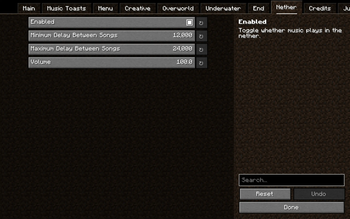
Settings for each music type (menu, creative, game, underwater, end, nether, credits, and jukebox)
- Whether or not music of this type can play
- The maximum delay that can happen before more music plays (apart from the credits and jukebox music)
- The maximum delay that can happen before more music plays (apart from the credits and jukebox music)
- The volume at which the songs play
Special settings for jukebox songs
- A setting that when enabled turns down regular music when a disc song is playing
- A setting to change the jukebox songs to play in mono, so they don't switch ear when you turn around
- A setting to replace the song 11 with the song eleven
- A setting to replace the song cat with the song dog
- A setting to replace the song ward with the song Droopy Likes Your Face
Useful info in the debug screen
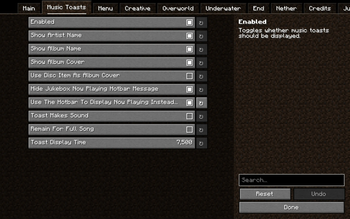
Music Toasts
- Music toasts are like regular recipe and advancements toasts. They can show the album cover, the song artist & name, and the song album name.
- Music toasts have lots of customization for each part of them. (duration, whether or not they make a sound, what information they display. etc)
- Music toasts are compatible with music added by resourcepacks!
Create a
music_list.jsonfile inresourcepack/assets/mixtapeto add a Title, Artist, and Album.
{
  "calm1": {
    "name": "Minecraft",
    "artist": "C418",
    "album": "Minecraft - Volume Alpha"
  },
  "calm2": {
    "name": "Clark",
    "artist": "C418",
    "album": "Minecraft - Volume Alpha"
  }
}
- Create an
album_list.jsonfile inresourcepack/assets/mixtapeto point an album name towards a 300x300 tile inresourcepack/assets/mixtape/textures/gui/album_covers.png
{
  "Minecraft - Volume Alpha": {
    "x": 0,
    "y": 0
  },
  "Minecraft - Volume Beta": {
    "x": 1,
    "y": 0
  }
}
Mixtape also comes with 6 built-in resourcepacks! These are to control what music plays, and some add music written by c418 for minecraft but not used in the game.
- Unused music
- Adds the unused music written by c418 for minecraft
- 0x10c in the end
- Makes the songs from the 0x10c soundtrack play in the end
- Only c418
- Stops the overworld (and menu) music not written by c418 from playing
- Only c418 plus unused music
- Stops the overworld (and menu) music not written by c418 from playing and adds the unused music
- No nether update
- Stops the songs from the nether update soundtrack from playing
- No nether update plus unused music
- Stops the songs from the nether update soundtrack from playing and adds the unused music
- No Biome based
- Makes all overworld music play in the overworld, without biome specific triggers
- No Biome based plus unused music
- Makes all overworld music play in the overworld, without biome specific triggers and adds the unused music
Songs added by the unused music resourcepack include:
- Intro
- Kyoto
- Équinoxe
- Ki
- Chris
- Flake
- Excuse
- Door
- Beginning
- Moog City
- Droopy Likes Richochet
All music added by this mod was composed by c418.
Installation
- Download and run the Fabric installer.
- Click the "vanilla" button, leave the other settings as they are, and click "download installer".
- Note: this step may vary if you aren't using the vanilla launcher or an old version of Minecraft.
- Download the Fabric API and Cloth Config
and move them to the mods folder (
.minecraft/mods). - Download mixtape from the releases page
and move it to the mods folder (
.minecraft/mods).
- Edition: Minecraft Java
- File type: .jar
- Minecraft versions listed: 1.20.3, 1.20.4
- How to install: Install the matching mod loader (Forge, Fabric or NeoForge) for your Minecraft version. → Download the .jar. → Put it in the .minecraft/mods folder and launch that loader profile.
- Where to get it: Opens on Modrinth — not every file is mirrored on our own servers.
Install steps are the general flow for this file type — How to install Minecraft Java mods & modpacks walks through it step by step.
- Ships as Mixtape-1.6.2-1.20.4.jar — drop this file into the mods folder
- Download size: 29.5 MB
- Download link checked 30 Aug 2026 — working
These come from our own check of the pack file, not from the source page.