HomeJavaModsMusic Moods
Music Moods
ModsJava

Music Moods

by Ampflower · on Modrinth

Configure how music & sound are handled. Free Minecraft Java mod for 26.1-rc-2, 26.1, 26.1.1.

Which build do you need?

This mod ships a separate file for every mod loader and every version of the game. Pick both, then download — the wrong build installs fine and then does nothing in the game.

Mod loader

Minecraft version

⬇ Download for 26.1–26.1.2 · Fabric⬇ Download for 1.21.11 · Fabric⬇ Download for 1.21.9–1.21.10 · Fabric⬇ Download for 1.21.6–1.21.8 · Fabric⬇ Download for 1.21.5 · Fabric⬇ Download for 1.21.4 · Fabric⬇ Download for 1.21.2–1.21.3 · Fabric⬇ Download for 1.21–1.21.1 · Fabric⬇ Download for 1.20.5–1.20.6 · Fabric⬇ Download for 1.20.4 · Fabric⬇ Download for 26.1–26.1.2 · Quilt⬇ Download for 1.21.11 · Quilt⬇ Download for 1.21.9–1.21.10 · Quilt⬇ Download for 1.21.6–1.21.8 · Quilt⬇ Download for 1.21.5 · Quilt⬇ Download for 1.21.4 · Quilt⬇ Download for 1.21.2–1.21.3 · Quilt⬇ Download for 1.21–1.21.1 · Quilt⬇ Download for 1.20.5–1.20.6 · Quilt⬇ Download for 1.21.11 · NeoForge⬇ Download for 1.21.9–1.21.10 · NeoForge⬇ Download for 1.21–1.21.1 · NeoForge
I don't know my version or loader
Open the Minecraft launcher and look at the profile you play on — it names both, like fabric-loader-1.21.4. The version also shows in the bottom-right corner of the game's main menu.
No loader in the profile name? Then it's plain Minecraft, and these mods won't run — you need Fabric or NeoForge installed first.
Music Moods — screenshot 1Music Moods — screenshot 2Music Moods — screenshot 3

Music Moods

Configure how music & sound are handled. Useful for cases where resource packs and mods replace the music immediately instead of just letting it play for any reason.

How to Use

Music Moods requires Minecraft 1.16.5+, along with Fabric API.

For Forge 1.17 and older, you must install ObsidianUI and Architectury API as well.

On Fabric, Mod Menu may be installed to easily access the configuration screen that way as well.

Install Minecraft 1.16.5+, Fabric or Quilt, any mods that like to replace the currently playing track and stick with the default of fading between tracks or modify the config to not let the current track be replaced.

Mod Support

Designed around the BetterNether and BetterEnd mods' built in resource packs, you can play with any mod or resource pack that has per-biome music that replaces the current track to have it smoothly transition.

Limited support has been added for The Immersive Music Mod.

Configuration

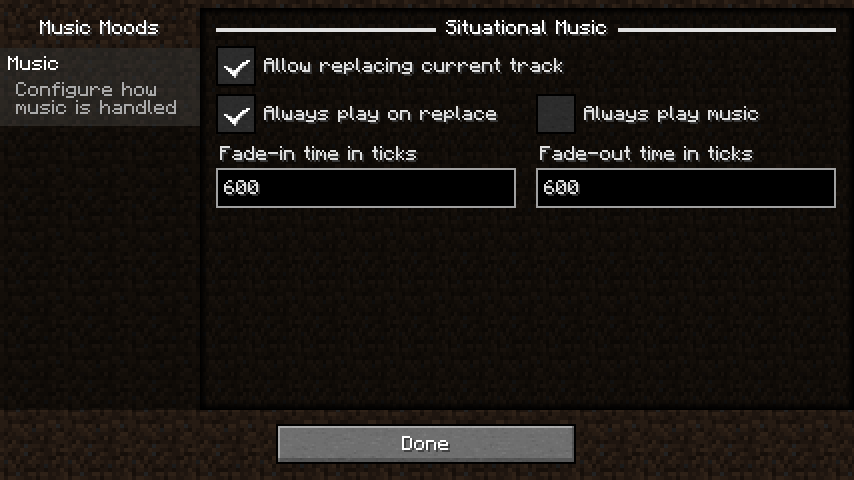
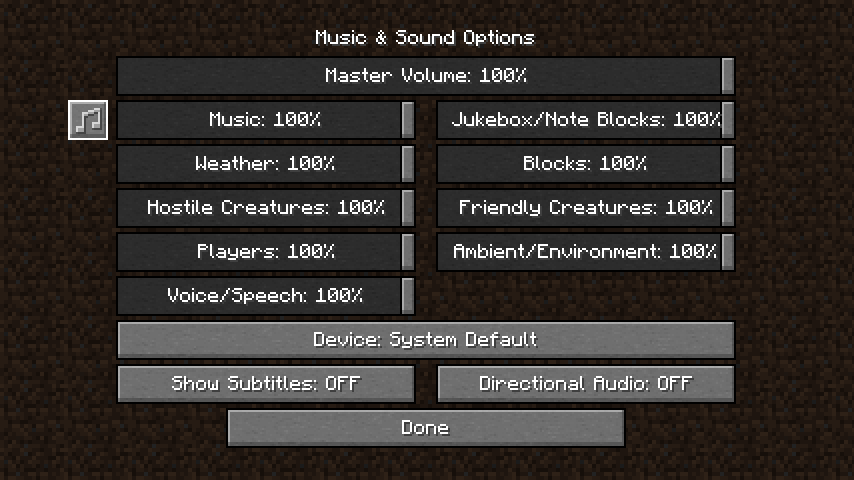
You can edit the config in game when Mod Menu is installed by navigating to Mods, Music Moods, then hitting the Configure... button. Alternatively, there's the new Music & Sound options screen.

Screenshots of the configuration screens.

The new redesigned Music & Sounds Screen

The redesigned Music & Sound screen

The configuration for situational music.

The music configuration screen

Music

Situational Music

Includes the title screen, various biomes, being underwater and battles.

Verified by MCModsHub

These come from our own check of the pack file, not from the source page.

Explore more