
CobblePass - The Ultimate Battle Pass for Cobblemon
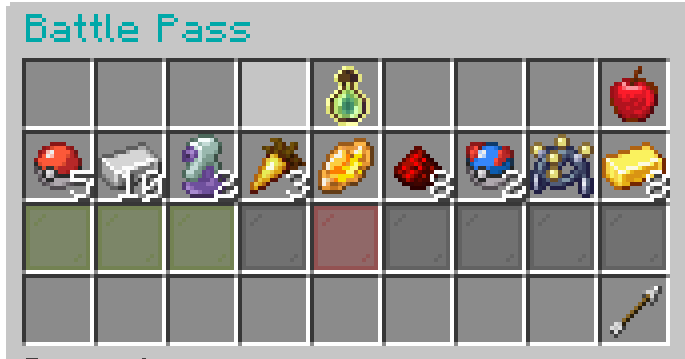
Welcome to the completely revamped CobblePass! This mod provides a deeply integrated and highly customizable battle pass system for your Cobblemon server. Engage your players with a rewarding progression system, complete with free and premium tracks, seasonal content, and a wide array of configurable rewards.

Features
- Seasons: Create unique battle pass seasons with configurable durations and rewards.
- Dual Reward Tracks: Implement both
freeandpremiumreward tiers. - Dynamic GUI: A clean, intuitive, and paginated GUI (
/bp) for players to view progress and claim rewards. - XP Progression:
- Gain XP from various in-game actions: catching, defeating, evolving, hatching, and trading Pokémon.
- Two XP progression models:
FORMULA: XP required per level increases based on a configurable multiplier.MANUAL: Manually define the exact XP required for each level.
- Diverse Reward Types:
ITEM: Grant any item from Minecraft or other mods, with full NBT support.POKEMON: Reward players with specific Pokémon, including level, shininess, and other attributes.COMMAND: Execute any server command as a reward, with placeholders for player name and UUID.
- Admin Management:
- A full suite of commands for managing seasons, players, and configurations.
- Create, start, stop, and delete seasons.
- Modify player XP, levels, and premium status on the fly.
- Reload configurations without a server restart.
- Economy Integration: Charge for the premium pass using any Impactor-compatible economy plugin.
- Highly Configurable: Tweak everything from XP values to reward templates and season settings through intuitive JSON files.
- Data Integrity: Player data is saved reliably and includes safeguards against corruption.
Dependencies
CobblePass requires the following mods to be installed on your server:
- Fabric API
- Cobblemon (v1.6+)
- Impactor (For economy features)
- GooeyLibs
Installation
- Ensure you have a Fabric server running Minecraft 1.21.1 or later.
- Download the latest versions of CobblePass and all required dependencies.
- Place the
.jarfiles into your server'smodsfolder. - Start your server. CobblePass will generate its default configuration files in the
config/cobblepass/directory.
Getting Started: Your First Season
Setting up a new Battle Pass is easy with the in-game creation tool.
Step 1: Create the Battle Pass
- As an operator, run the command:
/battlepass create - This will open a GUI where you can set:
- Duration: The length of the season in days.
- Max Level: The highest level players can achieve.
- Premium Toggle: Whether this season will have a premium track.
- Click "Create Battle Pass". This generates
config.jsonandtiers.jsonfiles and resets all player progress for a fresh start.
Step 2: Configure Your Rewards
- Open
config/cobblepass/tiers.json. - By default, it's filled with placeholder rewards (Apples). Customize each level's
freeRewardandpremiumReward. See the detailed tiers.json Configuration section below for examples of Item, Pokémon, and Command rewards. - This is where you can also define reusable reward
templates!
Step 3: Configure Settings
- Open
config/cobblepass/config.json. - Adjust XP gain values (
catchXP,defeatXP, etc.), the cost of the premium pass (premiumCost), and the XP progression model (xpProgression). See the config.json Configuration section for more details.
Step 4: Reload the Configuration
- Once you've saved your changes to the JSON files, run the command:
/battlepass reload - This will load all your new settings and rewards into the server without needing a restart.
Step 5: Start the Season!
- When you're ready for the season to begin, run:
/battlepass season start - The timer will start, and players can now begin earning XP!
Commands
The base command is /battlepass with aliases /bp and /pass.
Player Commands
| Command | Description |
|---|---|
/bp |
Opens the main Battle Pass GUI to view progress and claim rewards. |
/bp premium |
Shows information about the premium pass, including cost and status. |
/bp premium buy |
Purchases the premium pass if premiumMode is enabled and the player has enough funds. |
/bp claim <level> [premium] |
A command-based way to claim a reward for a specific level. The GUI is the primary method. |
Admin Commands (Permission Level 4)
| Command | Description |
|---|---|
/bp create |
Opens a GUI to create a new Battle Pass season from scratch. |
/bp delete confirm |
Deletes all Battle Pass files (config.json, tiers.json, and all player data). This is irreversible. |
/bp season start |
Starts the currently configured season. |
/bp season stop |
Stops the active season, pausing the timer. |
/bp reload |
Reloads config.json and tiers.json from the disk. Player data is unaffected. |
/bp addxp <player> <amount> |
Adds a specified amount of XP to a player's pass. |
/bp addlevels <player> <amount> |
Adds a specified number of levels to a player's pass. |
/bp premiumanage add <player> |
Grants a player premium status for free. |
/bp premiumanage remove <player> |
Revokes a player's premium status. |
Configuration Files
All configuration is located in the config/cobblepass/ directory.
config.json
This file controls the core mechanics of the Battle Pass.
{
  "catchXP": 50,
  "defeatXP": 25,
  "evolveXP": 100,
  "hatchXP": 75,
  "tradeXP": 50,
  "premiumCost": 1000,
  "seasonDurationDays": 30,
  "currentSeason": 1,
  "seasonStartTime": 1729898400000,
  "seasonEndTime": 1732490400000,
  "enablePermissionNodes": true,
  "premiumMode": true,
  "xpProgression": {
    "mode": "FORMULA",
    "xpPerLevel": 1000,
    "xpMultiplier": 1.05,
    "manualXpValues": {}
  }
}
XP Values (catchXP, defeatXP, etc.): The amount of Battle Pass XP granted for each action.
premiumCost: The price for the premium pass, using your server's economy.
seasonDurationDays: The length of a season in days, set via /bp create.
currentSeason, seasonStartTime, seasonEndTime: These are managed automatically by the /bp season and /bp create commands. Do not edit manually.
enablePermissionNodes: Set to true to use a permissions plugin for command access.
premiumMode: Set to true to enable the premium track for the current season.
xpProgression:
- mode: Either
"FORMULA"or"MANUAL". - If
FORMULA: usesxpPerLevelas the base andxpMultiplierto increase the requirement each level. (e.g., Level 2 needs 1000 XP, Level 3 needs 1000*1.05=1050 XP, etc.) - If
MANUAL: uses themanualXpValuesmap to define XP for each level specifically."manualXpValues": { "2": 500, "3": 550, "4": 600 }
tiers.json
The heart of your Battle Pass, where all rewards are defined.
{
  "templates": {
    "rare_candy_stack": {
      "type": "ITEM",
      "data": { "id": "cobblemon:rare_candy", "Count": 5 }
    },
    "greeting_command": {
      "type": "COMMAND",
      "command": "tellraw %player% {\"text\":\"Thanks for supporting the server!\",\"color\":\"gold\"}",
      "data": { "id": "minecraft:paper", "display_name": "§6Server Thank You" }
    }
  },
  "tiers": [
    {
      "level": 1,
      "freeReward": {
        "type": "ITEM",
        "data": { "id": "cobblemon:poke_ball", "Count": 10 }
      }
    },
    {
      "level": 5,
      "freeReward": {
        "$template": "rare_candy_stack"
      },
      "premiumReward": {
        "type": "POKEMON",
        "data": {
          "species": "eevee",
          "level": 5,
          "shiny": true
        }
      }
    },
    {
        "level": 10,
        "premiumReward": {
            "$template": "greeting_command"
        }
    }
  ]
}
- templates: (Optional) Define reusable rewards here. Give a template a name (e.g., "rare_candy_stack") and then reference it in a tier using
"$template": "rare_candy_stack". This is great for recurring rewards. - tiers: A list of tier objects. Each object must have a
level. - Reward Objects: Can be
freeRewardorpremiumReward.- type:
ITEM,POKEMON, orCOMMAND. - data:
- For
ITEM: Theidof the item and itsCount. You can add any other NBT data here too. - For
POKEMON: Thespeciesis required. You can also specifylevel,shiny,ability, and more. The display item in the GUI will be a sprite of that Pokémon. - For
COMMAND: Theidspecifies which item to display in the GUI. You can also add a customdisplay_name.
- For
- command: (Only for
COMMANDtype) The command string to execute. Use%player%for the player's name and%uuid%for their UUID.
- type:
Player Data
Player progress is stored individually in config/cobblepass/players/<uuid>.json. It's recommended not to edit these files manually, but they can be useful for diagnostics or manual corrections if needed.
{
  "version": "1.0",
  "level": 5,
  "xp": 250,
  "isPremium": true,
  "claimedFreeRewards": [
    1,
    2,
    3,
    4,
    5
  ],
  "claimedPremiumRewards": [
    5
  ]
}
- Edition: Minecraft Java
- File type: .jar
- Minecraft version listed: 1.21.1
- How to install: Install the matching mod loader (Forge, Fabric or NeoForge) for your Minecraft version. → Download the .jar. → Put it in the .minecraft/mods folder and launch that loader profile.
- Where to get it: Opens on Modrinth — not every file is mirrored on our own servers.
Install steps are the general flow for this file type — How to install Minecraft Java mods & modpacks walks through it step by step.
- Ships as CobblePass-2.1.0+1.21.1.jar — drop this file into the mods folder
- Download size: 85 KB
- Download link checked 30 Aug 2026 — working
These come from our own check of the pack file, not from the source page.