
ModsJava
Quiet Fishing
I don't know my version or loader
Open the Minecraft launcher and look at the profile you play on — it names both, like fabric-loader-1.21.4. The version also shows in the bottom-right corner of the game's main menu.
No loader in the profile name? Then it's plain Minecraft, and these mods won't run — you need Fabric or NeoForge installed first.
🌟 Features
🎯 Focus On Your Own Bobber
Stop getting distracted by other players' noise! This mod mutes all fishing bobber sounds except for your own.
🔊 Always Hear Your Catch
No more worrying about missing a catch because you cast your line too far. Your own bobber's sound will always be heard at a consistent volume, regardless of distance.
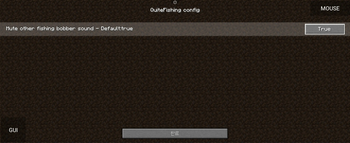
⚙️ Easy Configuration (Config GUI, Powered by MidnightLib)
For convenience, this mod provides a settings screen (e.g., via Mod Menu) where you can easily toggle the features on or off at any time.
📦 Cross-Loader Support
This mod supports multiple mod loaders (Fabric/NeoForge), allowing you to use it in your preferred environment.
Quick facts
- Edition: Minecraft Java
- File type: .jar
- Minecraft versions listed: 1.21.9, 1.21.10
- How to install: Install the matching mod loader (Forge, Fabric or NeoForge) for your Minecraft version. → Download the .jar. → Put it in the .minecraft/mods folder and launch that loader profile.
- Where to get it: Opens on Modrinth — not every file is mirrored on our own servers.
Install steps are the general flow for this file type — How to install Minecraft Java mods & modpacks walks through it step by step.
Verified by MCModsHub
- Ships as QuiteFishing-1.21.9-neoforge-1.1.jar — drop this file into the mods folder
- Download size: 497 KB
- Download link checked 20 Sept 2026 — working
These come from our own check of the pack file, not from the source page.