
Arst Motion Blur
Java mod listed for Minecraft 1.20. File opened and checked on 21 Oct 2026; downloads from the MC Java Mods app on Android.
I don't know my version or loader
Arst Motion Blur
This mod adds motion blur effect to Minecraft. Requires MidnightLib and Satin API.
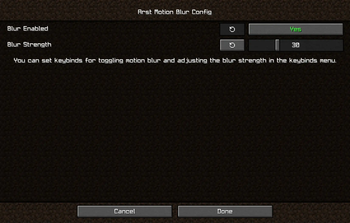
You can enable or disable motion blur and adjust the blur strength with Mod Menu Mod. Three customizable keybinds are also added:
- Toggle motion blur (Set to
mkey by defalt) - Increase blur strength (Unbound by default)
- Decrease blur strength (Unbound by default)
It is not a fork of Noryea's Motion Blur but I did refer to some of its code. The shader code in Noryea's mod uses GLSL 120 which is not supported by some devices while Arst Motion Blur uses GLSL 330 and presumably supports more platforms. The original idea was to make Motion Blur work on my M1 Macbook and eventually I also added more features. You can say this is an upgraded version of Noryea's mod.
If you encounter any issues when using this mod, you can submit an issue in the Github repo or directly ask for help in my discord if you are not familiar with Github.
Credits: Noryea for parts of the shader code and the inspiration for the project.
- Edition: Minecraft Java
- File type: .jar
- Minecraft versions listed: 1.20, 1.20.1, 1.20.2
- How to install: Install the matching mod loader (Forge, Fabric or NeoForge) for your Minecraft version. → Download the .jar. → Put it in the .minecraft/mods folder and launch that loader profile.
- Where to get it: Opens on Modrinth — not every file is mirrored on our own servers.
Install steps are the general flow for this file type — How to install Minecraft Java mods & modpacks walks through it step by step.
- Ships as arst-motion-blur-0.1.1.jar — drop this file into the mods folder
- Download size: 98 KB
- Download link checked 10 Oct 2026 — working
These come from our own check of the pack file, not from the source page.