
AE2 Pattern Archive
Java mod listed for Minecraft 1.20. Downloads from the MC Java Mods app on Android.
AE2 Pattern Archive lets you export, store, and import your entire AE2 crafting pattern library across worlds and servers, with duplicate filtering and…
⬇ Download on Modrinth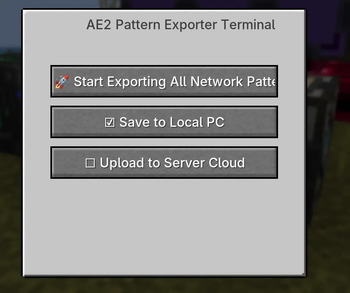

AE2 Pattern Archive 📦
For Minecraft 1.20.1 | Forge
Please scroll down for the Chinese description. / 中文介绍请向下滑动查看。
🇬🇧 English Description
📖 What is this mod?
AE2 Pattern Archive is a highly practical utility add-on for Applied Energistics 2 (AE2). Have you ever dreaded the tedious process of manually encoding hundreds of patterns when starting a new world or joining a new server? This mod solves that problem by allowing you to easily export your AE2 pattern library into a file and import it anywhere.
Encode your patterns once, and use them forever. You can seamlessly bring your automated crafting setups across different modpacks, single-player saves, and servers. You can even import archive files given to you by your friends and use their patterns directly.
Beyond simply transferring data, this mod provides a complete pattern logistics system. It allows you to centrally store your imported patterns, organize them into custom groups, and quickly distribute them to specific Pattern Providers in your factory.
✨ Key Features
- Cross-World Pattern Sharing: Export all patterns in your network into an
.nbtfile. You can save it to your local computer, upload it to the server's private cloud, or create a public archive for everyone on the server to share. - Pattern Logistics & Management: The Hub serves as a central manager. Inside, you can sort your patterns, create custom routing groups, and filter them based on target machines or Mod IDs.
- Smart Distribution System: Distributes patterns based on their type. Crafting Patterns can be globally dispatched to your network via the Execution button in the Routing Hub GUI. For Processing Patterns, use the Pattern Addresser tool and hit
Vto physically distribute them into matching Pattern Providers based on your active groups. - Easy Recipe Fixing: Playing a different modpack where the target machines have changed? You can easily fix and re-map broken patterns directly via JEI integration without having to encode them from scratch.
- Whitelist System: Easily share your Pattern Routing Hub with your friends by adding their usernames to the whitelist, allowing safe and cooperative base building.
🧱 Blocks & Items
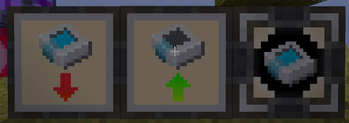
- Pattern Exporter: Connects to your AE2 network. Click to scan and export all your encoded patterns into an archive file.
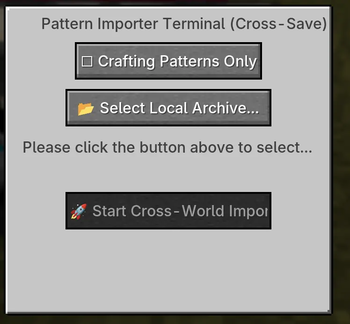
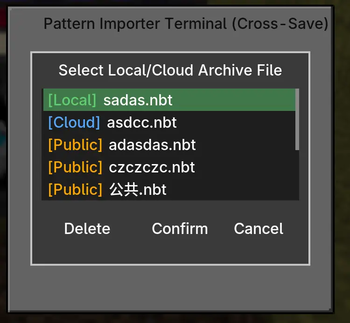
- Pattern Importer: Reads an archive file from your computer or the server, and physically loads the patterns into an adjacent Routing Hub.
- Pattern Routing Hub: A massive virtual pattern storage terminal. You can group patterns, rename routes, fix broken recipes, and execute the distribution of Crafting Patterns to your network from here.
- Pattern Addresser: A portable logistics tool for Processing Patterns. Shift+right-click the Hub to bind it. Right-click a Pattern Provider to scan the provider array and register them. Hold the tool and press
Vto distribute processing patterns into them.
⚙️ Basic Workflow
- Place a Pattern Exporter to save your current AE2 patterns into a local or server archive.
- In your new base, place a Pattern Routing Hub and a Pattern Importer. Use the Importer to load your saved archive.
- Open the Routing Hub to review and arrange your patterns into groups. If some machines are mismatched due to changing modpacks, click to fix them using JEI.
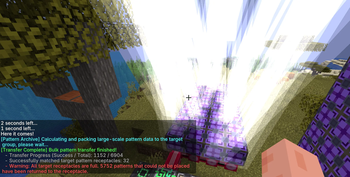
- To distribute Crafting Patterns: Open the Pattern Routing Hub GUI and click the "Execute/Start" button in the top right corner. You will be prompted to manually filter and select the specific patterns you want to transfer (or simply click "Select All"). The system features an anti-duplication check: during the transfer, it will actively scan your network and deliberately skip any crafting patterns that already exist in your Pattern Providers, preventing wasteful duplicates!
- To distribute Processing Patterns: Bind a Pattern Addresser to the Hub (Shift + Right-click), then right-click the Pattern Providers adjacent to your target physical machines (like crushers or inscribers) to scan and record the provider array. While holding the Addresser, press
V(default) to automatically distribute the matching processing patterns into them.
📦 Dependencies & Compatibility
- Requires Minecraft 1.20.1, Forge 47.4.16+, and Applied Energistics 2.
- JEI is highly recommended for unlocking the recipe fixing features.
- Jade is supported for quickly viewing equipment online status.
- Broadly compatible with most AE2 add-on pattern providers (e.g., Advanced AE).
📜 License
All Rights Reserved (ARR) © 2026 Sakurain. All Rights Reserved.
- Players & Modpack Creators: You are entirely free to download, play, and include this mod in any publicly distributed (free) modpacks without the need to ask for permission.
- Developers & Reposters: This is a closed-source project. Under the "All Rights Reserved" license, you may not edit, decompile, extract assets/code for your own projects, commercially sell this mod, or claim it as your own work without explicit written permission.
🇨🇳 中文介绍
📖 这是什么模组?
AE2 样板存档是一个专为 Applied Energistics 2 (AE2) 设计的极具实用性的附属模组。每次开新存档或加入新服务器时,都要重新手搓成百上千个样板,是不是非常折磨?本模组允许你将 AE2 样板库轻松导出为文件,并在任何地方随时导入。
自己写了一次样板,就再也不用写第二次。你可以跨存档、跨整合包、跨服务器无缝迁移你的自动化样板数据。你甚至可以直接导入朋友分享给你的样板存档,把他们的劳动成果拿来给自己扩展工厂。
除了搬运数据,它本身就是一个完善的样板物流模组。你可以将导入的样板集中存放在调配中枢里进行管理、设置自定义分组,并快捷地将它们精准传输到工厂各个角落指定的样板供应器中。
✨ 核心功能
- 跨存档样板共享:将网络中的所有样板(支持合成样板与处理样板)扫描并导出为
.nbt格式文件。你可以将它存在本地电脑,上传到服务器的个人云端,或者由管理员设为全服公开档案供所有人使用。 - 样板物流与管理:样板调配中枢是管理样板的“大脑”。你可以在里面对多达数千个样板进行条件过滤、查阅,并根据不同的机器建立自定义的物流分发分组。
- 化繁为简的智能派发:系统根据样板类型提供区分化派发。合成样板可通过调配中枢 GUI 右上角的执行按钮实现全网一键下发;对于 处理样板,使用样板寻址仪绑定后按下
V键,即可根据过滤规则精准且自动地下发到对应的物理机器旁。 - 跨整合包配方修正:如果换了整合包导致原有的目标机器方块发生了变化,你可以在界面中结合 JEI 直接无损修复和重定向失效的处理样板,而不需要重新手敲。
- 白名单安全机制:你可以将小伙伴的玩家名称添加到白名单中,只有获得授权的人才能操作你的样板调配中枢,安全方便地与好友共享资源。
🧱 方块与物品介绍
- 样板导出器:接入 AE2 网络,一键扫描并将网络内所有的样板打包导出为存档文件。
- 样板导入器:读取本地或服务端的存档文件,将其中的样板数据导入到相邻的调配中枢里。
- 样板调配中枢:大容量的虚拟样板存储终端。在这里可以对成百上千个样板进行分组、修复、过滤,以及执行全局的合成样板派发操作。
- 样板寻址仪:用于处理样板的手持物流工具。潜行右键绑定调配中枢,普通右键样板供应器自动向外扩散扫描并记录设备。拿在手上按
V键即可快捷派发处理样板。
⚙️ 基础使用流程
- 放置样板导出器,把你当前家里的样板库导出为本地或服务器存档。
- 在新基地放置样板调配中枢与样板导入器,通过导入器将你的存档加载进中枢。
- 打开中枢 GUI,整理、对样板进行分组。如果遇到因为换了整合包导致目标机器不匹配的死样板,点击它即可借助 JEI 进行快速修复。
- 传输合成样板:打开样板调配中枢 GUI,点击右上角的“执行/开始”按钮进入过滤界面。你需要手动勾选筛选出本次想要下发的样板分类(也可以直接点击“全选”下发全部)。在此过程中系统会进行智能查重——它会预先检测 AE 网络,如果发现你要传输的某个合成样板已经存在于家里的供应器中,就会自动跳过以防止重复传输浪费空间!
- 传输处理样板:手持样板寻址仪潜行右键中枢进行绑定,再去右键目标机器(如粉碎机、压印器等)相邻的样板供应器扫描并记录阵列。随后把寻址仪拿在手上按
V键(默认快捷键),系统匹配成功后就会将对应的处理样板全自动发送进去。
📦 依赖与兼容性
- 需求:Minecraft 1.20.1,Forge 47.4.16+,Applied Energistics 2。
- 强烈建议安装 JEI,以获得完整的配方重定向与修复功能。
- 支持 Jade,可直接显示设备的网络在线状态。
- 通过底层提取适配器,兼容绝大多数 AE2 附属模组(如 Advanced AE)的样板供应器。
📜 版权声明
保留所有权利 (ARR) © 2026 Sakurain。保留所有权利。
- 对于玩家与整合包作者:完全允许并热烈欢迎各位下载游玩,同时允许将其加入到任何免费公开的整合包中,无需额外申请授权。
- 对于开发者与搬运者:本模组为闭源项目。未经作者书面明确授权,严禁反编译并剥离代码/美术资源挪作他用,严禁对模组本体进行收费倒卖,严禁抹除原作者署名并声称为自己的作品。
- Edition: Minecraft Java
- File type: .jar
- Minecraft version listed: 1.20.1
- How to install: Install the matching mod loader (Forge, Fabric or NeoForge) for your Minecraft version. → Download the .jar. → Put it in the .minecraft/mods folder and launch that loader profile.
- Where to get it: Opens on Modrinth — not every file is mirrored on our own servers.
Install steps are the general flow for this file type — How to install Minecraft Java mods & modpacks walks through it step by step.
- Ships as pattern_archive-1.0.10-Forge-1.20.1.jar — drop this file into the mods folder
- Download size: 490 KB
- Download link checked 10 Oct 2026 — working
These come from our own check of the pack file, not from the source page.