
ArmorSkin
ArmorSkin is a lightweight, client-side Fabric mod that completely overhauls the vanilla armor status bar, making it dynamic, accurate, and visually stunning. Instead of staring at generic iron chestplate icons regardless of what you're actually wearing, this mod seamlessly updates your HUD to reflect your exact physical armor loadout in real-time.
✨ Key Features
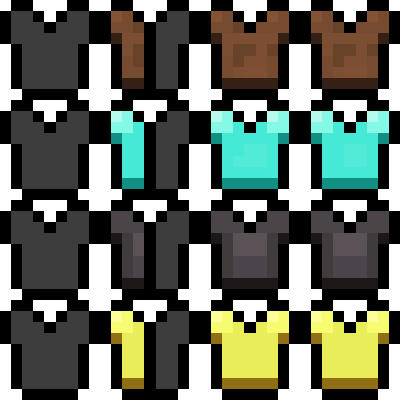
- Dynamic Material Icons: Your armor bar will now physically match the materials you are wearing. Whether you are geared up in Netherite, Diamond, Gold, Copper, Turtle Shells, or Chainmail, the HUD will instantly display custom icons for each material.
- Intelligent Mixed Sets: Mixing and matching different armor sets? ArmorSkin effortlessly handles complex loadouts by generating custom "half-and-half" split icons. If you wear an Iron Helmet alongside Gold Boots, the mod precisely calculates the defense points and renders split icons to show exactly what is keeping you alive.
- Precise Enchantment Glint: Built to leverage the modern Minecraft rendering pipeline, the mod brings the vanilla enchanted glint directly to your HUD. But it doesn't just slap a glowing texture everywhere—the glint is material-specific! If you have an enchanted Gold Helmet but a normal Leather Chestplate, only the Gold icons (or the Gold halves of a mixed icon) will glow.
- Elytra & Configuration Support: Fully supports visual Elytra indicators and integrates flawlessly with Mod Menu, allowing you to tweak settings or even force a static armor skin if you prefer a consistent look.
Bring your HUD to life and always know exactly what armor you're wearing at a glance!
License: ArmorSkin is free and open source under the GNU GPL v3.0 (or later). Forks and modified versions must remain open source under the same license and must credit the original author. Source: https://github.com/IzzyDotExe/ArmorSkin
- Edition: Minecraft Java
- File type: .jar
- Minecraft version listed: 26.2
- How to install: Install the matching mod loader (Forge, Fabric or NeoForge) for your Minecraft version. → Download the .jar. → Put it in the .minecraft/mods folder and launch that loader profile.
- Where to get it: Opens on Modrinth — not every file is mirrored on our own servers.
Install steps are the general flow for this file type — How to install Minecraft Java mods & modpacks walks through it step by step.
- Ships as armorskin-1.1.jar — drop this file into the mods folder
- Download size: 52 KB
- Download link checked 30 Aug 2026 — working
These come from our own check of the pack file, not from the source page.