HomeJavaModsHumility - Another Furniture Mod
Humility - Another Furniture Mod
ModsJava

Humility - Another Furniture Mod

by Miki-Liki · on Modrinth

⬇ Download on Modrinth
Humility - Another Furniture Mod — screenshot 1Humility - Another Furniture Mod — screenshot 2Humility - Another Furniture Mod — screenshot 3Humility - Another Furniture Mod — screenshot 4Humility - Another Furniture Mod — screenshot 5Humility - Another Furniture Mod — screenshot 6Humility - Another Furniture Mod — screenshot 7Humility - Another Furniture Mod — screenshot 8

HumilityAFM

Humility - Another Furniture Mod


Description

This is a simple and small mod that adds some simple decorative blocks such as cabinets (which are fancier types of item frames) as well as some vanilla block variations.
It specialises in procedurally generating variants of the same block so that you can always find the look you were searching for.

Download

The only official downloads are from Modrinth and GitHub
I can't ensure any other downloads are safe and don't include viruses
PLS download the mod from Modrinth if you can


Features:

Almost fully resourcepack compatible!

HumilityAFM uses mostly the existing vanilla textures,
So most resourcepacks should work with it out of the box!
There are some included resourcepacks that improve the compatibility even more :)

Cabinets

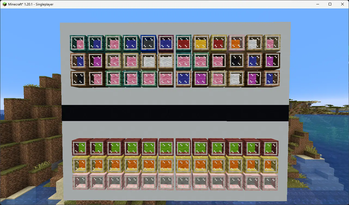
Make your treasures pop!
Match the wood to your build and wool interior to your item!
Cabinet Block Image
Need something brighter? Illuminated Cabinet comes for rescue!

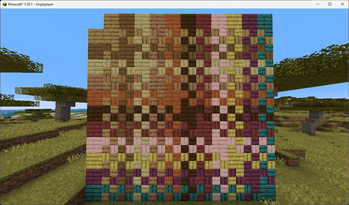
Wooden Mosaics!

Mix 2 different wood types to find your look!
Wooden Mosaic Image

Terracotta Tiles!

It’s like wooden mosaic but flatter.
Terracotta Tiles Image

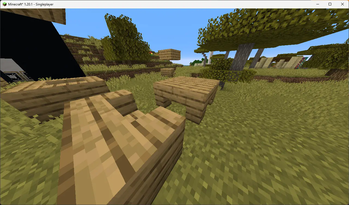
Forced Corner Stairs variants

Make the vanillest armchairs, sofas, tables and more!
Forced Corner Stairs Image

Light Strips (need to be enabled in the config)

Lighten up your builds with unobtrusive light source
LED Image
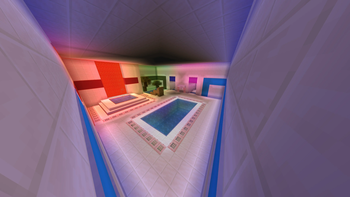
LEDs also support Bliss shader and Shimmer's mod coloured lights!
LED coloured light Image

Soul and Redstone Jack o'Lanterns! (With Shimmer support!)

Soul and Redstone Pumpkins

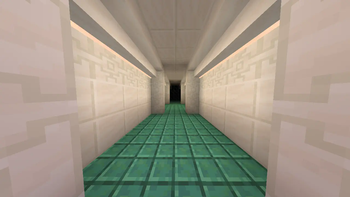
Candlesticks! (need to be enabled in the config)

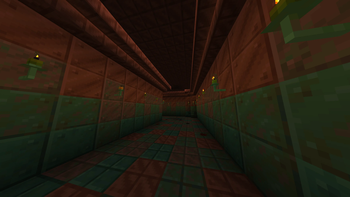
Candlesticks in a tunnel

High config customizability


Roadmap:

High priority:

Medium priority:

Low/unknown priority:


FAQ:

Q: Can you update/port the mod to MC x.x.x?
A: Depends, I'm interested in supporting multiple MC versions, but can't support all of them.
If you want support for specific MC version pls create an issue on GitHub

Q: Can you port to mod to forge?
A: I wanted this to be a forge mod, but I just couldn't get even the empty forge template to work and I gave up.
I'm not planing on porting the mod myself, but if you are interested in porting it yourself, you can, pls let me know of such projects on GitHub :)
You can also use the mod Kilt to run forge mods on fabric

Q: Why don’t I see Light Strips / Coloured Torches / Coloured Jack o'Lanterns in my game?
A: You need to enable coloured feature set in the config and restart the game. The coloured torches are in beta, and I don't want to separate any of them from each other

Q: Why don’t my Light Strips / Coloured Torches / Coloured Jack o'Lanterns emit coloured light?
A: For coloured lighting you need a separate compatible mod or shader. For now this includes Bliss shader and Shimmer mod
If the light sources still don't emmit coloured light:
When using Shimmer mod, there is probably some mod incompatibility. Try disabling the 'NVIDIUM' mod if present and it should start working again, if 'NVIDIUM' is not the cause try asking in Shimmer DC server for help
When using Bliss shader, make sure to load it via Iris or Oculus and not using Optifine! Then make sure floodfill option is enabled in the shader settings

Q: Why is the inside of Cabinets transparent?
A: Sodium <0.6.0 has issues with rendering transparency. You can try replacing it with Embeddium or installing other mods, like NVIDIUM, may help fix the problem. If that doesn't help, you can disable partial Cabinet transparency in the configuration (you will still be able to see the items inside)

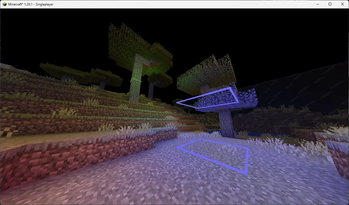
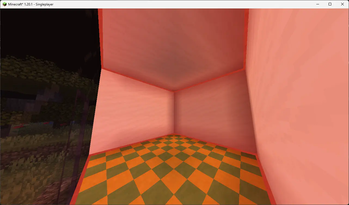
Q Why do the edges become transparent when I look at a Cabinet?
A: I have no idea... probably another transparency issue :/


Versioning:

{major}.{minor}.{patch}.{mc_version_specific_patch}

Note that features marked as beta may change or be removed even in minor updates, breaking their backward compatibility


Building instructions:

  1. Download the source code from GitHub
  2. Download the advzip utility, you can find it here under AdvanceCOMP package and move the advzip.exe executable to the main project folder
  3. Download the dependent mods for datagen and put them under ./build/datagen/mods/
  4. Run the pbr_redistributor.py scripts using the command python pbr_redistributor.py
  5. Run command ./gradlew runDatagen or gradlew runDatagen in the terminal
    • When the command fails, enable datagenMode in the config file under ./build/datagen/config/humility-afm.json
  6. Move the content (the inside of the folder) of src/main/generated/data/humility-afm/recipie(s)/datapack to src/main/resources/resourcepacks/alternate_wooden_mosaics_recipes/data/humility-afm/recipie(s)/
  7. Move the content (the inside of the folder) of src/main/generated/data/humility-afm/advancement(s)/recipes/misc/datapack to src/main/resources/resourcepacks/alternate_wooden_mosaics_recipes/data/humility-afm/advancement(s)/recipes/misc/
  8. Run command ./gradlew build or gradlew build in the terminal
  9. The compiled mod jar should be located in ./build/libs/ folder


💖 Like the mod? Check out my other work!

Modrinth GitHub Ko-fi

Quick facts

Install steps are the general flow for this file type — How to install Minecraft Java mods & modpacks walks through it step by step.

Verified by MCModsHub

These come from our own check of the pack file, not from the source page.

Explore more