
Slice - Radial hotbar
Java mod listed for Minecraft 26.x. Downloads from the MC Java Mods app on Android.
⬇ Download on Modrinth





Features
- Flexible layout control with adjustable radius, item size, and rotation angles
- Visibility options for slots, numbers, and sprites
- Multiple interaction modes (toggle menu or click-to-select item)
- Configurable inner and outer deadzones
- Hotbar scrolling toggle
- Custom texture pack support
Screenshots
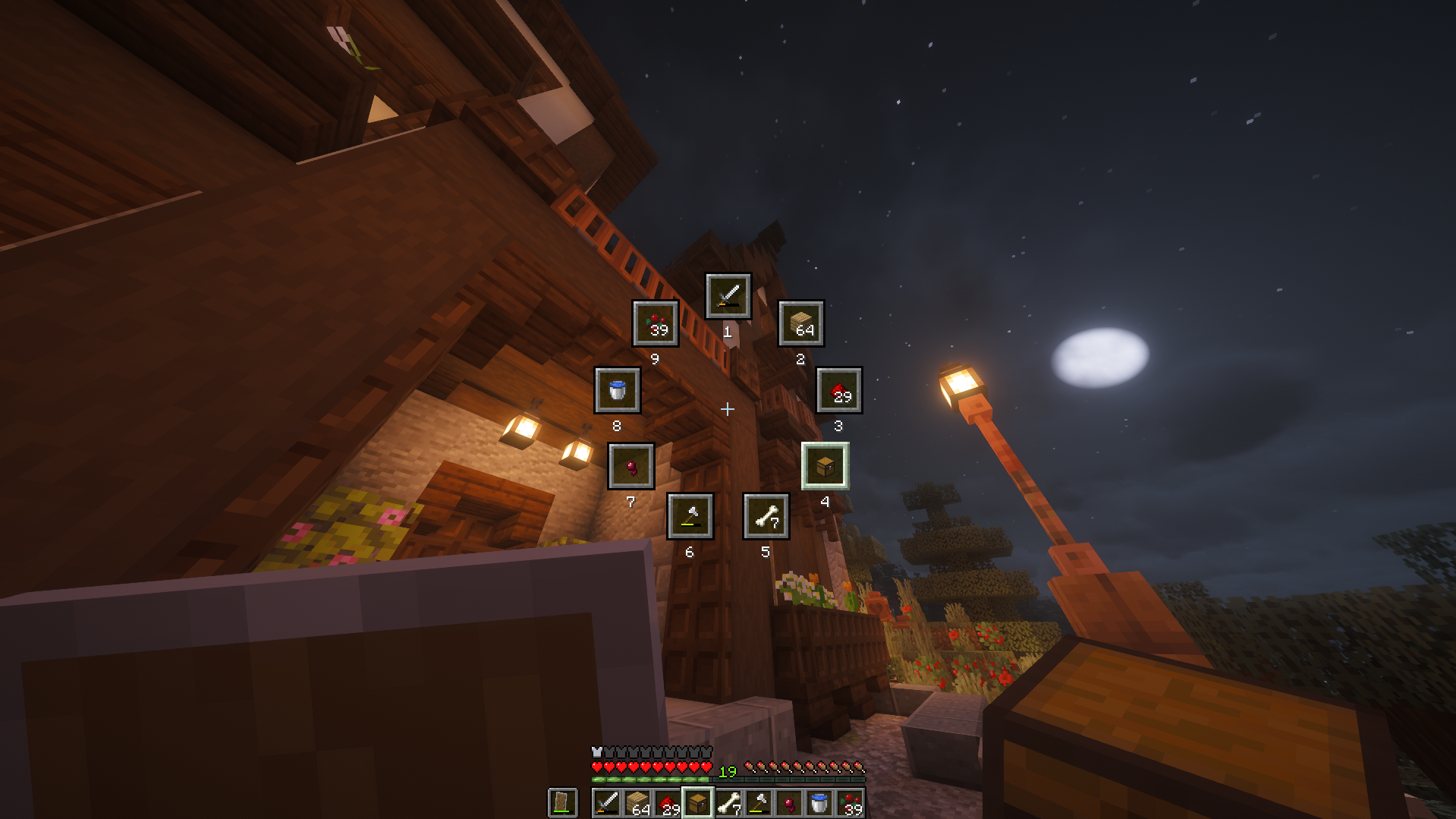 Click to watch the trailer/demo
Supported Versions
✅ - Supported, ❌ - Unsupported, 🔍 - Planned / In development
| Version | Loaders | Minimum required version | Latest Slice version | |
|---|---|---|---|---|
| 26.1.2 | ✅ |


|
26.1.2.0-beta, 64.0.0, 0.18.4 |
1.0.2 |
| 26.1.1 | ✅ |
|
26.1.1.0-beta, 63.0.1, 0.18.4 |
1.0.2 |
| 26.1 | ✅ |
|
26.1.0.1-beta, 0.18.4 |
1.0.1 |
| 1.21.11 | ✅ |

|
21.11.0, 61.0.0, 0.18.0, 0.30.0-beta |
1.0.0 |
| 1.21.10 | ✅ |
|
21.10.0, 60.0.0, 0.18.0, 0.30.0-beta |
1.0.0 |
| 1.21.9 | ✅ |
|
21.9.0, 59.0.0, 0.17.0, 0.30.0-beta |
1.0.0 |
| 1.21.8 | ❌ | |||
| 1.21.7 | ❌ | |||
| 1.21.6 | ❌ | |||
| 1.21.5 | ❌ | |||
| 1.21.4 | ❌ | |||
| 1.21.3 | ❌ | |||
| 1.21.2 | ❌ | |||
| 1.21.1 | ✅ |
|
21.1.1, 52.1.0, 0.17.0, 0.27.0 |
1.0.0 |
| 1.21 | ❌ | |||
| 1.20.2 | ❌ | |||
| 1.20.1 | ❌ | |||
| 1.20 | ❌ | |||
| 1.19.4 | ❌ | |||
| 1.19.3 | ❌ | |||
| 1.19.2 | ❌ | |||
| 1.19.1 | ❌ | |||
| 1.19 | ❌ | |||
| 1.18.2 | ❌ | |||
| 1.18.1 | ❌ | |||
| 1.18 | ❌ | |||
| 1.17.1 | ❌ | |||
| 1.17 | ❌ | |||
| 1.16.5 | ❌ | |||
| 1.16.4 | ❌ | |||
| 1.16.3 | ❌ | |||
| 1.16.2 | ❌ | |||
| 1.16.1 | ❌ | |||
| 1.16 | ❌ | |||
| 1.15.2 | ❌ | |||
| 1.15.1 | ❌ | |||
| 1.15 | ❌ | |||
| 1.14.4 | ❌ | |||
| 1.14.3 | ❌ | |||
| 1.14.2 | ❌ | |||
| 1.14.1 | ❌ | |||
| 1.14 | ❌ | |||
| 1.13.2 | ❌ | |||
| 1.13.1 | ❌ | |||
| 1.13 | ❌ | |||
| 1.12.2 | ❌ | |||
| 1.12 | ❌ | |||
| 1.11.2 | ❌ | |||
| 1.11 | ❌ | |||
| 1.10.2 | ❌ | |||
| 1.10 | ❌ | |||
| 1.9.4 | ❌ | |||
| 1.9 | ❌ | |||
| 1.8.9 | ✅ | |
11.15.1.2318 |
0.2.0 |
| 1.8 | ❌ | |||
| 1.7.10 | ❌ |
Dependencies
NeoForge
None
Forge
None
Fabric
| Minecraft version | Minimum FabricAPI version |
|---|---|
| 26.1.2 | 0.145.4+26.1.2 |
| 26.1.1 | 0.144.0+26.1 |
| 26.1 | 0.144.0+26.1 |
| 1.21.11 | 0.139.4+1.21.11 |
| 1.21.10 | 0.134.1+1.21.10 |
| 1.21.9 | 0.133.14+1.21.9 |
| 1.21.1 | 0.102.0+1.21.1 |
Quilt
| Minecraft version | Minimum FabricAPI version |
|---|---|
| 1.21.11 | 0.139.4+1.21.11 |
| 1.21.10 | 0.134.1+1.21.10 |
| 1.21.9 | 0.133.14+1.21.9 |
| 1.21.1 | 0.102.0+1.21.1 |
How to customize/configure
 Neoforge
NeoForge offers an in-game config menu.
Main Menu > Mods > *Select Slice* > Config
 Forge
Forge
I cannot be bothered to implement a config screen for Forge. Please just edit the config file yourself.
 Modrinth
Profile > (⋮) button > Open folder > (Explorer) config > (Explorer) slice-common.toml
 Stock launcher
(File Explorer) %appdata% > .minecraft > config > slice-common.toml
Save the file and use /slice reloadClient to reload the config file.
 Fabric
Download Mod Menu and use their config menu instead.
Main Menu > Mods > *Select Slice* > -Config button next to the name-
 Quilt
Quilt
Download Mod Menu and use their config menu instead.
Main Menu > Mods > *Select Slice* > -Config button next to the name-
Feedback
Feel free to send feedback on the issues page. Feature requests and bug reports are always welcome! Stars too :)
Credits- Polyfrost Staff (Listing my mod inside their client)
- Fancy badges (Readme badges)
- Devin's badges (Readme badges)
- jaredlll08 (Multiloader template)
- JannisX11 (Blockbench)
- Ewan Howell (Minecraft title generator)
- Aseprite

- Edition: Minecraft Java
- File type: .jar
- Minecraft version listed: 26.1.2
- How to install: Install the matching mod loader (Forge, Fabric or NeoForge) for your Minecraft version. → Download the .jar. → Put it in the .minecraft/mods folder and launch that loader profile.
- Where to get it: Opens on Modrinth — not every file is mirrored on our own servers.
Install steps are the general flow for this file type — How to install Minecraft Java mods & modpacks walks through it step by step.
- Ships as Slice-forge-26.1.2-1.0.2.jar — drop this file into the mods folder
- Download size: 184 KB
- Download link checked 31 Oct 2026 — working
These come from our own check of the pack file, not from the source page.