


TeaBridge

TeaBridge is another Fabric/Quilt mod that bridges your Discord and Minecraft chat together. Originally made only for the devOS Seasons server to fix some issues we've had with other chat bridge mods, this mod is now available to all.
Features
- Send and view messages between Discord and Minecraft
- Server Crash detection [uploads to mclo.gs]
- Markdown support [provided by Placeholder API]
- Shows roles of a Discord member if you hover over their Discord name in Minecraft chat
- Shows in Minecraft chat if a message sent in Discord chat was an attachment
- Mention filtering [good luck pinging
@everyone/@herein Minecraft chat] - Death and Advencement messages
[screenshots in Gallery]
Discord Permissions Required
- View Channel
- Send Messages
- Read Message History
Config
{
  "discord": {
    "token": "",
    "webhook": ""
  },
  "game": {
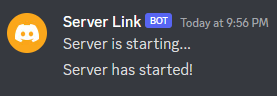
    "serverStartingMessage": "Server is starting...",
    "serverStartMessage": "Server has started!",
    "serverStopMessage": "Server has stopped!",
    "serverCrashMessage": "Server has crashed!",
    "mirrorDeath": true,
    "mirrorAdvancements": true
  },
  "crashes": {
    "uploadToMclogs": true
  }
}
Development
TeaBridge is on devOS' Maven
maven { url = "https://mvn.devos.one/snapshots/" }
modImplementation("one.devos.nautical:TeaBridge:<version>")
Quick facts
- Edition: Minecraft Java
- File type: .jar
- Minecraft version listed: 1.21.1
- How to install: Install the matching mod loader (Forge, Fabric or NeoForge) for your Minecraft version. → Download the .jar. → Put it in the .minecraft/mods folder and launch that loader profile.
- Where to get it: Opens on Modrinth — not every file is mirrored on our own servers.
Install steps are the general flow for this file type — How to install Minecraft Java mods & modpacks walks through it step by step.
Verified by MCModsHub
- Ships as teabridge-1.4.1-mc1.21.1.jar — drop this file into the mods folder
- Download size: 8.0 MB
- Download link checked 20 Sept 2026 — working
These come from our own check of the pack file, not from the source page.