
ModsJava
Mine Mine no Mi: Role Assigner
Automatically synchronize in-game stats like race, faction, fighting style etc. with a matching role in Discord. A must-have for server owners.
⬇ Download on Modrinth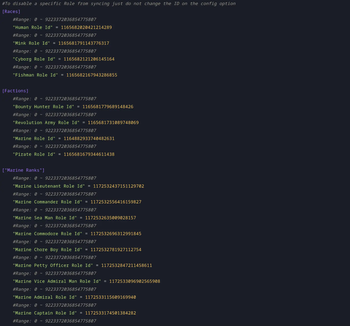
Discord Role Assigner
This Mine Mine no Mi Addon uses Discord Integration to synchronize the in-game stats with Discord as a Role.
It synchronizes:
- Faction
- Race
- Fighting Style
- Marine Rank
- Revolutionary Rank
- Mink Subrace
Compile it yourself
git clone https://github.com/rathmerdominik/mmnm-role-assigner
cd mmnm-role-assigner
./gradlew build
cd build/libs
You can now just take the jar file out of this directory and place it under the mods/ folder on your server.
This mod requires Discord Integration 3.0.5 to be installed and setup on your server!
Config Options
#To disable a specific Role from syncing just do not change the ID on the config option
[Races]
    #Range: 0 ~ 9223372036854775807
    "Human Role Id" = 0
    #Range: 0 ~ 9223372036854775807
    "Mink Role Id" = 0
    #Range: 0 ~ 9223372036854775807
    "Cyborg Role Id" = 0
    #Range: 0 ~ 9223372036854775807
    "Fishman Role Id" = 0

[Mink Sub Races]
    #Range: 0 ~ 9223372036854775807
    "Bunny Role Id" = 0
    #Range: 0 ~ 9223372036854775807
    "Dog Role Id" = 0
    #Range: 0 ~ 9223372036854775807
    "Lion Role Id" = 0

[Factions]
    #Range: 0 ~ 9223372036854775807
    "Bounty Hunter Role Id" = 0
    #Range: 0 ~ 9223372036854775807
    "Revolution Army Role Id" = 0
    #Range: 0 ~ 9223372036854775807
    "Marine Role Id" = 0
    #Range: 0 ~ 9223372036854775807
    "Pirate Role Id" = 0

["Marine Ranks"]
    #Range: 0 ~ 9223372036854775807
    "Marine Lieutenant Role Id" = 0
    #Range: 0 ~ 9223372036854775807
    "Marine Commander Role Id" = 0
    #Range: 0 ~ 9223372036854775807
    "Marine Sea Man Role Id" = 0
    #Range: 0 ~ 9223372036854775807
    "Marine Commodore Role Id" = 0
    #Range: 0 ~ 9223372036854775807
    "Marine Chore Boy Role Id" = 0
    #Range: 0 ~ 9223372036854775807
    "Marine Petty Officer Role Id" = 0
    #Range: 0 ~ 9223372036854775807
    "Marine Vice Admiral Man Role Id" = 0
    #Range: 0 ~ 9223372036854775807
    "Marine Admiral Role Id" = 0
    #Range: 0 ~ 9223372036854775807
    "Marine Captain Role Id" = 0
    #Range: 0 ~ 9223372036854775807
    "Marine Fleet Admiral Role Id" = 0

["Revolutionary Ranks"]
    #Range: 0 ~ 9223372036854775807
    "Revolutionary Army Officer Role Id" = 0
    #Range: 0 ~ 9223372036854775807
    "Revolutionary Army Supreme Commander Role Id" = 0
    #Range: 0 ~ 9223372036854775807
    "Revolutionary Army Member Role Id" = 0
    #Range: 0 ~ 9223372036854775807
    "Revolutionary Army Commander Role Id" = 0
    #Range: 0 ~ 9223372036854775807
    "Revolutionary Army Chief of Staff Role Id" = 0

["Fighting Styles"]
    #Range: 0 ~ 9223372036854775807
    "Art of Weather Role Id" = 0
    #Range: 0 ~ 9223372036854775807
    "Brawler Role Id" = 0
    #Range: 0 ~ 9223372036854775807
    "Sniper Role Id" = 0
    #Range: 0 ~ 9223372036854775807
    "Black Leg Role Id" = 0
    #Range: 0 ~ 9223372036854775807
    "Doctor Role Id" = 0
    #Range: 0 ~ 9223372036854775807
    "Swords Man Role Id" = 0
Quick facts
- Edition: Minecraft Java
- File type: .jar
- Minecraft version listed: 1.16.5
- How to install: Install the matching mod loader (Forge, Fabric or NeoForge) for your Minecraft version. → Download the .jar. → Put it in the .minecraft/mods folder and launch that loader profile.
- Where to get it: Opens on Modrinth — not every file is mirrored on our own servers.
Install steps are the general flow for this file type — How to install Minecraft Java mods & modpacks walks through it step by step.
Verified by MCModsHub
- Ships as mmnmroleassign-1.1.4.jar — drop this file into the mods folder
- Download size: 57 KB
- Download link checked 30 Aug 2026 — working
These come from our own check of the pack file, not from the source page.