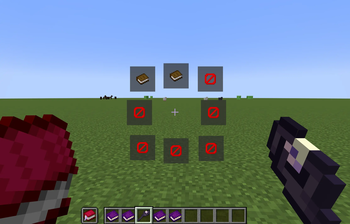




An addon for Hex Casting 1.20.1 that adds a wheel for Hex Casting's spellbook item.
Features:
- Open a spellbook wheel by pressing the backtick key (configurable in the keybinds menu).
- Quickly navigate through your spells by using number keys (1-9).
- Set icons for spellbook pages (right-clicking on a spell wheel button while holding an item will change it). (Since
1.1.0) - Cast with an artifact/trinket in hand right after changing the page by holding
Ctrland pressing on the spell wheel (quick navigation via number keys activate it too). (Since1.1.0) - Preview the iota stored in the spellbook page by hovering over the page's button in the wheel menu. (Since
1.1.0) - Fully client-side!
Requirements:
- Hex Casting (guh)
- Architectury API
Special Thanks To:
Quick facts
- Edition: Minecraft Java
- File type: .jar
- Minecraft version listed: 1.20.1
- How to install: Install the matching mod loader (Forge, Fabric or NeoForge) for your Minecraft version. → Download the .jar. → Put it in the .minecraft/mods folder and launch that loader profile.
- Where to get it: Opens on Modrinth — not every file is mirrored on our own servers.
Install steps are the general flow for this file type — How to install Minecraft Java mods & modpacks walks through it step by step.
Verified by MCModsHub
- Ships as hex-spellwheel-fabric-1.1.1.jar — drop this file into the mods folder
- Download size: 38 KB
- Download link checked 30 Aug 2026 — working
These come from our own check of the pack file, not from the source page.