

WorldManager
Create and manage worlds in-game, through commands.
Commands
The main command is /worldmanager. It has a shorter alias /wm.
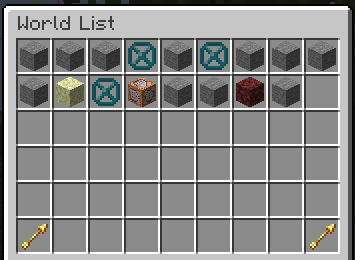
/wm listopens an overview gui of all custom worlds that have been created through this mod/wm delete <id>deletes the specified world, kicking all players that are currently in it/wm tp <id> [<targets>]teleports to the specified world to the players last location./wm seticon <id> [<icon>]sets the world icon to the specified item, or the item in your hand./wm manage [<id>]opens world management gui for the specified world, or the current world
Create
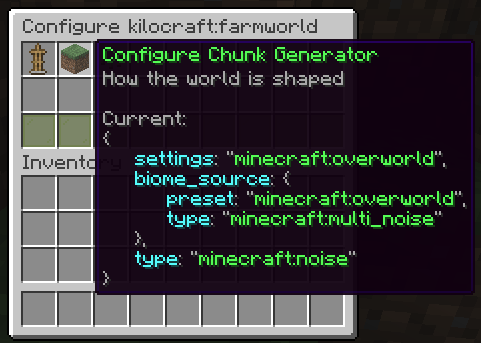
/wm create <id> opens a gui where you can configure your world (dimension type, chunk generator and seed)
/wm create <id> <nbt> allows you to create a world without using the gui (advanced). {seed: 0L, generator: {biome: "minecraft:the_void", type: "fantasy:void"}, type: "minecraft:overworld"} could be used to create a void world.
Import
/wm create <id> <file> allows you to import a world from a zip or rar archive, or from a folder.
Spawn
/wm setspawn sets the world spawn of the current world to your position.
/wm spawn <id> [<targets>] teleports to the specified world spawn. If the spawn point is not set, it uses the vanilla spawn point logic.
The file / folder needs to contain a valid level.dat file.
This will import the overworld dimension of the given world.

Powered by fantasy <3
- Edition: Minecraft Java
- File type: .jar
- Minecraft version listed: 26.2
- How to install: Install the matching mod loader (Forge, Fabric or NeoForge) for your Minecraft version. → Download the .jar. → Put it in the .minecraft/mods folder and launch that loader profile.
- Where to get it: Opens on Modrinth — not every file is mirrored on our own servers.
Install steps are the general flow for this file type — How to install Minecraft Java mods & modpacks walks through it step by step.
- Ships as worldmanager-1.5.1+26.2.jar — drop this file into the mods folder
- Download size: 1.6 MB
- Download link checked 30 Aug 2026 — working
These come from our own check of the pack file, not from the source page.