ModsJava
Achievement Style
I don't know my version or loader
Open the Minecraft launcher and look at the profile you play on — it names both, like fabric-loader-1.21.4. The version also shows in the bottom-right corner of the game's main menu.
No loader in the profile name? Then it's plain Minecraft, and these mods won't run — you need Fabric or NeoForge installed first.


Tired of Minecraft’s basic advancement notifications?
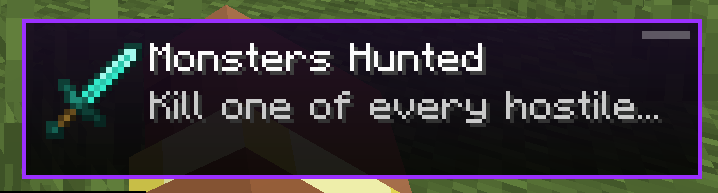
Achievement Style replaces them with a cleaner, more modern notification system.
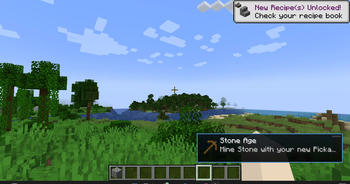
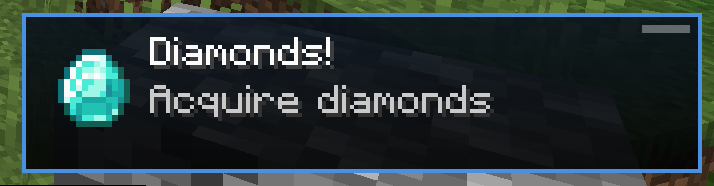
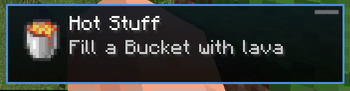
Advancements now appear as smooth, animated messages in the bottom-right corner of your screen, featuring the item icon and title for a more immersive experience.
✅ Features:
- ✔ Fully client-side – no need to install on servers
- ✔ Compatible with most mods that add custom advancements
- ✔ Lightweight and performance-friendly
- ✔ Highly customizable via Mod Menu
- ✔ Sound customizable via Mod Menu
- ✔ Multilingual support out of the box
🔧 Customization:
You can tweak:
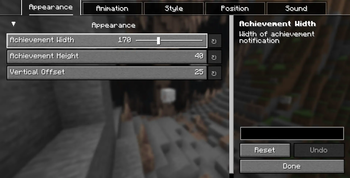
- Notification size (width, height)
- Animation speed & duration
- Vertical position & spacing
- Background color, border, and shine effect
- Sound
Configuration is available in-game via Mod Menu
🧩 Requires:
• Mod Menu
• YACL
🌐 Configuration Menu Supported Languages:
- English 🇬🇧
- Українська 🇺🇦
- Deutsch 🇩🇪
- Français 🇫🇷
- Español 🇪🇸
- Polski 🇵🇱
- 日本語 🇯🇵
📸 Screenshots:
🌄 In Game View
💎 Diamonds
✨ Rare Achievement
🛠️ Configuration
🏆 Create Achievement Examples:
🗜️ Bonk
🛞 Magma Wheel
Quick facts
- Edition: Minecraft Java
- File type: .jar
- Minecraft versions listed: 26.1, 26.1.1, 26.1.2
- How to install: Install the matching mod loader (Forge, Fabric or NeoForge) for your Minecraft version. → Download the .jar. → Put it in the .minecraft/mods folder and launch that loader profile.
- Where to get it: Opens on Modrinth — not every file is mirrored on our own servers.
Install steps are the general flow for this file type — How to install Minecraft Java mods & modpacks walks through it step by step.
Verified by MCModsHub
- Ships as achievementstyle-1.4.3.jar — drop this file into the mods folder
- Download size: 56 KB
- Download link checked 30 Aug 2026 — working
These come from our own check of the pack file, not from the source page.