
LEM Client Helper
Currently supports Minecraft 1.20.4.
LCH is a Fabric mod that enhances the experience on Legacy Edition Minigames servers, by default it does not affect Singleplayer or non-LEM servers.
This mod adds the following features and options customizable through Mod Menu:
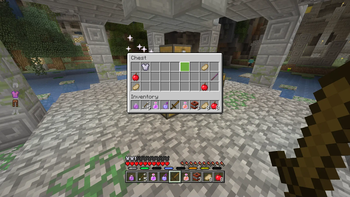
Take Everything
Take Everything allows you to take all items out of a chest with one button.
The default keybind is Spacebar, you can change it in Minecraft's Control settings
Resource Preloader
Resource Preloading allows you to download the resource packs in advance to allow for faster loading times in LEM servers.
Preloading is only accessable via the mod's config page, resources will not be preloaded automatically.
Preloading will automatically continue in the background if you would like to close the config menu and play.
The limit for how many packs can be cached is expanded to support the large amount of resource packs LEM utilizes(20 -> 30).
Options
Completed Notification: A notification will be displayed in-game once a pack has been preloaded.
Delete Packs: Deletes the resource pack cache.
Preview Pack List: Displays a list of all the packs that will be downloaded.
Start Download: Starts downloading the packs to preload them.
Local Server Config
This allows you to set some LEM server options on the client, ignoring what you have it set to on the server.
Setting these options to 0 will make them use the options you set on the server.
This is useful if you play on multiple devices, with different display sizes
Options
GUI Scale: Changes the GUI Scale the server expects for some UI elements, notably chest refill icon.
Panorama Scale: Changes the GUI Scale the server will use for the panorama renderer.
Armor HUD
LCH provides a more accurate Armor Bar than what is displayed without the mod.
Options
Enabled Armor HUD: The Armor Bar will be displayed if this is enabled.
Always Show Armor HUD: The Armor Bar will be visible outside of LEM servers when enabled.
Armor HUD Scale Modifier: Changes how large the Armor Bar will be, accepts values between
1.00-4.00.Armor HUD X Offset: Changes the distance of the Armor Bar from the edge of the screen.
Small Inv
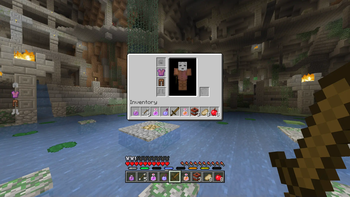
LCH provides a more accurate Small Inventory UI than what is displayed without the mod.
Options
- Enabled: The accurate Small Inventory will be used if this is enabled. If it is disabled it will use the vanilla UI.
- Edition: Minecraft Java
- File type: .jar
- Minecraft version listed: 1.20.4
- How to install: Install the matching mod loader (Forge, Fabric or NeoForge) for your Minecraft version. → Download the .jar. → Put it in the .minecraft/mods folder and launch that loader profile.
- Where to get it: Opens on Modrinth — not every file is mirrored on our own servers.
Install steps are the general flow for this file type — How to install Minecraft Java mods & modpacks walks through it step by step.
- Ships as lemclienthelper-0.0.28-1.20.4.jar — drop this file into the mods folder
- Download size: 247 KB
- Download link checked 20 Sept 2026 — working
These come from our own check of the pack file, not from the source page.