Enbeon's Custom Books
I don't know my version or loader

Enbeon's Custom Books
Yet another Minecraft mod that gives Enchanted Books unique textures based on the enchantments they have.
Compatible with Fabric and Quilt. Sorry if you run Forge or NeoForge!
This mod is compatible with 1.21.4+. I probably won't backport unless there's demand for it.
Preamble
This mod is the product of wanting a solution to component-controlled textures for Enchanted Books, when CIT is unavailable and Mojang's vanilla solution is infeasible.
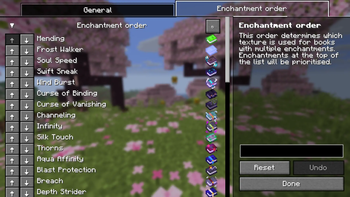
Enbeon's Custom Books uses a precedence-based system to decide which texture is used for books with multiple enchantments. I've provided what I feel is a sensible default order, with rarer enchantments taking priority over more common ones (for example, Mending has the highest priority, while Sharpness has the lowest). The order is also fully configurable in the mod config.
I took inspiration from Even Better Enchants for some of the textures in this mod.
Dependencies
Fabric API is required to run this mod.
Additionally, to access the in-game config screen, you will need:
Textures
See the gallery for all of the book textures.
The animation for the Mending book texture can be disabled in the in-game config.
Language support
As of v1.0.4, Enbeon's Custom Books supports:
- English
- Simplified Chinese (thanks moqyng!)
Mod compatibility
If you find this mod useful and want me to add modded enchantments to it, feel free to create an issue or pull request.
I'm also happy to accept pull requests to add support for new languages.
Special thanks
This project uses the Stonecutter build tool, which allows compiling a single codebase to multiple different game versions.
- Edition: Minecraft Java
- File type: .jar
- Minecraft versions listed: 26.1, 26.1.1, 26.1.2
- How to install: Install the matching mod loader (Forge, Fabric or NeoForge) for your Minecraft version. → Download the .jar. → Put it in the .minecraft/mods folder and launch that loader profile.
- Where to get it: Opens on Modrinth — not every file is mirrored on our own servers.
Install steps are the general flow for this file type — How to install Minecraft Java mods & modpacks walks through it step by step.
- Ships as enbeons_custom_books-1.0.4+26.1.jar — drop this file into the mods folder
- Download size: 96 KB
- Download link checked 30 Aug 2026 — working
These come from our own check of the pack file, not from the source page.