
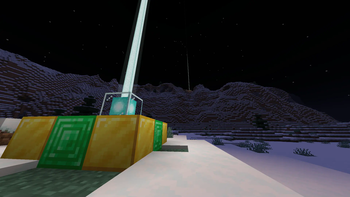
Beacons link this world to the firmament beyond. Go there, to the ends of eternity, and return changed.
Anshar explores the eternities to which the beacons point. By harnessing the infinite power of the nether star, we can store data - or even ourselves - in the fabric of the world itself.
An active beacon resonates with the cosmos on a frequency determined by the blocks making up its base. This expands its functionality in two ways:
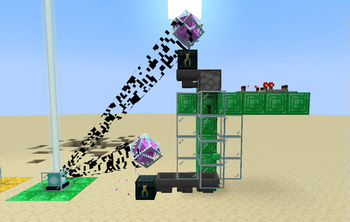
- Beacons can read and write items into space, sharing with all others on the same frequency. Connecting an ender chest to the beacon by placing it on the pyramid (or nearby with an end crystal above it) modifies the chest to act as an interface to this storage.
- Standing on a beacon will embed the player into space, allowing them to navigate connected beacons to obtain reentry. Tarry not long within eternity, or the distant sounds may draw near.
Storing items
Every Frequency has an inventory attached to it that has the same size and behavior as an Ender Chest. To access this inventory, do one of the following:
- Place an Ender Chest on the pyramid of the Beacon.
- Place an Ender Chest somewhere nearby the Beacon, then place End Crystal on top while sneaking. The crystal will automatically connect to the nearest beacon. Alternatively, you can manually link it by clicking the Beacon with End Crystal item while sneaking.
Frequency storage is accessible to both players and machines through attached ender chests.
Jumping between beacons
Once you step onto the beacon, you will be written into the sky. From there, you'll be shown other possible destinations. You may hop to a desired beacon by looking at its gate and holding forward. You can descend back into the world anytime by sneaking.
Art Credits
- Audio Production: Nulb
- Voice Acting & Mod Icon: Hiroyuki K.T.
This mod was created as a ModFest 1.20 submission
- Edition: Minecraft Java
- File type: .jar
- Minecraft version listed: 1.21.4
- How to install: Install the matching mod loader (Forge, Fabric or NeoForge) for your Minecraft version. → Download the .jar. → Put it in the .minecraft/mods folder and launch that loader profile.
- Where to get it: Opens on Modrinth — not every file is mirrored on our own servers.
Install steps are the general flow for this file type — How to install Minecraft Java mods & modpacks walks through it step by step.
- Ships as anshar-1.1.0.jar — drop this file into the mods folder
- Download size: 8.2 MB
- Download link checked 30 Aug 2026 — working
These come from our own check of the pack file, not from the source page.