
Minecraft Chat To ChatGPT
Disclaimer - Using the API is not free, Messaging consumes tokens, which cost money. For pricing details, visit OpenAI Pricing
Usage
To interact with ChatGPT, type commands prefixed with #.
Register
First, register your API key, which can be found at OpenAI API Key. Note: An account is required.
Example usage (ignore angle brakets):
#register <YOUR_API_KEY_HERE>
The mod will confirm key registration. If the key is invalid, chatting will fail.
Setting Parameters
The Default parameters are
- Model: gpt-3.5-turbo Available Models
- Max Tokens: 50 What are Tokens?
- Temperature: 1.0 (This controls the randomness 1.0 is fully random, 0.0 is fully deterministic)
To modify these parameters, use the #setapi command:
#setapi model ada // set the model
#setapi tokens 30 // set the max tokens to 30
#setapi temp 0.2 // set the temperature to 0.2
Chatting
To chat with ChatGPT, use the #chat command followed by the message you want to send:
#chat What is water?
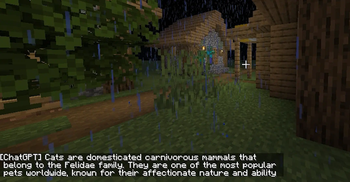
This will ask ChatGPT "What is water?" and the response will appear in the chat. Responses are visible only to the player.
Dependencies
This mod requires the FabricAPI to work
Resources
OpenAI API Documentation for more information.
- Edition: Minecraft Java
- File type: .jar
- Minecraft version listed: 1.19.3
- How to install: Install the matching mod loader (Forge, Fabric or NeoForge) for your Minecraft version. → Download the .jar. → Put it in the .minecraft/mods folder and launch that loader profile.
- Where to get it: Opens on Modrinth — not every file is mirrored on our own servers.
Install steps are the general flow for this file type — How to install Minecraft Java mods & modpacks walks through it step by step.
- Ships as chat-to-chatgpt-1.0.0.jar — drop this file into the mods folder
- Download size: 10.9 MB
- Download link checked 20 Sept 2026 — working
These come from our own check of the pack file, not from the source page.