Bedrock Books
Changes the book screen to look more like the one seen in Bedrock Edition, all while remaining 100% client side!
⬇ Download on Modrinth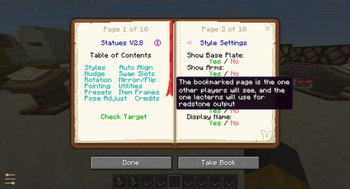

Bedrock Books
Bedrock Books is a mod that simply changes the book screen to look more like the one seen in Bedrock Edition, all while remaining 100% client side!
Note: this is not a fully 100% accurate port, some aspects have been slightly adapted and adjusted to better fit with how books work on Java Edition
Features
- Fully client side, will work on any server modded or vanilla
- Compatible with all pre-existing books
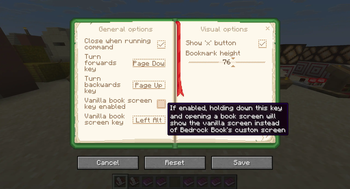
- Configurable, can change keybinds or toggle certain features to your liking
- Pages can be moved or deleted in the book writing screen just like Bedrock Edition
- Lectern screens have a 'bookmark' which indicates which page players without the mod will see, more info below
Compatibility
As mentioned above, this mod will not interfere with the way any pre-existing books look (aside from there being two pages visible instead of one of course). The area where text is displayed is exactly the same size as vanilla meaning the layout of pages will look the same with or without this mod.
This mod does not modify any save data or anything server-side, it is a purely visual change so you can safely use it on servers or uninstall it whenever you wish without losing any data.
If you need to access the vanilla book screens for whatever reason, you can enable a keybind from the config menu. With this enabled, opening a book while holding they keybind will display the vanilla book screen instead of Bedrock Book's custom screen.
Lecterns
Lectern screens will show a 'bookmark', this indicates the page that the server or other players see. This feature allows you to fine tune redstone power levels just like you can in vanilla Java Edition using lecterns. Additionally this makes sure vanilla players can read a book on a lectern properly, as otherwise they would effectively skip a page if a player with this mod turned to the next page.
Other loaders/versions?
I am planning to backport this mod to some popular modding versions, mainly 1.21.1 and 1.20.1 when I have time to do so. Forge will not be supported.
License
Bedrock Books by ioblackshaw (a.k.a. Enchanted_Games) is licensed under CC BY-NC 4.0


- Edition: Minecraft Java
- File type: .jar
- Minecraft version listed: 26.2
- How to install: Install the matching mod loader (Forge, Fabric or NeoForge) for your Minecraft version. → Download the .jar. → Put it in the .minecraft/mods folder and launch that loader profile.
- Where to get it: Opens on Modrinth — not every file is mirrored on our own servers.
Install steps are the general flow for this file type — How to install Minecraft Java mods & modpacks walks through it step by step.
- Ships as eg_bedrock_books-1.2.0+26.2-neoforge.jar — drop this file into the mods folder
- Download size: 221 KB
- Download link checked 30 Aug 2026 — working
These come from our own check of the pack file, not from the source page.