
Heirlooms
I don't know my version or loader
🏷️ This description may not reflect the version of the mod you’re using. If you have questions or need help, ask in the #support channel on my Discord server.







About
Heirlooms gives your crafted items a history, then lets you display them like keepsakes inside your world.
- Adds craft-date and creator-name tooltips to unstackable crafted & enchanted items
- Keeps the extra tooltip hidden until CTRL or ALT is held
- Works with crafted, smithing-table and enchanting-table items from other mods
- Adds Display Cases and Display Racks for showing off your favourite items in-world
New Tooltips
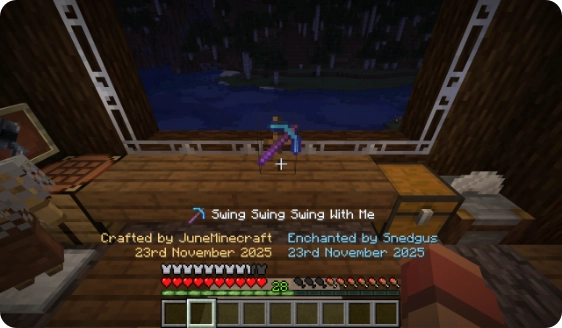
Your unstackable crafted items get a special tooltip showing:
- the date the item was crafted
- the name of the player who crafted it
New Blocks
Heirlooms adds two new blocks, which are perfect for holding your favourite items and elevating their symbolic importance:
- Display Case - showcase your items in a glass enclosure
- Display Rack - show your items on a wooden rack
Both blocks show information about the item, including the tooltip information the mod adds, when a player looks at the block in-world.
Tooltips
Any item that you craft which can't be stacked will receive an heirloom tooltip. Popular examples would include tools, weapons and armour.

Hidden by default
The tooltip information is only shown when holding down the CTRL or ALT keys while hovering over the item.

Supports modded items
As long as the item is made in a crafting table or a smithing table, or enchanted in an enchanting table, it should work, no matter the mod.
This example shows an item from Basic Weapons

Blocks
Heirlooms adds two blocks to show off your items with:
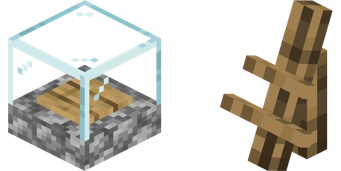
Display Case
The display case is a full-sized block and shows items on the wooden plate in the center.
- Perfect for blocks
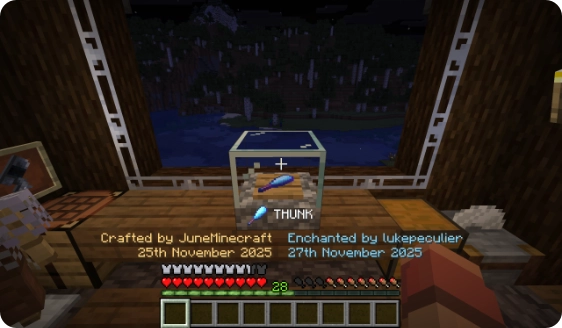
Display Rack
The display rack is a small block and shows items at an angle.
- Perfect for tools, weapons, armour
Rendering Differences
The display case and rack render some items differently to each other. If an item is a block with a custom item texture (e.g. sugar cane, torch, sign) the display case will show the block model, while the rack shows the gui sprite:

Frequently Asked Questions
Is there a (fabric/forge/neoforge/risugami's modloader) version?
Heirlooms exists on both Fabric and NeoForge. If you're running Quilt, use the Fabric jar.
Can you backport the mod to Minecraft 1.X.X?
Heirlooms will not be backported. The mod will however support new major versions of Minecraft.
I found a bug / my game crashed
If you find any problems with Heirlooms, please feel encouraged to create an issue on the GitHub repository issue tracker. Bug reports are incredibly useful and help this mod reach its full potential.
- Edition: Minecraft Java
- File type: .jar
- Minecraft versions listed: 26.1, 26.1.1, 26.1.2
- How to install: Install the matching mod loader (Forge, Fabric or NeoForge) for your Minecraft version. → Download the .jar. → Put it in the .minecraft/mods folder and launch that loader profile.
- Where to get it: Opens on Modrinth — not every file is mirrored on our own servers.
Install steps are the general flow for this file type — How to install Minecraft Java mods & modpacks walks through it step by step.
- Ships as heirlooms-neoforge-1.4.3+26.1.jar — drop this file into the mods folder
- Download size: 100 KB
- Download link checked 30 Aug 2026 — working
These come from our own check of the pack file, not from the source page.