HomeJavaModsFabricord
Fabricord
ModsJava

Fabricord

by RiriFa · on Modrinth

Which Minecraft do you have?

Every version of the game needs its own build. Pick yours, then download — the wrong build installs fine and then does nothing in the game. This mod is built for Fabric only.

⬇ Download for 1.20.3–1.21.4⬇ Download for 1.20.1
I don't know my version or loader
Open the Minecraft launcher and look at the profile you play on — it names both, like fabric-loader-1.21.4. The version also shows in the bottom-right corner of the game's main menu.
No loader in the profile name? Then it's plain Minecraft, and these mods won't run — you need Fabric or NeoForge installed first.
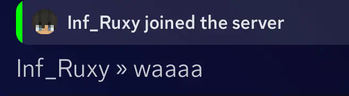
Fabricord — screenshot 1Fabricord — screenshot 2

🔹 Fabricord – The easiest way to bridge your Fabric server chat with Discord! 🔹

If you have any feature suggestions, feel free to reach out via Issues, PR, or Discord! For bug reports or improvements, submit feedback on GitHub!

⚠️ This project is NOT affiliated with the Fabricord mod on CurseForge.


🌟 What is Fabricord?

Fabricord is a Fabric-based alternative to DiscordSRV, designed to seamlessly bridge Minecraft server chat with Discord channels.

🔥 Why Use Fabricord?

Sync chats between your Fabric server and Discord effortlessly
Lightweight & Optimized – No unnecessary bloat, just what you need
Modern, visually appealing message style
Easy user mentions system – Supports role & user ID tagging
Death & achievement notifications to Discord


📥 Installation Guide

Setting up Fabricord is quick and easy:

  1. Install the mod on your Fabric server and start it once
    • A configuration file (config.yml) will be auto-generated
  2. Edit config.yml in server-root/fabricord
    • Enter your BotToken & LogChannelID
  3. Restart your server, and you're good to go! 🎉

💖 Support Fabricord!

If you enjoy using Fabricord, consider leaving a tip or following the project to support future updates! 🚀
Your support helps keep this mod alive and improving.


📜 License & Additional Info

Fabricord is available under the Apache License.
Check out our GitHub repository for source code & contributions.


📊 Project Stats

CodeFactor GitHub License Dynamic JSON Badge Dynamic JSON Badge Dynamic JSON Badge GitHub commit activity (branch)

Quick facts

Install steps are the general flow for this file type — How to install Minecraft Java mods & modpacks walks through it step by step.

Verified by MCModsHub

These come from our own check of the pack file, not from the source page.

Explore more