
Pebble's Crate
Weighted randomiser crate mod for Minecraft Fabric 1.19.2-1.20.1 Great for vote crates, premium crates and whatever else you want to use it for.
⬇ Download on Modrinth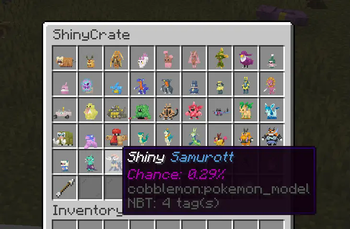

Pebble's Lootcrate
Pebble's Lootcrate mod for Fabric Minecraft version 1.19.2, 1.20.1 and 1.21.1

Make sure you have Fabric Language Kotlin installed!
If you would like to convert your configs from AdvancedCrates to Pebble's Crate, I have written a converter that will help speed up the process a little bit, it can be found here along with a crate config creator/editor (WIP): https://pebblescrate.sethi.tech/
Go to source:

Feel free to drop me a star on Github :)
Come try out the crates on one of the servers I manage :) IP: dynastymc.org
Permissions
For all admin commands, if you have LuckPerm installed, the following is required:
pebbles.admin.crate
Available Commands
/padmin crate Displays all available crate in the config and lets you grab a crate transformer/crate key
/padmin getcrate <name> Get a crate transformer
/padmin givekey <player> <amount> <cratename> Gives cratekey to a specific player
How to use?
After installing the mod, you may navigate to /config/pebbles-crate/crates or create the folders then create a file, for example example.json
You may use the follow example as reference for the structure:
{
"crateName": "Vanilla Items Crate",
"screenName": "&6Vanilla Items Crate",
"crateKey": {
"material": "minecraft:tripwire_hook",
"name": "&#FFBF00Vanilla Key",
"lore": [
"&#FFDC73• Opens a Vanilla Items Crate"
]
},
"prize": [
{
"name": "?BC5DDiamond",
"material": "minecraft:diamond",
"amount": 1,
"nbt": "{species:\"cobblemon:bulbasaur\",aspects:[\"shiny\"]}",
"commands": [
"give {player_name} minecraft:diamond 1"
],
"broadcast": "&6{player_name} &fhas received {prize_name} &ffrom {crate_name}",
"messageToOpener": "&6[Pebble's Crates] &f&lYou got {prize_name} &f&lfrom Vanilla Items Crate",
"lore": [
"Chance of getting the drop: {chance}%"
],
"chance": 40
},
{
"name": "&rElytra",
"material": "minecraft:elytra",
"amount": 1,
"commands": [
"give {player_name} minecraft:elytra 1"
],
"broadcast": "&6{player_name} &fhas received {prize_name} &ffrom {crate_name}",
"messageToOpener": "&6[Pebble's Crates] &f&lYou got {prize_name} &f&lfrom Vanilla Items Crate",
"lore": [
"Chance of getting the drop: {chance}%"
],
"chance": 5
},
{
"name": "&rGolden Apple",
"material": "minecraft:golden_apple",
"amount": 1,
"commands": [
"give {player_name} minecraft:golden_apple 1"
],
"broadcast": "&6{player_name} &fhas received {prize_name} &ffrom {crate_name}",
"messageToOpener": "&6[Pebble's Crates] &f&lYou got {prize_name} &f&lfrom Vanilla Items Crate",
"lore": [
"Chance of getting the drop: {chance}%"
],
"chance": 55
}
]
}
Note that the mod supports legacy formatting (e.g. ?BC5D, &4, &f, &r) as demonstrated in the example.
Todo
- Admin UI for editing the loot in-game
- Better/more error handling
- Finish writing todos
- Edition: Minecraft Java
- File type: .jar
- Minecraft version listed: 1.21.1
- How to install: Install the matching mod loader (Forge, Fabric or NeoForge) for your Minecraft version. → Download the .jar. → Put it in the .minecraft/mods folder and launch that loader profile.
- Where to get it: Opens on Modrinth — not every file is mirrored on our own servers.
Install steps are the general flow for this file type — How to install Minecraft Java mods & modpacks walks through it step by step.
- Ships as pebbles-crates-1.1.1-1.21.1.jar — drop this file into the mods folder
- Download size: 1.0 MB
- Download link checked 20 Sept 2026 — working
These come from our own check of the pack file, not from the source page.