
Helium Client
Java mod listed for Minecraft 26.x. Downloads from the MC Java Mods app on Android.
⬇ Download on Modrinth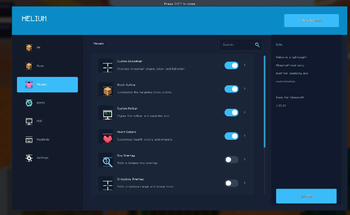


Welcome to Helium Client!
Helium client is a client based minecraft mod that allows you to customize the game in real time.
IMPORTANT NOTE:
ALL SETTINGS MUST BE TURNED ON VIA HELIUM CLIENT SETTINGS.

Summary:
Helium client optimizes the game with settings such as
- Adaptive Scaling
- Culling Behind Camera
- Throttle Particles
- Disable Map Rendering.
Helium client also lets players customize the game!
- Custom Block Outlines
- Complete Color Overhaul of UI / GUI
- Custom Inventory Hotbars. And Much More!
You can see the Helium Settings by either
- Pressing Right Shift / The Selected Keybind
- Options -> Helium Settings

Tips
- Enable Optimizations!
- Visual Effects Increases FPS!
- Customize Your UI!
In helium client, You can use Profiles to share your Minecraft Settings OR By Using Others.
 You can save a profile. Then go into the folder. Then send it to someone. They can import it by clicking "Import JSON" or "Import TXT" depending on what format it was exported on.

Texture Pack Editor / Resource Pack Editor

How it works.
- Create A Pack.
- Rename it to whatever you want.
- Search for any texture and edit it!
- You can import textures if you dont want to edit them with the ingame editor
- You can Change Keybinds for tools Via the Minecraft Keybinds menu.
- Save to pack, Then Apply Changes. Then click Done.
Thanks for Using Helium!
- Edition: Minecraft Java
- File type: .jar
- Minecraft version listed: 26.1.2
- How to install: Install the matching mod loader (Forge, Fabric or NeoForge) for your Minecraft version. → Download the .jar. → Put it in the .minecraft/mods folder and launch that loader profile.
- Where to get it: Opens on Modrinth — not every file is mirrored on our own servers.
Install steps are the general flow for this file type — How to install Minecraft Java mods & modpacks walks through it step by step.
- Ships as helium-mc26.1.2-1.0.17.jar — drop this file into the mods folder
- Download size: 8.4 MB
- Download link checked 11 Oct 2026 — working
These come from our own check of the pack file, not from the source page.