
Middle-Earth Additions: Factions



📖 Overview
Middle-Earth Additions: Factions is a powerful addon for the Middle-Earth mod that automatically tracks player faction affiliations and provides seamless integration with PlaceholderAPI-compatible mods. Perfect for servers wanting to display faction information in chat, prefixes, and other UI elements.

✨ Features
🏰 Automatic Faction Tracking
Real-time Detection: Automatically detects when players join factions in the Middle-Earth mod
Persistent Storage: Stores faction data as JSON files in your world save directory
Zero Configuration: Works out of the box with no additional setup required
🔗 PlaceholderAPI Integration
Universal Compatibility: Works with StyledChat, LuckPerms, and any mod supporting PlaceholderAPI
Multiple Placeholders: Provides various placeholder formats for different use cases
Optional Dependency: Functions independently but enhances with PlaceholderAPI present
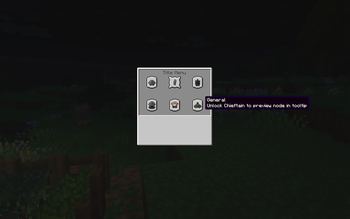
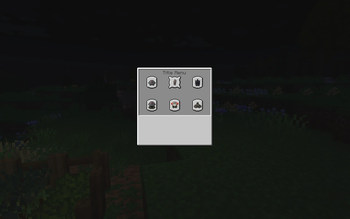
🧭 Title Menu (New)
How to Open: Press the default keybinding O to open the Faction Title Menu while in-game. You can rebind this in Controls under category “Middle Earth Additions”.
Faction Panel: A compact panel shows your current faction icon and five title nodes.
Good/Evil Variants: The menu adapts to your disposition (good/evil), changing button icons and rank names (e.g., Soldier→Knight→Captain→Baron→Lord vs Warrior→Uruk→Chieftain→General→Overlord).
Linear Progression: Unlocks must be earned in order. Attempting to preview or unlock a later node shows a prerequisite message.
Requirements & Feedback: Tooltips display Silver Coin, Gold Coin, and EXP level requirements with color-coded status. Insufficient resources or missing prerequisites are shown via action bar messages.
Faction Icon: The top-left faction button displays a faction-appropriate item (e.g., Gondorian Shield, Mordor Wooden Shield, etc.).
Unlocked Perks List: Perks for unlocked ranks are listed in the panel (examples: 10% Speed Boost, +0.5 Arrow Damage, +1 Heart, Resistance aura).
🎮 Player Commands
Toggle Display: Players can control whether their faction appears in chat
Testing Tools: Built-in commands for debugging and testing placeholder functionality
🛠️ Developer API
Public API: Clean interface for other mods to access faction data
Type Safety: Proper null handling and error management
Documentation: Comprehensive JavaDoc and usage examples
📋 Requirements
Required Dependencies
Minecraft: 1.21.1
Fabric Loader: 0.16.14+
Fabric API: Latest version
Middle-Earth Mod: 1.5.3-1.21.1-alpha or compatible
Optional Dependencies
PlaceholderAPI: 2.4.0+ (for enhanced placeholder support)
StyledChat: For chat formatting integration
LuckPerms: For permission-based prefix/suffix integration
🚀 Installation
Install Fabric Loader and Fabric API
Install the Middle-Earth mod
Download and place this mod in your mods folder
(Optional) Install PlaceholderAPI for enhanced compatibility
Start your server/world
📝 Available Placeholders
Basic Placeholders
| Placeholder | Description | Example Output |
|---|---|---|
| %mefaction% | Formatted faction name | Gondor |
| %mefaction_full% | Full faction identifier | me:gondor |
| %mefaction_display% | Name with faction (if enabled) | [Gondor] PlayerName |
| %metitle% | Player title name | Soldier |
Supported Factions
All Middle-Earth mod factions are supported with proper formatting:
| Faction ID | Display Name |
|---|---|
| me:gondor | Gondor |
| me:rohan | Rohan |
| me:dale | Dale |
| me:longbeards | Longbeards |
| me:longbeards.erebor | Erebor |
| me:lothlorien | Lothlórien |
| me:mordor | Mordor |
| me:misty_mountains_goblins | Misty Mountains |
| me:isengard | Isengard |
| me:shire | Shire |
| me:bandit | Bandit |
🎯 Usage Examples
StyledChat Integration
{

"chat": {

"format": "<%mefaction% {player_name}> {message}"

}

}
Result: Hello everyone!
LuckPerms Prefix
/lp user PlayerName meta setprefix 100 "%mefaction% "
Result: Player appears as Gondor PlayerName
Custom Chat Formatting
{

"style": {

"chat": "[%mefaction%] %player% » %message%"

}

}
Result: [Gondor] PlayerName » Hello Middle-earth!
🎮 Commands
Player Commands
/togglefaction - Toggle faction display in your name
Shows your current faction status
Provides preview of how your name will appear
Administrator Commands
/viewfactiondata - View all stored faction data
Lists all players and their factions
Shows total player count
/exportfactiondata - Show faction data file location
Displays path to JSON storage file
Shows current storage statistics
/testfactionplaceholder - Test placeholder functionality
Debug tool for server administrators
Shows all available placeholders for a player
Displays current toggle state
📊 Data Storage
Faction data is automatically saved to [world]/faction_data.json:
{

"player-uuid-here": {

"playerId": "player-uuid",

"playerName": "PlayerName",

"disposition": "good",

"factionId": "me:gondor",

"spawnId": "me:gondor.minas_tirith",

"timestamp": 1672531200000

}

}
Data Fields
playerId: Unique player identifier
playerName: Current player name
disposition: Faction alignment (good/evil/neutral)
factionId: Full faction identifier from Middle-Earth mod
spawnId: Associated spawn location
timestamp: Last update time in milliseconds
🤝 Compatibility
Tested Compatibility
✅ StyledChat - Full chat formatting support
✅ LuckPerms - Prefix/suffix integration
✅ TAB - Scoreboard and tablist integration
✅ MiniMOTD - Server MOTD placeholders
🛠️ Configuration
This mod is designed to work with zero configuration. All settings are automatically detected and configured based on your Middle-Earth mod installation.
Customization Options
Player toggle states are preserved across server restarts
Faction name formatting can be customized via the API
JSON data location is tied to world saves for multi-world support
📄 License
This mod is released under the All Rights Reserved License. See LICENSE file for details.
🙏 Credits
Middle-Earth Mod - For providing the amazing Middle-earth experience
PlaceholderAPI - For the excellent placeholder system
Fabric Community - For the modding framework and tools
Happy adventuring in Middle-earth! 🧙♂️⚔️🏰
- Edition: Minecraft Java
- File type: .jar
- Minecraft version listed: 1.21.8
- How to install: Install the matching mod loader (Forge, Fabric or NeoForge) for your Minecraft version. → Download the .jar. → Put it in the .minecraft/mods folder and launch that loader profile.
- Where to get it: Opens on Modrinth — not every file is mirrored on our own servers.
Install steps are the general flow for this file type — How to install Minecraft Java mods & modpacks walks through it step by step.
- Ships as me-factions-1.5.1+1.21.8.jar — drop this file into the mods folder
- Download size: 128 KB
- Download link checked 30 Aug 2026 — working
These come from our own check of the pack file, not from the source page.