
LT-ItemFilter
Java mod listed for Minecraft 1.18. Downloads from the MC Java Mods app on Android.
LT-ItemFilter is a Minecraft mod that automatically filters items in your inventory. The mod allows for easy management of a list of items to be kept, so…
⬇ Download on Modrinth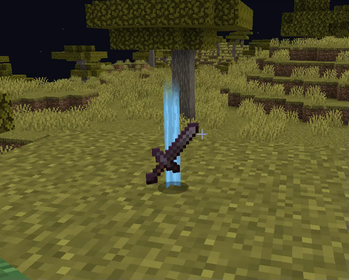
LT-ItemFilter - Mod for Minecraft
📌 Description
LT-ItemFilter is a Minecraft mod that automatically filters items in your inventory. The mod allows you to easily manage a list of items to be kept, so you don't have to worry about accidentally discarding valuable items. With intuitive commands, you can quickly add or remove items or switch filter profiles – all from the chat!
✨ Features
- Automatic discarding of unwanted items from your inventory.
- Management of allowed item lists via profiles.
- Easy addition and removal of items from the filter using commands.
- Clear interface with item highlighting (SHIFT) and filter activation (Ctrl+G).
- Generation and loading of configuration from the
ltitemfilter-config.jsonfile.
| Command | Description |
|---|---|
/ltf filter |
Toggle item filter |
/ltf add <item> |
Add an item to the filter |
/ltf remove <item> |
Remove an item from the filter |
/ltf list |
Display the list of items in the current profile |
/ltf profiles |
List available profiles |
/ltf config save |
Save configuration |
/ltf config reload |
Reload configuration |
Additionally:
- Ctrl+G – shortcut to activate filtering (alternatively, use the command
/lts filter) - SHIFT – highlights items on the ground
🛠 Configuration
Upon first launch, the mod generates a configuration file:
%appdata%/.minecraft/config/ltitemfilter-config.json
In this file where you can manually edit the item lists and filter profiles. Ensure that the file structure remains unchanged – only modify the content of the lists (e.g., by adding item identifiers).
👥 Authors
- LordTricker – Main mod creator
- AdversTM – Assistance with item highlighting
- Mr. GPT – Content support 🤖
🌍 Contact
"Bierzcie i korzystajcie z tego wszyscy - to jest bowiem praca moja, która dla was została wykonana" ~LordTricker
- Edition: Minecraft Java
- File type: .jar
- Minecraft version listed: 1.18.2
- How to install: Install the matching mod loader (Forge, Fabric or NeoForge) for your Minecraft version. → Download the .jar. → Put it in the .minecraft/mods folder and launch that loader profile.
- Where to get it: Opens on Modrinth — not every file is mirrored on our own servers.
Install steps are the general flow for this file type — How to install Minecraft Java mods & modpacks walks through it step by step.
- Ships as ltifilter-1.4.1-Alpha+1.18.2.jar — drop this file into the mods folder
- Download size: 264 KB
- Download link checked 11 Oct 2026 — working
These come from our own check of the pack file, not from the source page.