
Item Commander
Java mod listed for Minecraft 1.21. Downloads from the MC Java Mods app on Android.
I don't know my version or loader
Item Commander
Shiny item do stuff
A simple Serverside Fabric mod that allows you to assign commands to Item(Stacks).
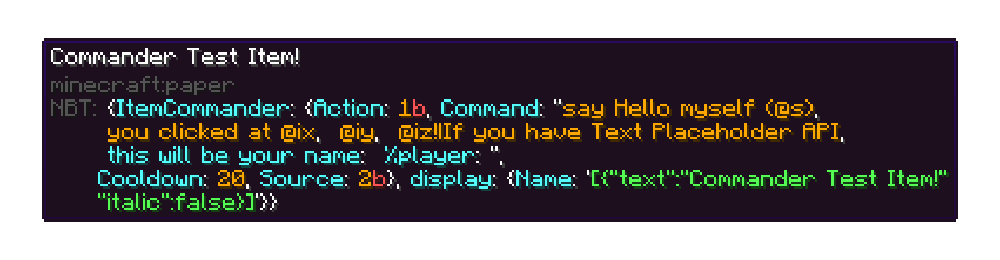
It works by adding NBT data to the item, then when a player uses an item the NBT data for that item is checked, if it contains the ItemCommander tag tree it executes the specified command.
To embed a command in an item, hold it in your main hand and run /commander create "<command>" [CONSUME_ACTION] [COMMAND_SOURCE] [cooldownTicks] [CustomItemNBT]
consume actions:
| Action | Description |
|---|---|
| CONSUME | Consumes the item |
| KEEP | Keeps the item |
command sources:
| Action | Description |
|---|---|
| SERVER | Command executed by the server |
| PLAYER | Command executed by the player |
| OP | Command executed by the player with OP |
| SERVER_AS_PLAYER | Command executed by the server as the player (like OP) |
| DANGEROUSLY_OP | Command executed by the player whilst being OP ⚠️ |
defaults in bold*
Command placeholders
when creating a command you can use the following vanilla-like placeholders:
| Placeholder | Action |
|---|---|
@itemname |
Item Name |
@pich |
Player pitch |
@yaw |
Player yaw |
@ix |
Item use X coordinate |
@iy |
Item use Y coordinate |
@iz |
Item use Z coordinate |
@x |
Player use X coordinate |
@y |
Player use Y coordinate |
@z |
Player use Z coordinate |
@p and @s |
The player using the Commander Item |
To append more commands to one item, hold a Commander Item in your main hand and run /commander append "<command>"
To save a Commander Item, hold it in your main hand and run /commander save <fileName>
To load/give a Commander Item, run /commander give <fileName> [quantity] [player(s)]
This mod supports Patbox' Text Placeholders API.
- You can use
%modid:type%or%modid:type/data%inside a Commander Item to make use of a custom placeholder - Example:
commander create
This mod supports LuckPerms' Fabric Permission API.
commander.command.createallows a player to use this mod to embed commands in itemscommander.command.appendallows a player to use this mod to append commands to Commander Itemscommander.command.giveallows a player to use this mod to give itself Commander Itemscommander.command.saveallows a player to use this mod to save Commander Items to a file on the server
Examples
Creating a Commander Item
/commander create "say Hello myself (@s), you clicked at @ix, @iy, @iz!" KEEP OP 20 paper{display:{Name:'[{"text":"Commander Test Item!","italic":false}]'}}
Appending an extra command to a Commander Item
/commander append "If you have Text Placeholder API, this will be your name: %player:name%"
Saving a Commander Item
/commander save commander_test_item
Giving/loading a saved item to a player
/commander give commander_test_item 1 @p
Bleeding edge builds
Upstream builds are available via GitHub Actions.
Setup
For setup instructions please see the fabric wiki page that relates to the IDE that you are using.
License
This template is available under the CC0 license. Feel free to learn from it and incorporate it in your own projects.
- Edition: Minecraft Java
- File type: .jar
- Minecraft versions listed: 1.21, 1.21.1
- How to install: Install the matching mod loader (Forge, Fabric or NeoForge) for your Minecraft version. → Download the .jar. → Put it in the .minecraft/mods folder and launch that loader profile.
- Where to get it: Opens on Modrinth — not every file is mirrored on our own servers.
Install steps are the general flow for this file type — How to install Minecraft Java mods & modpacks walks through it step by step.
- Ships as itemcommander-1.7.0-pre.2+1.21.1.jar — drop this file into the mods folder
- Download size: 70 KB
- Download link checked 11 Oct 2026 — working
These come from our own check of the pack file, not from the source page.