
SimpleAFK
This mod enables simple AFK management for servers.
It provides the ability to configure:
- when a player is marked as afk.
- when (if at all) a player is kicked for being afk too long.
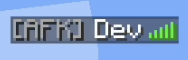
- Formatting options to format the afk message, kick message and afk name in tab list.
It skips players that are AFK when checking for the percentage of players sleeping.
This overrides the vanilla setIdleTimeout command, and discards any values set in there.

Simple AFK aims to be highly configurable, to allow for any server to make it act the way they want. In the server config file, you will find the following options:
NOTE: The default defined in () only matters if you are NOT using a permission mod.
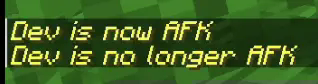
secondsBeforeAfkwhich is how many seconds after a last player movement the player is marked as afk.secondsBeforeKickwhich is how many seconds after the player has been marked as afk they are going to be kicked, set to 0 to disable kicking.isNowAfkMessageis a string where you can customize how the global message should look when a player goes afk. This allows for color codesisNoLongerAfkMessageis a string where you can customize how the global message should look when a player is no longer afk. This allows for color codesplayerNameFormatis how the tablist is formatted for when a player is afk. This allows for color codesafkKickMessageis how the message should look when a player gets kicked after the amount of seconds defined. This allows for color codes
Simple AFK introduces some standard permission nodes if you are using a permission system.
simpleafk.toggle- Allows the player to toggle their AFK status (Default: Everyone has this permission)simpleafk.toggle.target- Allows the player to toggle another player's AFK status (Default: Only OP's has this permission)simpleafk.bypass- Allows the player to bypass AFK status (Meaning they won't get marked as AFK and won't get kicked) (Default: Only OP's has this permission)simpleafk.bypass_sleep- Allows the player to bypass the sleep required percentage check (Default: Only OP's have this permission)
Wiki
Check out the wiki for detailed documentation.
If you think anything is missing from the wiki that is unclear, send a message in the discord or open an improve documentation issue.
Roadmap
Check out the version milestones
Links
Join my Discord for support and updates! (Just created, so barebones)
Thanks to
- jaredlll08 for creating
Multiloader-Template
- Edition: Minecraft Java
- File type: .jar
- Minecraft version listed: 1.21.1
- How to install: Install the matching mod loader (Forge, Fabric or NeoForge) for your Minecraft version. → Download the .jar. → Put it in the .minecraft/mods folder and launch that loader profile.
- Where to get it: Opens on Modrinth — not every file is mirrored on our own servers.
Install steps are the general flow for this file type — How to install Minecraft Java mods & modpacks walks through it step by step.
- Ships as simpleafk-neoforge-1.21.1-1.5.2.jar — drop this file into the mods folder
- Download size: 33 KB
- Download link checked 20 Sept 2026 — working
These come from our own check of the pack file, not from the source page.