Widgets
A customizable HUD mod that displays FPS, ping, coordinates, time, date, memory, CPU, and GPU info. Move widgets anywhere on the screen, adjust their…
I don't know my version or loader
[EN]
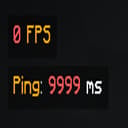
Enhance your Minecraft experience with customizable on-screen widgets!Widgets Mod adds a set of useful, fully customizable widgets to your Minecraft HUD, providing real-time information at a glance. Whether you're monitoring your FPS, ping, coordinates, or system performance, this mod has you covered. With an intuitive configuration screen, you can easily tweak the appearance and position of your widgets to suit your needs.
✨ Key Features:
- Multiple Widgets: Display FPS, ping, coordinates, time, date, memory usage, CPU, and GPU info.
- Predefined Positions: Choose from four corners (top-left, top-right, bottom-left, bottom-right) to place your widgets.
- Color Coding: FPS and ping widgets change color based on their values (e.g., green for high FPS, red for low).
- Configurable Text: Customize the text format for each widget using placeholders (e.g., $fps$, $ping$) and Minecraft color codes.
- Background Toggle: Enable or disable a semi-transparent background for better readability.
- Performance Optimized: Lightweight and efficient, with minimal impact on your game's performance.
- Cloth Config Integration: Easily tweak settings via an in-game configuration screen (requires Cloth Config API).
📋 Supported Widgets:
- FPS: Shows your current frames per second with color-coded indicators.
- Ping: Displays your server ping (multiplayer only) with color-coded values.
- Server Address: Shows the address of the server you are currently playing on.
- Coordinates: Shows your X, Y, Z coordinates in various formats.
- Memory Usage: Monitors your game's memory usage (used/total MB).
- CPU & GPU Info: Shows your CPU and GPU details for system monitoring.
- Edition: Minecraft Java
- File type: .jar
- Minecraft versions listed: 1.20, 1.20.1, 1.20.2
- How to install: Install the matching mod loader (Forge, Fabric or NeoForge) for your Minecraft version. → Download the .jar. → Put it in the .minecraft/mods folder and launch that loader profile.
- Where to get it: Opens on Modrinth — not every file is mirrored on our own servers.
Install steps are the general flow for this file type — How to install Minecraft Java mods & modpacks walks through it step by step.
- Ships as widgets-1.0.5.jar — drop this file into the mods folder
- Download size: 74 KB
- Download link checked 30 Aug 2026 — working
These come from our own check of the pack file, not from the source page.