




Ever built a really loud, obnoxious farm? A machine that stabs at your ears? Something that drives you to turn down your volume? Of course you have. Step on up and try...

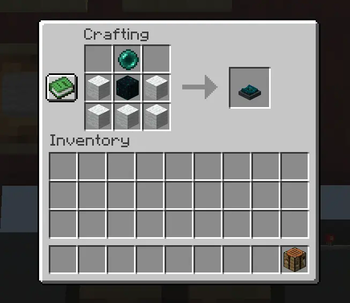
Sculk Muffler adds a single configurable block to the game. The Sculk Muffler. Place it down, and it silences sounds in an area in front of it. The Sculk Muffler has a configurable range, and you can set it to quiet sounds down or mute them entirely. It can even be disabled via redstone signal.
In addition to sound, Sculk Mufflers stop vibrations from within their area of influence. This only happens when the mufflers are configured to entirely mute sounds.
If that's not enough, you can upgrade your Sculk Muffler to an Advanced Sculk Muffler to filter by specific sounds, fine tune the working area, or perhaps try containment mode to allow the sounds to play, but only when you're within the immediate area.
I developed this mod in remembrance of older mods that added similar blocks. While Extreme Sound Muffler is great, I prefer placing blocks in key areas to quiet them down. Especially for playing on servers with friends, since they don't need to configure anything. It just works when they come to visit.
- Edition: Minecraft Java
- File type: .jar
- Minecraft version listed: 1.21.1
- How to install: Install the matching mod loader (Forge, Fabric or NeoForge) for your Minecraft version. → Download the .jar. → Put it in the .minecraft/mods folder and launch that loader profile.
- Where to get it: Opens on Modrinth — not every file is mirrored on our own servers.
Install steps are the general flow for this file type — How to install Minecraft Java mods & modpacks walks through it step by step.
- Ships as sculkmuffler-1.2.0.jar — drop this file into the mods folder
- Download size: 165 KB
- Download link checked 20 Sept 2026 — working
These come from our own check of the pack file, not from the source page.