
ModsJava
Atlas
Java mod listed for Minecraft 1.20. Downloads from the MC Java Mods app on Android.
I don't know my version or loader
Open the Minecraft launcher and look at the profile you play on — it names both, like fabric-loader-1.21.4. The version also shows in the bottom-right corner of the game's main menu.
No loader in the profile name? Then it's plain Minecraft, and these mods won't run — you need Fabric or NeoForge installed first.
Looking for Atlas for newer versions? Try TheDeathlyCow's NovoAtlas, a port of Atlas to newer Minecraft versions!
Atlas
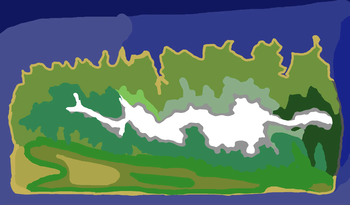
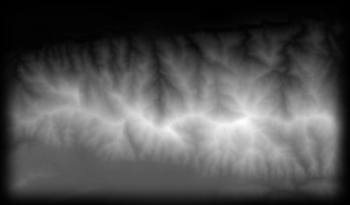
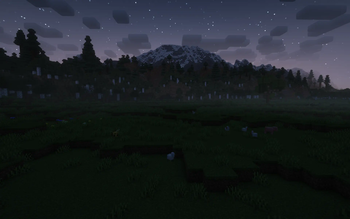
 atlas is a data-driven image-based world generator. give the mod a heightmap and biome map image, and you can incorporate it into a datapack dimension!
how to use
- create or find a grayscale heightmap. save it as a png with 8bpc, RGBA encoding. the image should be saved in a datapack-- see the example below for more details.

- create a copy of the image and paint over it with whatever colors you like. each color corresponds to a different biome. do not mix or blend the colors. save this image with the same encoding to your datapack (see the Github for more information).

- create a datapack and put your dimension file in as normal. an example dimension file, along with an explanation of the parameters, can be found here.
- load up the world! if something has gone wrong, you'll get a datapack error in your logs.

if you're still having trouble, send a message in the discord #help-and-support channel.
some tips:
- when you're drawing the biomes, it may be helpful to be able to see the heightmap as a contour map. you can emulate this in your preferred photo editor by selecting a black pixel and then using "select by color" with varying thresholds to get varying contour lines of your map.
- if your maps are not the same size, you might have regions of void that are mapped to biomes, or regions of terrain that are just your default biome. you can use this to save yourself some time!
- your map will be centered at 0,0. up in the image is north. if your map is an uneven number of pixels, the last pixel on the south and/or east side will be cut off.
- if
starting_yin your dimension is less than your dimension'smin_y, you can create areas of void. use this to create non-rectangular maps! - anything outside of the world will be void, but certain hardcoded structures may still spawn, depending on what features are in your default biome.
Quick facts
- Edition: Minecraft Java
- File type: .jar
- Minecraft versions listed: 1.20, 1.20.1
- How to install: Install the matching mod loader (Forge, Fabric or NeoForge) for your Minecraft version. → Download the .jar. → Put it in the .minecraft/mods folder and launch that loader profile.
- Where to get it: Opens on Modrinth — not every file is mirrored on our own servers.
Install steps are the general flow for this file type — How to install Minecraft Java mods & modpacks walks through it step by step.
File checked by MCModsHub
- Ships as atlas-1.3.0+1.20.jar — drop this file into the mods folder
- Download size: 169 KB
- Download link checked 11 Oct 2026 — working
These come from our own check of the pack file, not from the source page.