
SVWaypoint
Java mod listed for Minecraft 1.20. Downloads from the MC Java Mods app on Android.
Modern 3D waypoints for Minecraft servers, with persistent world markers, custom icons, item rendering, unicode support, and a clean in-game HUD.
⬇ Download on Modrinth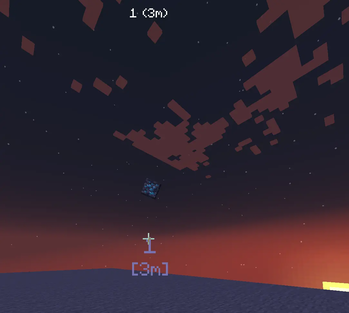
SVWaypoint
SVWaypoint is a clean and modern waypoint mod that lets players and servers create persistent 3D waypoints rendered directly in the world.
Unlike older waypoint systems, SVWaypoint does not use Armor Stands. Instead, it uses a custom lightweight waypoint entity designed for better performance, cleaner rendering, and better multiplayer support.
It is perfect for event servers, minigames, survival servers, roleplay servers, stream projects, and custom resource-pack experiences.
Features
- Custom lightweight waypoint entity.
- No Armor Stands.
- Persistent waypoints saved with world data.
- Multiplayer-ready server-side waypoint system.
- Clean 3D in-world rendering.
- Optional distance display.
- Optional unicode icon.
- Optional Minecraft item icon.
- Supports vanilla and modded items.
- Supports custom unicode fonts from resource packs.
- Public and private waypoints.
- Per-player waypoint ownership.
- Configurable text scale, icon scale, color, visibility, render distance, and item rotation.
- Closest-waypoint HUD.
- Keybind for quick temporary waypoints.
- Keybind for toggling the waypoint HUD.
Rendering System
Each waypoint can display:
- A main name.
- Distance below the name.
- A unicode symbol.
- A real Minecraft item as an icon.
- A custom font using a
ResourceLocation. - Optional rotating item icons.
- Optional through-walls rendering.
Example:
/svwaypoint create home Home
/svwaypoint edit home unicode \uE000
/svwaypoint edit home item minecraft:diamond
/svwaypoint edit home color #55FFAA
If an item icon is set, the unicode icon is cleared automatically. This keeps the waypoint clean and prevents both icons from rendering at the same time.
Commands
Create a waypoint at your current position
/svwaypoint create <id> <name>
Creates a persistent waypoint at the player's current position.
Example:
/svwaypoint create home Home
Create a waypoint at exact coordinates
/svwaypoint pos <id> <x> <y> <z> <name>
Creates a persistent waypoint at a specific position.
Example:
/svwaypoint pos spawn 0 80 0 Spawn
Remove a waypoint
/svwaypoint remove <id>
Deletes a waypoint completely.
Example:
/svwaypoint remove home
List waypoints
/svwaypoint list
Shows the waypoints visible to you.
View waypoint info
/svwaypoint info <id>
Shows waypoint data such as name, position, item, unicode icon, color, font, visibility, and render options.
Teleport to a waypoint
/svwaypoint tp <id>
Teleports you to the selected waypoint if you have permission.
Example:
/svwaypoint tp home
Edit a waypoint
/svwaypoint edit <id> <field> <value>
Available fields:
name
unicode
item
color
visible
distance
public
font
scale
unicode_scale
render_distance
background
through_walls
rotate_item
Examples:
/svwaypoint edit home name Base
/svwaypoint edit home unicode \uE000
/svwaypoint edit home item minecraft:nether_star
/svwaypoint edit home color #FFAA00
/svwaypoint edit home visible true
/svwaypoint edit home distance true
/svwaypoint edit home public false
/svwaypoint edit home font minecraft:default
/svwaypoint edit home scale 1.2
/svwaypoint edit home unicode_scale 1.5
/svwaypoint edit home render_distance 256
/svwaypoint edit home background true
/svwaypoint edit home through_walls false
/svwaypoint edit home rotate_item true
Temporary waypoint
/svwaypoint temp
Creates a temporary waypoint where the player is looking.
Reload waypoint data
/svwaypoint reload
Reloads and refreshes waypoint data and runtime waypoint entities.
Debug
/svwaypoint debug
Shows saved waypoint count, active runtime entity count, and useful debug information.
Keybinds
Default keybinds:
- X — Toggle closest-waypoint HUD.
- Z — Create a temporary raycast waypoint.
Keybinds can be changed from the Minecraft Controls menu.
Server Config
The server config is generated at:
config/svwaypoint-server.toml
Configurable options include:
- Temporary waypoint duration.
- Default render distance.
- Default text scale.
- Default icon scale.
- Default waypoint color.
- Default waypoint font.
- Show distance by default.
- Through-walls rendering.
- Text background.
- Item icon animation.
- Maximum waypoint limit.
- Command permissions.
- Teleport permissions.
- Debug mode.
Resource Pack Unicode Support
SVWaypoint supports custom unicode characters from resource packs.
Example:
/svwaypoint edit home unicode \uE000
/svwaypoint edit home font svwaypoint:waypoint_icons
This allows servers to use custom icons, symbols, and textures through Minecraft font providers.
If a custom font is missing or unavailable, the renderer safely falls back to:
minecraft:default
Item Icon Support
SVWaypoint can render real Minecraft items as waypoint icons.
Examples:
/svwaypoint edit home item minecraft:diamond
/svwaypoint edit home item minecraft:compass
/svwaypoint edit home item minecraft:nether_star
Modded items are also supported as long as the item exists on both the server and the client.
Example:
/svwaypoint edit boss item some_mod:custom_sword
- Edition: Minecraft Java
- File type: .jar
- Minecraft version listed: 1.20.1
- How to install: Install the matching mod loader (Forge, Fabric or NeoForge) for your Minecraft version. → Download the .jar. → Put it in the .minecraft/mods folder and launch that loader profile.
- Where to get it: Opens on Modrinth — not every file is mirrored on our own servers.
Install steps are the general flow for this file type — How to install Minecraft Java mods & modpacks walks through it step by step.
- Ships as svwaypoint-1.0.1.jar — drop this file into the mods folder
- Download size: 68 KB
- Download link checked 11 Oct 2026 — working
These come from our own check of the pack file, not from the source page.