Nodeflow
Java mod listed for Minecraft 26.x. Downloads from the MC Java Mods app on Android.
⬇ Download on Modrinth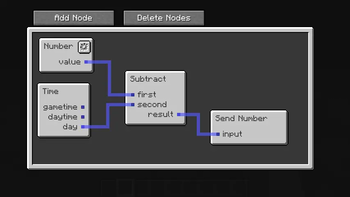
Nodeflow
Nodeflow is a library for graph based programming interfaces in minecraft on the fabric modloader.
Getting Started
Add a dependency on the library from jitpack. You can also use the modrinth maven, but you might end having to manually add a dependency on mixin extras then.
repositories {
    maven { url 'https://jitpack.io' }
}

dependencies {
    implementation 'com.github.mattidragon:nodeflow:$nodeflow_version'
}
To get started you will want to create a GraphEnvironment. Most mods will only ever need one, but if the available nodes change, feel free to create one every time.
public static final GraphEnvironment ENVIRONMENT = GraphEnvironment.builder()
        // Adds context that nodes need to execute. Stays same during each evaluation
        .addContextTypes(ContextType.SERVER_WORLD, ContextType.BLOCK_POS, ContextType.SERVER)
        // Datatypes that are allowed to be used. Exists for nodes that can act on any data type to know which ones are allowed
        .addDataTypes(DataType.BOOLEAN, DataType.NUMBER, DataType.STRING)
        // Adds groups of nodes at a time. They are also used for grouping in the editor.
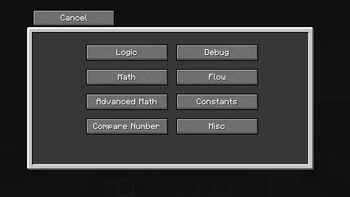
        .addNodeGroups(new TagNodeGroup(NodeGroup.MATH), new TagNodeGroup(NodeGroup.ADVANCED_MATH), new TagNodeGroup(NodeGroup.LOGIC), new TagNodeGroup(ModNodeTypes.REDSTONE_GROUP))
        // Adds single nodes. They will be placed in a misc group.
        .addNodeTypes(NodeType.TIME)
        .build();
Using this environment you can create a EditorScreen, although you usually don't have any use for the base class.
If you are using a block entity for holding your code you can make it implement GraphProvidingBlockEntity in addition to extending BlockEntity.
This interface already implements ExtendedScreenHandlerFactory so all you have to do is open the screen from the block entity.
Nodeflow will handle syncing the graph on change.
If you aren't storing the graph in a block you can create a subclass of EditorScreen and handle syncing yourself (or not if you are fully client sided).
Proper javadocs and a wiki might come in the future.
- Edition: Minecraft Java
- File type: .jar
- Minecraft version listed: 26.1.2
- How to install: Install the matching mod loader (Forge, Fabric or NeoForge) for your Minecraft version. → Download the .jar. → Put it in the .minecraft/mods folder and launch that loader profile.
- Where to get it: Opens on Modrinth — not every file is mirrored on our own servers.
Install steps are the general flow for this file type — How to install Minecraft Java mods & modpacks walks through it step by step.
- Ships as nodeflow-2.3.0+mc.26.1.2.jar — drop this file into the mods folder
- Download size: 163 KB
- Download link checked 11 Oct 2026 — working
These come from our own check of the pack file, not from the source page.