HomeJavaModsCustom Item Models
Custom Item Models
ModsJava

Custom Item Models

by JustS-js · on Modrinth

Custom Item Models Mod powered by Custom Model Data Component. Free Minecraft Java mod for 26.1, 26.1.1, 26.1.2.

Which Minecraft do you have?

Every version of the game needs its own build. Pick yours, then download — the wrong build installs fine and then does nothing in the game. This mod is built for Fabric only.

⬇ Download for 26.1–26.2⬇ Download for 1.21.6–1.21.11⬇ Download for 1.21.5⬇ Download for 1.21.4
I don't know my version or loader
Open the Minecraft launcher and look at the profile you play on — it names both, like fabric-loader-1.21.4. The version also shows in the bottom-right corner of the game's main menu.
No loader in the profile name? Then it's plain Minecraft, and these mods won't run — you need Fabric or NeoForge installed first.
Custom Item Models — screenshot 1Custom Item Models — screenshot 2Custom Item Models — screenshot 3

Custom Item Models

Setup

This modification is only needed on the server side - clients without this mod will be able to join and use all provided functionality. It also works in singleplayer if installed on client.

Usage

To see compatible ResourcePack examples, navigate into tutorial directory.

Rename Name Tag on the Anvil into the string that you would usually put inside minecraft:custom_model_data={strings:[]} array.

img Diamond before applying Name Tag with the title ruby:

{
    count: 1, 
    Slot: 0b, 
    id: "minecraft:diamond"
}

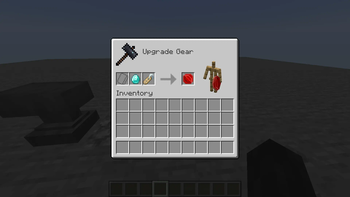
Then, apply this Name Tag onto the item via Smithing Table.

img Diamond after applying Name Tag with the title ruby:

{
    count: 1, 
    Slot: 0b, 
    id: "minecraft:diamond", 
    components: {
        "minecraft:custom_model_data": {
            strings: ["ruby"]
        }
    }
}

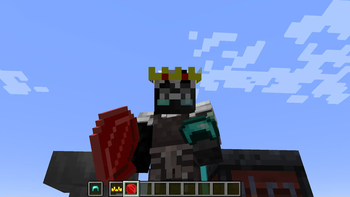
This mod also changes minecraft:equippable component for such items as armor pieces and elytras.

for example, Diamond Helmet before applying Name Tag with the title crown:

{
    count: 1, 
    Slot: 0b, 
    id: "minecraft:diamond_helmet"
}

img and after applying Name Tag with the title crown:

{
    count: 1, 
    Slot: 0b, 
    id: "minecraft:diamond_helmet", 
    components: {
        "minecraft:custom_model_data": {
            strings: ["crown"]
        }, 
        "minecraft:equippable": {
            equip_sound: "minecraft:item.armor.equip_diamond", 
            slot: "head", 
            asset_id: "cim:crown"
        }
    }
}

img

ATTENTION: Be aware that asset_id will always be under cim namespace, due to how vanilla code operates. You can see examples in the tutorial directory.

You don't have to use cim namespace for item models, only for armor rendering.

img

License

This mod is available under the MIT license. Feel free to learn from it and incorporate it in your own projects.

Verified by MCModsHub

These come from our own check of the pack file, not from the source page.

Explore more