
QoMC
Java mod listed for Minecraft 26.x. Downloads from the MC Java Mods app on Android.
I don't know my version or loader
Qconf Over Minecraft Commands (QoMC)
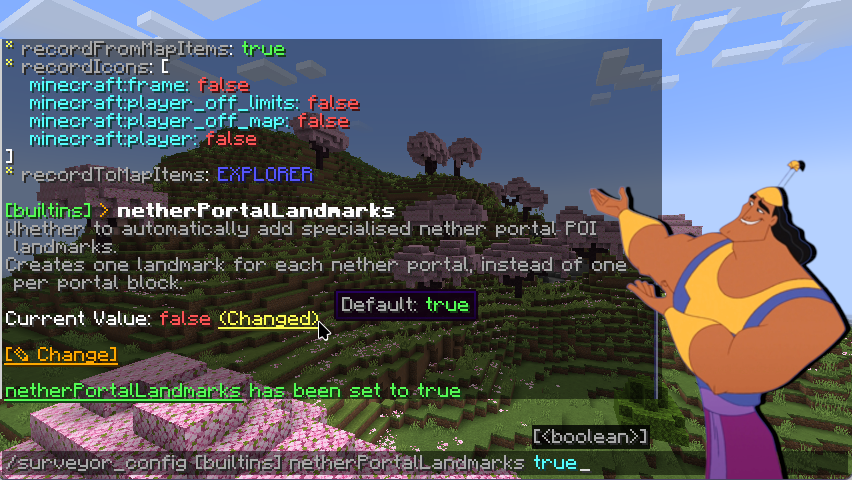
pull the lever, qomc!
QoMC automatically generates config commands for Minecraft mods utilizing Kaleido Config (JiJ-safe implementation of Quilt Config)
THE POISON CHOSEN ESPECIALLY FOR KALEIDO. KALEIDO'S POISON.
A number of mods utilize the config library Kaleido Config, which is convenient as it works on all loaders and minecraft versions.
Kaleido-based configurations generates .toml files in the game's config directory, but these can't be changed while the game is running.
McQoy solves this by auto-generating client-side configuration GUIs which allow you to edit the configs in-game.
This is good for singleplayer and client-side mods, but unhelpful for servers, or other situations where you need to see the before/after effect without going into the GUI. QoMC addresses this by generating config commands instead!
...RIGHT.
After installation, QoMC will detect mods making use of Kaleido on startup, and auto generate a command for them.
By default, the commands is generated as /<Mod ID>_config, e.g. /qomc_config.
For client-side config, they are generated as /<MOD ID>_config_client.
For mods with multiple config files, QoMC will split the commands by config, e.g. /qomc_config demo and /qomc_config main.
IN MY DEFENSE, YOUR POISONS ALL LOOK ALIKE
For devs, QoMC integration is implicit - just use Kaleido Config for configuration, and relevant commands will appear when QoMC is installed.
QoMC is a purely optional runtime dependency, so don't depend on QoMC in your buildscripts or mod metadata - only on modrinth / curseforge.
If you've implemented your own config commands, you can disable discovery of your configs using a metadata key:
In fabric.mod.json:
  "custom": {
    "qomc:hidden": true
  }
Or in neoforge.mods.toml:
  [modproperties.qomc]
  hidden=true
To make QoMC recognize a config as client-side, simply name your config as client.
HOW ABOUT DESSERT?
This project is licensed under the LGPL 3.0
QoMC takes direct inspiration from McQoy, its client-side GUI counterpart!
- Edition: Minecraft Java
- File type: .jar
- Minecraft versions listed: 26.1, 26.1.1, 26.1.2
- How to install: Install the matching mod loader (Forge, Fabric or NeoForge) for your Minecraft version. → Download the .jar. → Put it in the .minecraft/mods folder and launch that loader profile.
- Where to get it: Opens on Modrinth — not every file is mirrored on our own servers.
Install steps are the general flow for this file type — How to install Minecraft Java mods & modpacks walks through it step by step.
- Ships as qomc-1.1.0+26.1-neoforge.jar — drop this file into the mods folder
- Download size: 324 KB
- Download link checked 11 Oct 2026 — working
These come from our own check of the pack file, not from the source page.