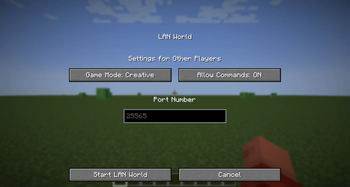
Force Port
A mod that forces the port to always be the same when using the "Open To LAN" feature!
Client-side only!

The configuration menu on recent Minecraft versions
Usage
Force Port allows you to modify the default port used when opening your world to LAN. This is useful for those who want to use a specific port for their server.
Just go to the installation location for that Minecraft instance, and open the config folder. You should see a file called forceport.txt. Open it with a text editor and change the port to your desired port.
Compatible Versions
| Mod Version | Game Version(s) | Mod Version Title |
|---|---|---|
| 1.0.1 | 1.14+ | force-port-fabric-1.0.1 |
| 1.0.0 | 1.14+ | force-port-fabric-1.0.0 |
Important Note
- This mod hasn't been tested full on older Quilt versions or older mod loaders. However, this mod does work on Fabric for 1.14 and above using Mod Loader 0.16.0+
- If you're using the latest Minecraft versions, you can use this mod without any issues.
- The Fabric API is NOT required for this mod to work.
- This mod is built with Java 21, so you need to change your Java version to 21 (or above) in the instance settings to run this mod, on any versions prior to 1.20.5.
- As of 1.0.1, if the config file is not valid, it will default to
25565(the default port for Minecraft servers). This is to prevent the mod from crashing. If the mod doesn't seem to work, please verify your config file!
Changelog
1.0.1
- Fixed a bug where the mod would crash if newlines were added into the
forceport.txtfile (a default feature in some Linux text editors). - Added a check to make sure the port is a number and is between 0 and 65535.
Quick facts
- Edition: Minecraft Java
- File type: .jar
- Minecraft version listed: 26.1
- How to install: Install the matching mod loader (Forge, Fabric or NeoForge) for your Minecraft version. → Download the .jar. → Put it in the .minecraft/mods folder and launch that loader profile.
- Where to get it: Opens on Modrinth — not every file is mirrored on our own servers.
Install steps are the general flow for this file type — How to install Minecraft Java mods & modpacks walks through it step by step.
Verified by MCModsHub
- Ships as force-port-fabric-1.0.2+26.1.jar — drop this file into the mods folder
- Download size: 32 KB
- Download link checked 30 Aug 2026 — working
These come from our own check of the pack file, not from the source page.