
March UI
Java mod listed for Minecraft 26.x. Downloads from the MC Java Mods app on Android.
A sleek, modern UI redesign mod for Minecraft that is minimalist and intuitive while adding additional quality client-side features.
I don't know my version or loader
March UI
March UI is not just a simple UI mod, or anything similar to the countless resource packs that reskin the game. This mod takes Minecraft, and redesigns its interface into a modern masterpiece. Now available in Alpha with limited features.
March UI is large in size due to the high-definition assets used.


Currently Implemented Features
Title Screen
A beautiful, minimalist home screen welcomes you to the game. All buttons are enhanced by subtle hover effects. The classic panorama is replaced with an atmospheric background video that loops seamlessly. You can also choose to use a high-quality still, or the Vanilla panorama.
In-game HUD
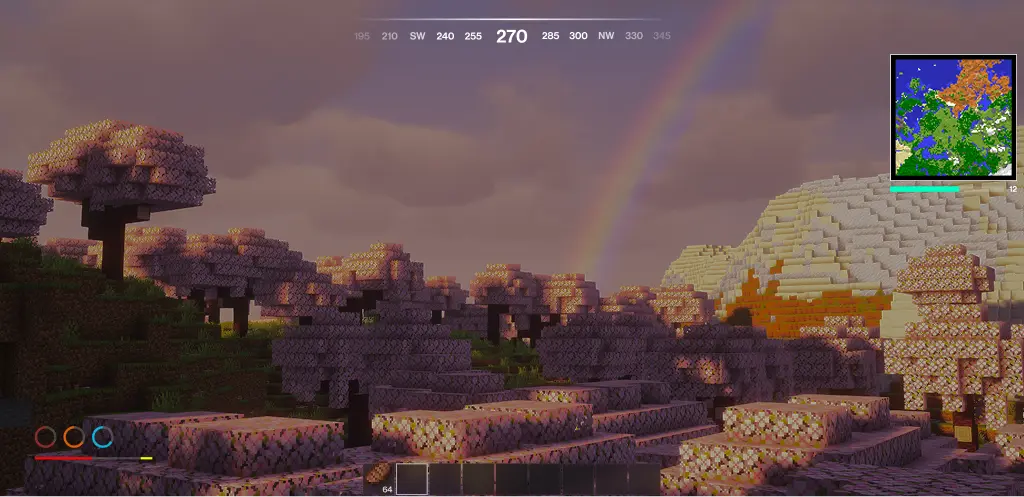 The in-game HUD has support for all vanilla HUD elements. Also included is a saturation bar. Bars blink when holding an associated armor item/food to show possible restoration. Aditionally, March UI offers a dynamic minimap, as well as a compass.
Pause Screen
The pause screen offers a moment of tranquility with a darkened overlay and backdrop blur.
Level Selection & Multiplayer Screen
These screens differ more from the vanilla experience, with each entry listed on the right, and the contextual options displayed on the left. Each world now offers a subtle hover and selection effect.
World Load Screen
The world load screen provides an eased progress bar with the same Title Screen background of your choosing.
Partially Implemented Features
- An option to keep the vanilla fonts and textured feel
- Settings Screen
- Advancements Screen
Coming Soon to March UI
- Mod Menu integration
- In-game screens (containers, etc.)
- Better font support with other languages
Incompatible Mods
- AppleSkin - Functionality Replaced
- Various Minimap Mods - Functionality Partially Replaced
- Edition: Minecraft Java
- File type: .jar
- Minecraft versions listed: 26.1, 26.1.1
- How to install: Install the matching mod loader (Forge, Fabric or NeoForge) for your Minecraft version. → Download the .jar. → Put it in the .minecraft/mods folder and launch that loader profile.
- Where to get it: Opens on Modrinth — not every file is mirrored on our own servers.
Install steps are the general flow for this file type — How to install Minecraft Java mods & modpacks walks through it step by step.
- Ships as MarchUI-1.0-alpha5.jar — drop this file into the mods folder
- Download size: 178.9 MB
- Download link checked 11 Oct 2026 — working
These come from our own check of the pack file, not from the source page.