
EyeModPhone
Java mod listed for Minecraft 1.19. Downloads from the MC Java Mods app on Android.
⬇ Download on Modrinth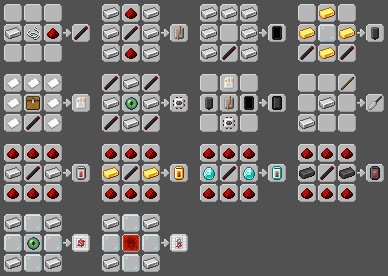
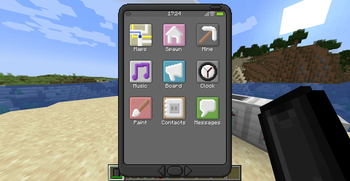
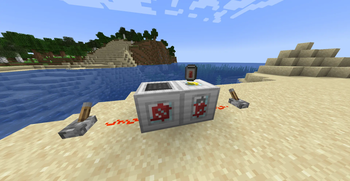
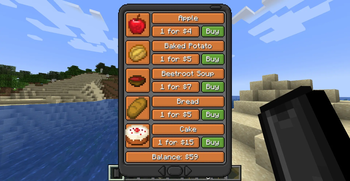
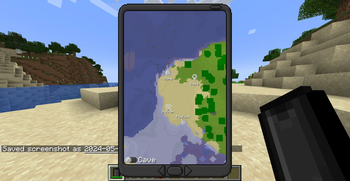
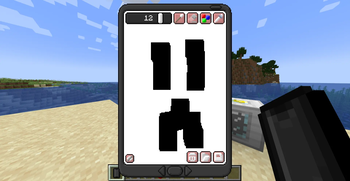
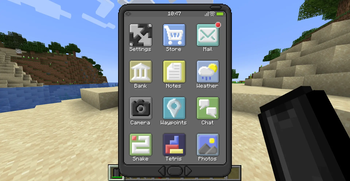
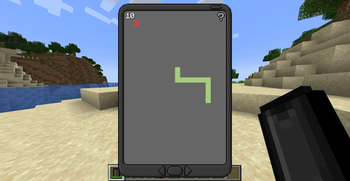
📱 EyeMod — A Fully Functional Phone for Minecraft
Message friends, snap photos, play games, and more — all from inside Minecraft.
EyeMod brings a working, realistic smartphone experience to your world. Whether you're running a bustling SMP or a solo survival world, the EyePhone packs a wide range of apps to keep you connected and entertained.
💡 Tip: Keep a Powerbank in your inventory to extend your battery life!
✨ Features
- 💬 Messaging — Chat with other players directly through the phone
- 🎮 Mini-games — Play games right on your EyePhone
- 📸 Camera & Photo Editing — Take and edit in-game pictures
- 🗺️ Maps, Notes, Shops, Spawns — A full suite of utility apps
- ⚙️ Highly configurable — Tailor almost everything to your server or world
1.20+ Note: OP/cheat apps (like the TNT app) have been removed from the default app selection to make server installs safer out of the box. These will return as a separate companion mod in a future update.
⚙️ Configuration
The config file lives in your .minecraft/config/ folder (or your server directory). Most of the mod's behavior can be tweaked there.
App IDs
Many config options require an app ID, which follows this format:
<modid>:<appname>
The mod ID is eyemod, and the app name is usually the app's display name with spaces replaced by underscores. For example, the Maps app ID is eyemod:maps.
💡 Pro tip: Run
/data get entity @p SelectedItemwhile holding an EyePhone to inspect all installed app IDs directly from the NBT data.
🛒 Shops
Shops are disabled by default. To enable them:
- Open your config file
- Set
allowShopAppstotrue
This unlocks the Food Shop and Util Shop apps on the EyePhone. You can customize the items sold in each shop via the foodShop and utilShop lists, and change the accepted currency using the currency property (default: Emeralds).
🏠 Spawn Locations
The Spawn app lets you list predefined teleport destinations — perfect for a spawn hub, nether portal, or end gateway. Add them in the config like this:
["Spawn=1/2/3/minecraft:overworld", "Nether=1/2/3/minecraft:the_nether"]
Players can also set a personal Home location. Teleportation is disabled by default — enable it with:
allowHome— lets players teleport to their homeallowSpawns— lets players teleport to predefined spawn points
🔒 App Access Control
Control which apps are available and to whom using the access config list:
| Value | Behavior |
|---|---|
0 |
Enabled for all players (default) |
1 |
Enabled for OPs only |
2 |
Completely disabled |
Example:
["eyemod:maps=1", "eyemod:notes=2"]
To disable all cheat-tagged apps at once, set disableCheatApps to true.
💰 App Pricing
App prices work the same way as access control — just use the price instead of an access level:
["eyemod:maps=100", "eyemod:notes=0"]
💾 Storage
EyePhone data is stored as NBT, so there's a per-phone character cap to keep things performant. If the cap is hit, data is automatically cleared.
- Adjust the cap with the
maxStorageproperty - For large servers, consider lowering this value
- Players can manually clear app data from the Settings app
Storage is calculated at ~2 bytes per character.
🖥️ Server Setup
EyeMod is fully server-compatible. Here's what server owners and operators should know:
🚫 Banning Players
Since the EyePhone allows free player-to-player communication, abuse can happen. Operators can ban a player from using the EyePhone directly through the Settings app by entering their username. Banned players lose access to all communication features.
📂 Data Storage
Player data is stored per world and includes:
- 💳 Account info (money, purchased apps)
- 💬 Messages (up to 64 per player, per app)
- 🚫 Ban list
- 📋 Board and chat messages
⚠️ Warning: Deleting the world data file removes all of the above permanently.
- Edition: Minecraft Java
- File type: .jar
- Minecraft version listed: 1.19.4
- How to install: Install the matching mod loader (Forge, Fabric or NeoForge) for your Minecraft version. → Download the .jar. → Put it in the .minecraft/mods folder and launch that loader profile.
- Where to get it: Opens on Modrinth — not every file is mirrored on our own servers.
Install steps are the general flow for this file type — How to install Minecraft Java mods & modpacks walks through it step by step.
- Ships as forge-1.19.4-eyemod-2.3.2a.jar — drop this file into the mods folder
- Download size: 488 KB
- Download link checked 11 Oct 2026 — working
These come from our own check of the pack file, not from the source page.