reconfigure
A config library for my mods
Design goals
- Uses the builder pattern so all options autocomplete. Just start with
Config.builder()and autocompletion will guide you through the whole process of creating a configuration - Designed to be used in the field initializers of a config class
- Does not use annotations for flexibility at runtime
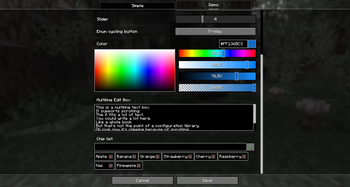
Preview

Example definition
class DemoConfig {
public final Config CONFIG = Config.builder("reconfigure-test")
.serializer(Serializers.JSON)
.build();
public final ConfigTab DEMO_TAB = CONFIG.createTab("demo").build();
Void HEADLINE = DEMO_TAB.createHeadline("headline");
public final Property<String> STRING = DEMO_TAB.createStringProperty("string").defaultValue("Hello world")
.asTextField().placeholder("Enter something").build();
public final Property<Boolean> CHECKBOX = DEMO_TAB.createBooleanProperty("checkbox").defaultValue(true)
.asCheckbox().build();
public final Property<Boolean> TOGGLE_BUTTON = DEMO_TAB.createBooleanProperty("toggle_button")
.asToggleButton().build();
public final Property<Integer> SLIDER = DEMO_TAB.createIntegerProperty("slider").defaultValue(4).range(1,10)
.asSlider().build();
public final Property<DayOfWeek> CYCLE_BUTTON = DEMO_TAB
.createEnumProperty("cycle_button", DayOfWeek.class)
.defaultValue(DayOfWeek.MONDAY)
.asCyclingButton()
.build();
public final Property<Integer> COLOR = DEMO_TAB.createIntegerProperty("color").asColorPicker().build();
public final Property<String> EDIT_BOX = DEMO_TAB.createStringProperty("box").asEditBox().build();
public final Property<List<String>> CHIP_LIST = DEMO_TAB.createListProperty("chiplist")
.asChipList()
.build();
}
Quick facts
- Edition: Minecraft Java
- File type: .jar
- Minecraft version listed: 26.2
- How to install: Install the matching mod loader (Forge, Fabric or NeoForge) for your Minecraft version. → Download the .jar. → Put it in the .minecraft/mods folder and launch that loader profile.
- Where to get it: Opens on Modrinth — not every file is mirrored on our own servers.
Install steps are the general flow for this file type — How to install Minecraft Java mods & modpacks walks through it step by step.
Verified by MCModsHub
- Ships as reconfigure-0.3.2.jar — drop this file into the mods folder
- Download size: 219 KB
- Download link checked 30 Aug 2026 — working
These come from our own check of the pack file, not from the source page.